Demystifying the Magic: How Online Review Management Systems Keep Your Reputation Squeaky Clean
Why Understanding How Online Review Management Software Works Could Change Your Business
How online review management software works is one of the most important things a local business owner can understand in 2026. Here is a quick answer before we dive deeper:
How Online Review Management Software Works — At a Glance:
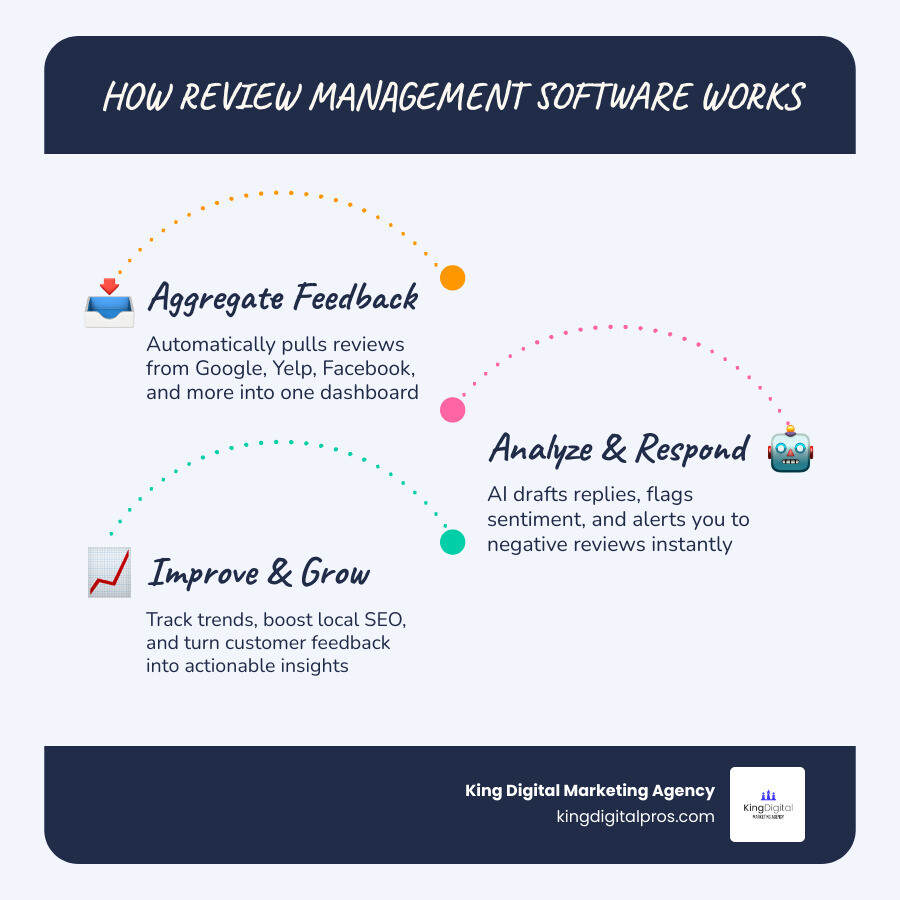
- Collects — The software connects to platforms like Google, Yelp, and Facebook via APIs and pulls all your reviews into one central dashboard.
- Alerts — You get notified in real time when a new review is posted, so nothing slips through the cracks.
- Analyzes — AI reads the sentiment of each review and flags its severity, separating a minor gripe from a serious complaint.
- Drafts — The system generates an on-brand response automatically, referencing details from the actual review.
- Gates — Negative reviews are held for human approval before any response is posted publicly.
- Escalates — High-severity reviews are routed to a manager via SMS or Slack for immediate action.
- Requests — After a transaction, the software automatically prompts happy customers to leave a review.
- Reports — Recurring themes across hundreds of reviews are surfaced so you can fix real operational problems.
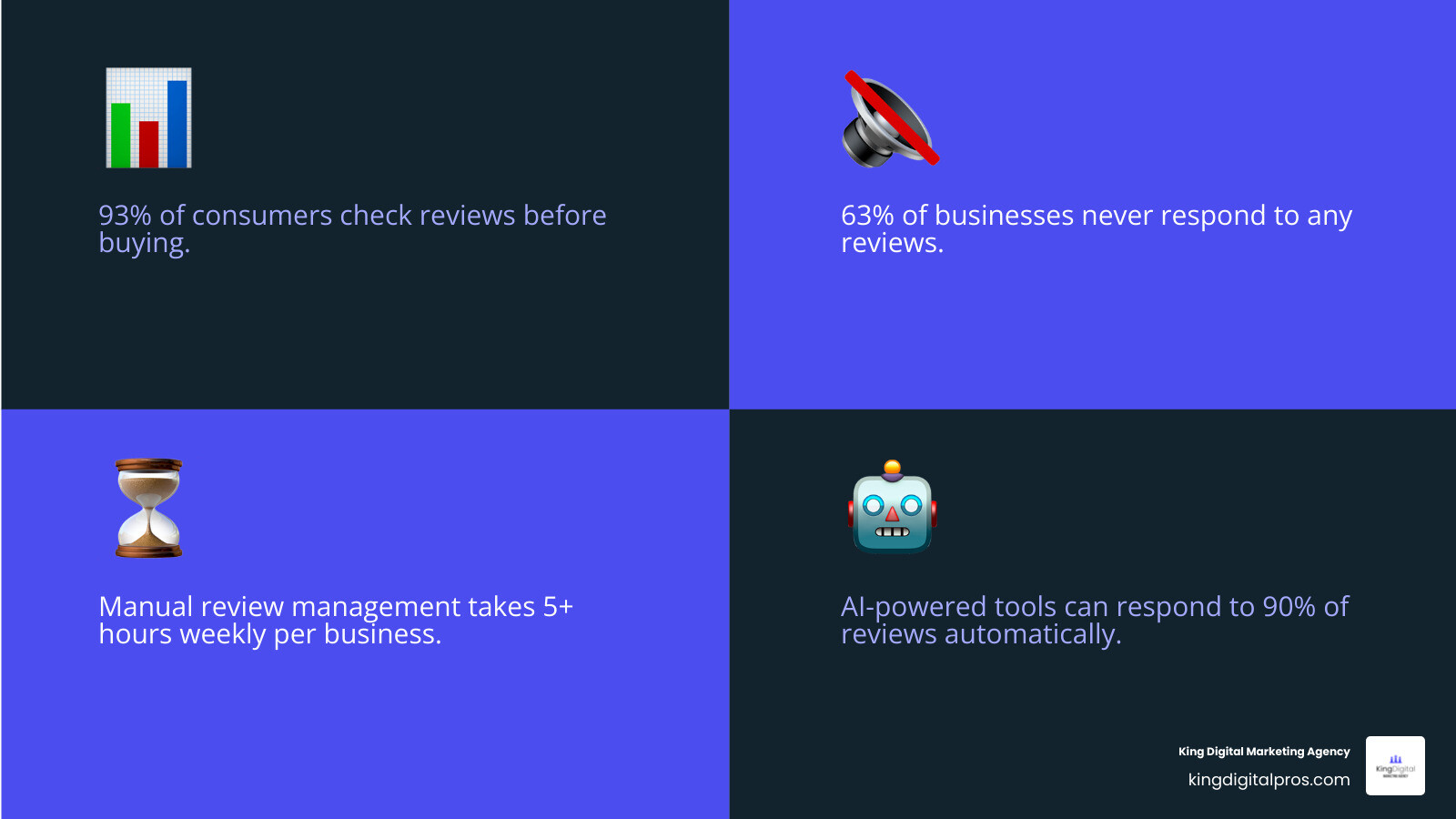
Right now, up to 93% of consumers check reviews before they buy. Yet 63% of customers say at least one business they reviewed never responded at all. That silence is not neutral — it is actively costing you customers and revenue, often without you even realizing it.
Managing reviews manually — logging into 10 platforms every morning, copy-pasting into spreadsheets, hoping nothing bad slipped through over the weekend — is simply not sustainable. There is a better way.
I’m Bernadette King, founder of King Digital Marketing Agency, where I help franchise owners and local businesses turn their online reputation into a growth engine. Understanding how online review management software works is central to every local SEO and visibility strategy I build for clients. In the sections below, I will break down exactly how these systems work — and how you can use them to outshine competitors without spending hours managing reviews yourself.
Know your how does online review management software work terms:
Introduction: Review Management vs. Reputation Management
To understand how does online review management software work, we must first draw a clear line between two terms that are frequently tossed around interchangeably: online reputation management (ORM) and online review management.
Think of online reputation management as a massive umbrella. It is a broad, holistic strategy that encompasses everything said about your business across the entire web. It includes your brand messaging, public relations campaigns, social media monitoring, crisis management, and search engine results page (SERP) sanitization. If a local news station runs a segment on your business, or if someone mentions your brand in a Reddit thread, that falls under the watchful eye of a broader online reputation monitoring tool.
Online review management, on the other hand, is a highly focused, action-oriented subset of ORM. It deals exclusively with customer feedback submitted to structured review platforms like Google Business Profile, Yelp, Facebook, TripAdvisor, and industry-specific directories.
While ORM seeks to influence the general public perception of your brand through various channels, review management focuses on the direct, transactional feedback loop between you and your customers. It answers specific questions: Did the customer enjoy their service? Was their food hot? Was the technician on time?
For local businesses operating in New Mexico—whether you are a family restaurant in Rio Rancho, a dental practice in Albuquerque, or a boutique hotel in Santa Fe—reviews are the lifeblood of your local search visibility. While you cannot always control what a random blogger writes about you, you can systematically master the review acquisition, monitoring, and response cycle.
How Does Online Review Management Software Work?
At its core, review management software acts as a “feedback operating system.” It replaces manual, chaotic web-surfing with a streamlined, automated workflow.
To appreciate the difference, let’s look at how manual review tracking stacks up against an automated system:
| Feature / Task | Manual Review Tracking | Automated Review Management Software |
|---|---|---|
| Daily Monitoring | Logging into 10+ sites individually; high risk of missing niche platforms. | Centralized dashboard pulling data automatically 24/7. |
| Response Time | Days or weeks (often missed entirely over weekends). | Minutes or hours, with real-time push notifications. |
| Response Method | Copy-pasting generic, repetitive templates. | AI-drafted, highly personalized, on-brand responses. |
| Review Generation | Manually emailing or begging customers in person. | Automated SMS/email triggers integrated with your POS/CRM. |
| Negative Feedback | Discovered publicly after the damage is already done. | Intercepted early or gated for immediate internal resolution. |
| Operational Insights | Guesswork based on a few memorable complaints. | Deep sentiment analysis highlighting systemic issues. |
The software bridges the gap between scattered online platforms and your internal team. It accomplishes this through robust Application Programming Interfaces (APIs). An API acts as a secure digital bridge, allowing the review software to communicate directly with platforms like Google, Yelp, and Facebook. Instead of scraping the web (which is unreliable and violates terms of service), professional software uses authorized API integrations to fetch new reviews the moment they are published.
The Core Mechanics: How Does Online Review Management Software Work to Aggregate Feedback?
The magic starts with platform polling. The software is constantly “talking” to the review platforms you have linked. Through secure API handshakes, the system polls these sites at regular intervals—often in real time—to check for new data.
Once a review is detected, the software performs data aggregation. It extracts the reviewer’s name, star rating, written comment, date, and the specific location where the review was left. This is incredibly useful for multi-location businesses, such as a franchise with locations in Corrales, Los Alamos, and Taos.
All of this aggregated data is fed into a centralized dashboard. Instead of jumping from tab to tab, your team logs into a single interface. Here, you can see your average rating across all platforms, read recent comments, and respond to reviews directly without ever leaving the dashboard.
The moment a new review lands, the system triggers real-time alerts. These can be sent via email, SMS, or Slack, ensuring your team is notified instantly. This is crucial when you consider that 53% of customers expect a business to respond to a negative review within a week, and one in three expect a response within three days. To explore these mechanics in greater depth, check out The Ultimate Guide to Feedback and Reviews Management Software.
System Integrations: How Does Online Review Management Software Work with Your CRM and POS?
To truly unlock the power of automation, review management software must talk to the systems you already use to run your business—specifically your Customer Relationship Management (CRM) software, Point of Sale (POS) systems, or Property Management Software (PMS).
By establishing a direct data bridge between your CRM/POS and your review software, you eliminate manual administrative work. Here is how that workflow operates in real life:
For instance, if you run a veterinary clinic in Edgewood or a home services business in Tijeras, your CRM tracks when a job is marked “complete.” The moment your technician closes out the ticket, an automated trigger tells the review software to send a personalized text or email to that specific customer, asking for their feedback.
Similarly, in the hospitality industry—say, a historic bed and breakfast in Santa Fe—the review software integrates with your Property Management Software. Upon checkout, the system automatically triggers a post-transaction survey. If the feedback is positive, the guest is prompted to share their experience on Google or TripAdvisor.
This seamless integration ensures that review requests are sent during the “golden hour”—when the experience is fresh in the customer’s mind. For a deeper look at setting up these integrations, see our Review Management Software Complete Guide.
AI, Automation, and Sentiment Analysis in Modern Review Workflows
In 2026, the integration of Artificial Intelligence (AI) has completely transformed how businesses handle customer feedback. AI is no longer just a buzzword; it is the engine that allows businesses to scale their customer service without losing the human touch.
According to research published in the Harvard Business Review on How Customer Reviews Affect Sales, prompt and highly specific responses to reviews directly correlate with increased consumer trust and higher conversion rates. This is where AI excels. Instead of relying on tired, generic templates (“Thank you for your business!”), modern review systems use advanced Natural Language Processing (NLP) to read, comprehend, and draft tailored replies.
Maintaining Brand Voice with AI-Drafted Responses
One of the biggest concerns business owners have when automating their reviews is sounding robotic. Nobody wants their business to sound like a cold machine.
To prevent this, high-quality review software allows you to train the AI on your specific brand voice. You can set parameters such as:
- Tone: Professional, friendly, casual, or humorous.
- Key phrases: Specific greetings or sign-offs unique to your business.
- Rules: Never mention competitors, always invite the customer back, or keep responses under three sentences.
When a review comes in, the AI analyzes the text and drafts a response that references the specific details mentioned by the customer. For example, if a diner leaves a review saying, “The green chile cheeseburger at the Rio Rancho location was incredible, but the wait time was a bit long,” the AI won’t just say “Thanks for the review!”
Instead, it drafts: “Hi Sarah, thank you for stopping by our Rio Rancho spot! We are thrilled you loved the green chile cheeseburger. We apologize for the wait time and are working with our kitchen team to speed things up. Hope to see you again soon!”
Surprisingly, when shown one human-written and one AI-written response, 58% of consumers preferred the AI-written reply because it was prompt, polite, and addressed their specific points directly. To learn how to implement these conversational guardrails, read Customer Feedback Simplified: A Guide to Managed Review Response.
Handling Negative Reviews and Escalation Workflows
While 5-star reviews can easily be automated to post instantly, negative or low-star reviews require a delicate, human touch. A reputation system that posts automated replies to angry customers without guardrails is a major business liability.
Excellent review management software uses severity classification to protect your brand. Here is how the safety workflow operates:
- Detect & Classify: The AI detects a 1-star or 2-star review. It analyzes the text for high-severity keywords (e.g., “health hazard,” “rude staff,” “refund,” “legal”).
- Gating: The review is automatically flagged, and any automated response is paused. It enters a “manual approval gate.”
- Internal Escalation: The system instantly sends an urgent notification (via SMS, Slack, or email) to the business owner or designated manager.
- Service Recovery: The manager can review the pre-drafted AI response, edit it to fit the specific situation, and post it manually.
This ensures you respond within the critical “golden hour” to resolve the issue privately while displaying a professional, calm demeanor to the public. For proven strategies on turning angry customers into loyal fans, consult The Reputation Rescue: Proven Strategies to Improve Business Reputation.
Turning Feedback into Actionable Intelligence with Sentiment Analysis
If you are receiving dozens of reviews a week across multiple locations in Albuquerque, Santa Fe, and Grants, reading every single one to spot trends is nearly impossible.
Review management software uses sentiment analysis to turn raw text into actionable business intelligence. The AI reads hundreds of reviews and categorizes the feedback into specific operational themes, such as:
- Customer Service
- Pricing / Value
- Cleanliness
- Wait Times
- Product Quality
For example, if several customers in Taos mention that the “parking lot is dark” or customers in Los Alamos note that “the lobby is cold,” the software aggregates these keywords. The dashboard will show a sentiment dip in the “Facilities” category, alerting you to a physical issue before it turns into a flood of bad reviews. You are no longer just managing public relations; you are using customer feedback to optimize your actual business operations. Learn more about harnessing this data with our guide to Customer Feedback Management Software.
Maximizing Business Impact and Avoiding Common Automation Mistakes
Understanding how the software works is only half the battle. To truly drive revenue, you must know how to leverage the software strategically while avoiding the pitfalls that can get your business penalized.

Generating Positive Reviews Without Violating Platform Policies
The most effective way to build a stellar online reputation is simply to ask. In fact, 83% of people asked to leave a review went on to leave one.
However, how you ask matters immensely. In the past, many businesses practiced review gating—a process where customers are pre-screened. If they indicate they had a good experience, they are sent to Google to leave a public review. If they indicate a bad experience, they are directed to a private feedback form.
Warning: Review gating strictly violates Google’s Terms of Service and Federal Trade Commission (FTC) guidelines. If caught, Google can (and will) wipe your entire review history, leaving your business profile completely empty.
Instead of gating, modern software uses a compliant “Prompt to Survey” strategy. You ask everyone for feedback equally. The software makes the process incredibly easy by sending clean, direct SMS or email links, or displaying QR codes at your checkout counters in Albuquerque or Rio Rancho. By asking every customer, you naturally drown out the occasional negative review with a steady, organic stream of 5-star feedback. For more compliant generation tactics, see Tired of Begging for Reviews? Meet Your New Best Friend Automated Review Generation Software.
How Review Management Impacts Revenue and Local SEO
Effective review management is not just a feel-good customer service metric; it is a massive driver of local search visibility and revenue.
When it comes to local SEO, Google’s local algorithm relies heavily on three review factors:
- Review Volume: How many reviews you have.
- Review Velocity: How frequently you receive new reviews.
- Review Diversity: Having reviews across multiple platforms.
By consistently generating fresh reviews, you signal to Google that your business is active, popular, and relevant. This directly boosts your rankings in the coveted Google Map Pack (the top three local listings displayed on search results pages).
The financial impact of these rankings is staggering. Studies show that a one-star increase in a Yelp rating leads to a 5–9% increase in revenue for independent businesses. Conversely, a one-star dip in your average rating can cut your overall revenue by 11%. Furthermore, businesses that reply to 100% of reviews grow 1.12 times faster than those who do not. To learn more about optimizing your profile for maximum local visibility, read Boost Local SEO Effective Review Management.
Common Mistakes to Avoid When Automating Reviews
While automation saves time, relying on it blindly can backfire. Here are the most common mistakes local businesses make and how to avoid them:
- Auto-posting responses to negative reviews: As mentioned, always use a human-in-the-loop gate for ratings of 3 stars or lower. An automated “Thanks for the great feedback!” on a 1-star review about terrible service is a PR disaster.
- Using generic, repetitive templates: If a prospective customer clicks on your Google Profile and sees the exact same corporate response copy-pasted 50 times, it looks lazy and insincere.
- Monitoring only one platform: While Google is king, 41% of consumers check three or more review platforms before making a decision. Ensure your software monitors Yelp, Facebook, and niche industry sites.
- Treating reviews as PR, not operations: If customers repeatedly complain about a slow check-in process at your Santa Fe hotel, don’t just write polite responses—fix the check-in process!
For a lighthearted look at what not to do, check out The Lazy Person’s Guide to Automated Review Management.
What to Look for When Choosing a Review Management Service
If you are ready to invest in a review management platform, keep this essential buyer’s checklist in mind:
- Official API Integrations: Ensure the platform has direct, legal API access to Google, Yelp, and Facebook. Avoid services that use unstable web-scraping workarounds.
- Usability: The dashboard should be simple enough for your front-desk staff or store managers to use daily without extensive training.
- Scalability: If you plan to expand your business from Albuquerque to Santa Fe, Rio Rancho, or beyond, the software must easily support multi-location management under a single login.
- Robust Reporting: Look for deep sentiment analysis tools that aggregate your data into clear, actionable operational insights.
For a comprehensive guide on selecting the right partner and package for your budget, see our Practical Guide to Reputation Management Services.
Frequently Asked Questions about Review Management
Is automating review responses against Google’s guidelines?
No. Utilizing AI or software to draft and publish review responses is entirely compliant with Google’s guidelines. Google encourages businesses to respond to their reviews. What does violate Google’s policies is generating fake reviews, purchasing reviews, or practicing review gating. Using software to streamline your internal response workflow is perfectly safe and highly recommended.
Can review management software help delete negative reviews?
No software can directly delete a legitimate negative review left by a real customer. If a service claims they can “guarantee negative review removal,” walk away—it is likely a scam.
However, the software does make it easy to flag and report reviews that violate platform terms of service (such as spam, hate speech, fake reviews from competitors, or reviews containing offensive language). For legitimate negative reviews, the best strategy is to respond professionally, offer to resolve the issue offline, and use the software to generate a steady stream of new, positive reviews to naturally push the negative feedback down.
How much time does review management software save?
On average, businesses utilizing an automated review management system cut the time spent on manual monitoring and responding by over 80%. Instead of spending 5 to 10 hours a week jumping between various review websites, your team can manage everything from a single dashboard in just 10 to 15 minutes a day.
Conclusion
Understanding how does online review management software work is the first step toward reclaiming your time and securing your business’s digital front door. In 2026, your online reputation is far too valuable to leave to chance—or to let sit unanswered over a busy weekend.
At King Digital Marketing Agency, we specialize in helping local businesses across New Mexico—from Albuquerque and Rio Rancho to Santa Fe, Corrales, and Taos—optimize their Google Business Profiles and master their local search visibility. We don’t just hand you a dashboard and leave you to figure it out; we build, manage, and optimize your local map listings so you can focus on doing what you do best: running your business.
Ready to turn your customer feedback into a powerful, automated growth engine? Let’s chat. Explore our Review Management Services today, and let us help you keep your online reputation squeaky clean.
