TL;DR:
- Most Albuquerque business owners mistakenly believe mobile optimization is just making their website look good on a phone, but it also involves speed, navigation, and touch interactions tailored for mobile users. Implementing a mobile-first approach ensures your website aligns with real user behavior, improving load times, readability, and conversions in a mobile-dominant environment. Continuous testing, analytics review, and content refinement are essential to maintain an effective mobile presence and prevent losing customers silently.
Most Albuquerque business owners think mobile optimization means making their website look decent on a phone screen. That misunderstanding is costing them customers every day. What is mobile optimization, really? It is the practice of shaping every layer of your website, including speed, navigation, readability, and touch interactions, specifically for the way real people use mobile devices. Mobile optimization is broader than “mobile SEO” and is fundamentally about user experience on small screens. This guide will show you exactly what it involves and how to apply it to your Albuquerque business website today.
Table of Contents
- What is mobile optimization and why does it matter for your SMB?
- Core components of mobile optimization: design, performance, and user experience
- Mobile-first vs responsive design: choosing the right approach for your business
- Practical mobile optimization strategies for Albuquerque small businesses
- The uncomfortable truth about mobile optimization most businesses overlook
- Boost your Albuquerque business with professional mobile-optimized web design
- Frequently asked questions
What is mobile optimization and why does it matter for your SMB?
Mobile optimization means redesigning and reconfiguring your website so it works the way mobile users actually behave, not just the way it looks when you shrink a browser window. Think of it as the difference between squeezing a full-sized mattress into a compact car and actually building a vehicle that fits your needs from the start.
Mobile optimization improves your website to offer a strong user experience on devices like smartphones and tablets. That means faster load times, intuitive navigation you can operate with one thumb, content that reads cleanly on a 6-inch screen, and buttons big enough to tap without frustration. Every one of those details affects whether a potential customer stays or leaves.
Here is why this matters urgently for your Albuquerque business:
- More than half of all web traffic now comes from mobile devices
- Local searches on phones frequently carry immediate buying intent, like “restaurant near me” or “Albuquerque plumber open now”
- Mobile users are impatient. A two-second delay feels much longer on a phone than it does on a desktop
- Mobile optimization constraints include one-handed use, variable network connectivity, and short bursts of attention
“A robust mobile optimization strategy is essential for success in the current digital landscape.” That is not a talking point. It is the reality every business with a website faces right now.
Ignoring these factors does not just hurt your user experience. It directly impacts how many phone calls, form submissions, and walk-ins your business generates each week. Review your website design best practices regularly to make sure your site reflects the mobile-first world your customers already live in.
With a clear understanding of what mobile optimization entails and why it is vital, let us explore its core components in detail.
Core components of mobile optimization: design, performance, and user experience
Typical mobile optimization components include responsive design, simpler navigation, quicker page loads, content formatted for small screens, and interactive elements designed for touch. Each of these is a separate problem to solve, and solving just one while ignoring the others will not get you the results you want.
Here is what each component actually involves in practice:
- Responsive design: Your site layout adjusts fluidly to different screen widths and orientations. A three-column desktop layout becomes a single scrollable column on mobile. Learn more about the web design essentials that make this work correctly.
- Simplified navigation: Menus that work on desktop can be impossible to use with a thumb. A hamburger menu or a sticky bottom navigation bar works far better for mobile users.
- Fast page loads: Page speed is a ranking factor and crucial for conversions, especially on mobile devices with variable networks. Compress images, minimize scripts, and defer non-critical resources.
- Readable content: A font that looks polished on a desktop monitor can become microscopic on a phone. Use a minimum 16px font size, adequate line spacing, and short paragraphs. Review your content optimization steps to make sure your written content is structured for mobile reading.
- Touch-friendly interactions: Buttons need to be at least 44×44 pixels. Links placed too close together cause accidental taps. Forms need large input fields and minimal typing requirements.
Pro Tip: Run your site through Google’s PageSpeed Insights and core web vitals report. It will flag your exact problem areas with specific recommendations, not vague warnings.
Here is a quick reference for mobile optimization essentials versus common mistakes:
| Element | What works on mobile | Common mistake |
|---|---|---|
| Images | Compressed, properly sized for screen | Full-resolution desktop images |
| Navigation | Hamburger menu or bottom bar | Multi-level dropdown menus |
| Font size | 16px minimum body text | 12-13px text carried over from desktop |
| Buttons | Large, spaced, within thumb reach | Small, clustered, near top of screen |
| Forms | Short, autofill-friendly fields | Long forms requiring heavy typing |
| Page load | Under 3 seconds on 4G | Heavy scripts loading all at once |
After breaking down the core components, let us compare mobile optimization approaches to clarify what works best for small businesses.
Mobile-first vs responsive design: choosing the right approach for your business
Many businesses treat responsive design as the finish line. It is not. Responsive design is a technique. Mobile-first is a philosophy. Understanding the difference could be the most important design decision you make this year.
Mobile-first design starts from the smallest screen, focusing on what is essential, then expands outward for larger screens. Responsive design adapts an existing layout using CSS to fit different screen sizes. The distinction matters because responsive design can still deliver a bloated, confusing experience on mobile if the original layout was built with desktop in mind.
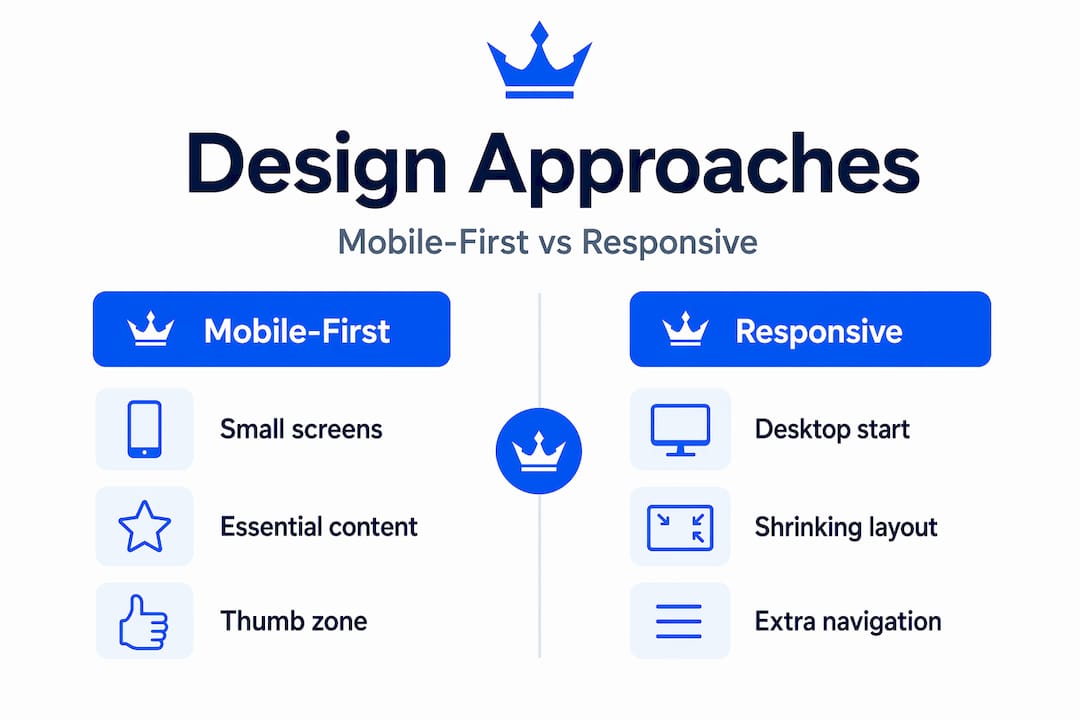
Here is a direct comparison:
| Factor | Mobile-first design | Responsive design only |
|---|---|---|
| Starting point | Smallest screen | Desktop layout |
| Content priority | Forces clarity and focus | Risk of content overload |
| SEO impact | Stronger mobile content parity | Mobile version can be thinner |
| Performance | Typically faster on mobile | May carry desktop asset weight |
| User experience | Designed for how mobile users behave | Adapted rather than designed |
Why does this matter for SEO? Google indexes your mobile version of your site first. If your mobile content is thinner than your desktop version, your rankings suffer directly. This is not theoretical; it is how Google’s systems work today.
Here is how to apply a mobile-first approach to your current site:
- Audit your mobile version separately from desktop. Open your site on your actual phone and navigate as a customer would.
- Identify content that is hidden, collapsed, or missing on mobile. Google sees what mobile users see.
- Prioritize your most important calls to action within the lower third of the screen where thumbs naturally reach.
- Test your layout in both portrait and landscape orientations.
- Build page templates starting from mobile widths and expanding outward with CSS media queries.
Pro Tip: The “thumb zone” on a smartphone is the area easily reachable with one hand. Place your primary call to action, phone number, and key navigation links within that zone. Anything outside it should be secondary.
With clarity on design approaches, we will now explore practical strategies to sharpen your site’s mobile performance.
Practical mobile optimization strategies for Albuquerque small businesses
Now we get to the tactics. These are the specific changes that make a measurable difference for local businesses competing for Albuquerque customers searching on their phones.
- Compress every image before uploading. Compressing images prevents load time spikes and should be a standard part of your content workflow. Use WebP format where possible. An image that loads instantly on your home fiber connection may crawl on a customer’s 3G signal.
- Move your most important button above the fold. Your phone number, “Get a free quote,” or “Book now” button should be visible the moment the page loads, without scrolling.
- Shorten your forms dramatically. If you have a 10-field contact form, cut it to four fields. First name, phone or email, and one question about what they need. Every extra field drops your completion rate.
- Never hide content on mobile that appears on desktop. Google reads your mobile content for ranking. If you collapse sections to save space on mobile and that content is gone from the rendered page, you are hiding it from search engines too.
- Test on actual devices and networks, not just desktop browser emulators. Performance varies significantly by hardware and connection type. Borrow a friend’s Android phone. Test on public WiFi. You will find problems your emulator never showed you.
The businesses winning local mobile search in Albuquerque are not necessarily the biggest or oldest. They are the ones whose mobile experience makes it effortless to call, book, or visit.
Additional mobile optimization checklist items worth reviewing regularly:
- Check that your Google Business Profile phone number matches your website
- Ensure your site passes Google’s mobile usability test in Search Console
- Review your user experience and SEO signals in Google Analytics, specifically mobile bounce rate and session duration
- Consider whether targeted mobile advertising makes sense to drive traffic to a well-optimized landing page
Pro Tip: Pull your Google Analytics data and filter specifically by mobile users. Look at which pages have the highest bounce rates on mobile. Those pages are telling you exactly where your biggest conversion losses are hiding.
Having covered practical tactics, let us share a perspective on mobile optimization that most guides leave out entirely.
The uncomfortable truth about mobile optimization most businesses overlook
Here is what I have seen working with local businesses in Albuquerque: most treat mobile optimization as a one-time visual project. They update the design, confirm it looks fine on an iPhone, and consider it done. That approach is how you lose customers quietly, without ever knowing why.

Mobile optimization requires designing for the real mobile environment, including network variability and one-thumb use. A site that looks beautiful in a desktop browser’s device emulator can still be a disaster on an actual phone running on a weak LTE signal in a parking lot. Those are the exact conditions your customers face.
The deeper problem is that many businesses optimize for the experience they can see, not the experience their customers actually have. They test on a new flagship phone with fast WiFi. Their customer is using a mid-range Android two years old, standing outside, with two bars of signal. That gap is where conversions die.
Mobile optimization is not a design project. It is an ongoing operational discipline. It demands real device testing, monthly analytics reviews broken down by device type, and iterative content optimization that reflects how mobile users actually read and navigate.
The businesses I respect most in this space treat their mobile analytics the way a restaurant owner treats their Yelp reviews: constantly, seriously, and with a commitment to acting on what they learn.
Now that we have uncovered these deeper realities, let us look at how King Digital can help elevate your mobile presence.
Boost your Albuquerque business with professional mobile-optimized web design
A well-optimized mobile site is one of the highest-return investments an Albuquerque small business can make. It directly affects how many customers find you, stay on your site, and contact you.

At King Digital, we build and redesign websites specifically for local SMBs who need more than a site that looks good on a phone. We apply web design essentials grounded in mobile-first principles, local SEO strategy, and conversion-focused structure. Our team understands what Albuquerque businesses face in local search and builds sites that compete. From SEO-friendly website design to full mobile-focused redesigns that drive measurable leads, we work as a true partner in your growth, not just a vendor.
Frequently asked questions
What is the main difference between mobile optimization and mobile SEO?
Mobile optimization focuses on user experience across speed, navigation, and readability on mobile devices, while mobile SEO targets improving your search rankings specifically for mobile search queries. You need both, but they solve different problems.
How important is testing on real mobile devices compared to emulators?
Testing on real hardware is essential because actual device performance varies by hardware capability and network conditions in ways that browser emulators cannot accurately replicate. Use real phones on real networks to catch the issues that matter most.
Can a slow mobile website affect my search engine ranking?
Yes. Page speed is a direct ranking factor for Google, and slow mobile load times also increase bounce rates, which signals poor quality to search engines and compounds the ranking damage.
What mobile design practices improve task completion like checkout or form submissions?
Mobile-optimized forms use minimal required fields, large touch-friendly inputs, and autofill support. Place your primary call to action within the thumb zone and ensure the page loads in under three seconds to maximize form completion rates.
Do I need a mobile-first design or is responsive design enough?
Mobile-first design ensures your site content is built for mobile as the primary experience, which aligns with how Google indexes your site. Responsive design alone can result in a weaker mobile experience if the original design was built with desktop as the default.
Recommended
- Website Design Guide for Albuquerque SMBs: Boost Local Presence
- Website content optimization steps for Albuquerque SMBs
- Website design best practices for Albuquerque businesses
- Web Design Essentials for Albuquerque SMBs: Boost Leads & SEO
