TL;DR:
- A Google Business Profile is a vital free tool for local service businesses to attract searchers and generate leads. Regularly updating, optimizing, and managing the profile enhances local search rankings and builds customer trust. Consistent engagement through reviews, posts, and accurate information keeps the profile active and improves visibility.
A Google Business Profile (GBP) is the single most powerful free tool a local service business owner has for attracting customers from search. This service business google profile guide covers every element you need to set up, fill out, and actively manage your profile to rank higher in local search results and turn profile views into real leads. By 2026, Google has raised the bar on what a complete, trustworthy profile looks like. Business owners who treat their GBP as a living marketing channel consistently outperform those who set it up once and walk away.
What essential business information must be accurate in your Google Business Profile?
Your business name, address, phone number, and website are the foundation of your entire local search presence. Google calls this your NAP data, and inconsistency across the web is one of the fastest ways to lose ranking ground. Every directory, citation, and social profile should match your GBP exactly, character for character.
Keyword stuffing your business name is a violation that leads to listing suspension, not a ranking boost. Your business name field must reflect your real, legal business name. Adding city names or service keywords to that field is a red flag Google’s spam detection catches quickly in 2026.
Category selection carries more weight than most business owners realize. One precise primary category anchors your relevance signal, and you can add up to 9 secondary categories for related services. Listing too many irrelevant categories actually harms engagement more than listing fewer, carefully chosen ones.
Your business description is prime real estate. Write it for the customer first, not the algorithm. Including location-based phrases naturally in your description improves local relevance without crossing into keyword stuffing. Aim for one or two geographic references woven into a clear explanation of what you do and who you serve.
Here are the core profile fields every service business must complete:
- Business name: Legal name only, no added keywords or city names
- Primary category: The single most accurate description of your main service
- Secondary categories: Only categories that genuinely apply to your offerings
- Phone number: A local number, not a toll-free line, builds more trust
- Website URL: Link directly to your homepage or a relevant landing page
- Business description: 750 characters max; lead with your strongest value statement
- Service area: Set by city, zip code, or county to define your coverage zone
How to effectively list and optimize your services in your Google Business Profile
Your services section is where you win or lose the lead. Detailed, keyword-rich service listings are a top relevance signal in 2026. Google reads every word in your service titles and descriptions to match your profile to customer searches.
Follow these steps to build a services section that works:
- List every service separately. Do not group “plumbing repairs” and “water heater installation” into one entry. Each service gets its own title and description.
- Write keyword-rich titles. Use the exact phrase a customer would type into Google. “Residential HVAC Repair” outperforms “Heating Services” every time.
- Add a description for each service. Include the benefit, the location you serve, and any relevant detail. Two to three sentences is enough.
- Include pricing where possible. Transparent pricing builds trust and filters out price-mismatched leads before they call.
- Align listings with your actual offerings. Never list a service you no longer provide. Mismatched expectations destroy reviews.
Service area settings for service businesses allow you to rank across your entire delivery zone without displaying a physical address. This is critical for mobile businesses like landscapers, cleaners, or electricians who work from a home base. Set your service area by the cities or zip codes you actually cover, and keep it updated when your coverage changes.
Pro Tip: Write your service descriptions in the second person. “We repair your water heater same day” converts better than “Water heater repair services available.” Customers respond to language that speaks directly to their situation.

What are the best practices for managing reviews and profile activity?
Reviews are the social proof that converts a profile view into a phone call. Responding to every review within 48 hours is the 2026 industry standard for profile trustworthiness. A response shows Google and potential customers that a real, attentive business owner is behind the listing.
Build a system for collecting reviews, not just hoping they arrive. Ask every satisfied customer at the moment of highest satisfaction, which is right after the job is complete. A simple text message with a direct link to your GBP review page removes all friction. Consistency matters more than volume. Ten new reviews per month beats a one-time burst of fifty.
Publishing Google Posts weekly keeps your profile fresh and signals active management to Google’s ranking algorithm. Use Posts to share seasonal promotions, completed project photos, or answers to common customer questions. Think of each Post as a mini-ad that costs nothing and expires after seven days.
Here are the most common review and activity mistakes service businesses make:
- Ignoring negative reviews: A professional, calm response to a bad review often impresses potential customers more than a five-star rating
- Letting the profile go silent: No Posts and no new photos for 60 days signals an inactive business
- Asking for reviews in bulk: Google’s algorithm detects sudden spikes and may filter them out
- Copying and pasting the same response: Personalized responses show authenticity; generic ones look automated
Pro Tip: Set a calendar reminder every Monday morning to publish one Google Post. Treat it like a social media post: one image, one clear message, one call to action. That 10-minute habit compounds into a significant ranking advantage over 12 months.
How to monitor and maintain your Google Business Profile for sustained growth
Active maintenance separates profiles that plateau from profiles that keep climbing. Google allows unauthorized edits to your profile from users and third parties, which means your hours, phone number, or category could change without your knowledge. A quarterly audit every 90 days catches and corrects these changes before they cost you leads.
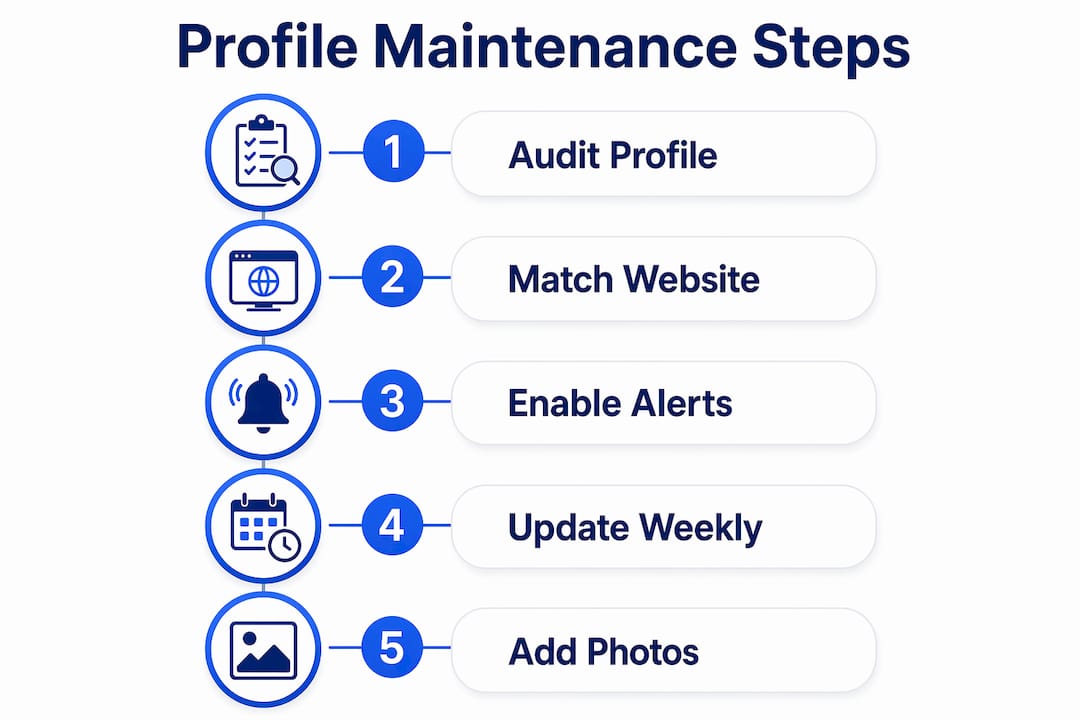
Completing every section of your GBP including description, services, and photos produces the best ranking results. Incomplete profiles rank lower. Use every character and service entry available to you.
The table below shows the key maintenance tasks, how often to do them, and why each one matters:
| Maintenance task | Frequency | Why it matters |
|---|---|---|
| Audit all profile fields for unauthorized changes | Every 90 days | Protects accuracy and prevents ranking drops |
| Update business hours for holidays and seasons | As needed | Prevents customer frustration and negative reviews |
| Add new photos of completed work | Monthly | Fresh visual content signals an active, credible business |
| Publish Google Posts | Weekly | Keeps profile active and improves local search visibility |
| Check and respond to all new reviews | Within 48 hours | Builds trust and meets 2026 engagement standards |
| Verify booking links and website URL are live | Monthly | Broken links kill conversions silently |
Matching your GBP information to your website is equally important. Your website’s title tags, service pages, and contact information should mirror what your profile says. When Google sees consistency between your profile and your site, it treats both as more authoritative. King Digital Marketing Agency recommends pairing your GBP work with a well-structured website for maximum local search impact. You can learn more about local search optimization strategies that complement your profile work.
Protecting your profile from spam edits also means enabling notifications in your GBP dashboard. Turn on alerts for suggested edits and review them immediately. A competitor or a well-meaning but incorrect customer can change your category or address with a single suggestion. Catching it fast keeps your profile clean.
Key Takeaways
A fully completed, actively managed Google Business Profile is the highest-return local marketing asset a service business owner controls directly.
| Point | Details |
|---|---|
| Accurate NAP data is non-negotiable | Your name, address, and phone must match every online listing exactly. |
| Category selection drives relevance | One precise primary category plus relevant secondary categories outperforms a scattered approach. |
| Service listings win leads | List every service separately with keyword-rich titles and clear descriptions. |
| Review response speed builds trust | Respond to every review within 48 hours to meet 2026 engagement standards. |
| Quarterly audits protect rankings | Check your profile every 90 days to catch and fix unauthorized changes. |
What I’ve learned after years of watching service businesses win and lose on Google
The biggest mistake I see local service businesses make is treating their Google Business Profile like a business card. They fill it out once, verify it, and move on. Six months later, they wonder why the phone stopped ringing.
The businesses that consistently dominate local search treat their GBP like a storefront window. They update it, clean it up, and put fresh things in it every single week. That discipline is what separates a profile that ranks on page one from one buried on page three.
If I had to tell you where to focus your energy first, I would say three things: get your services section fully built out, respond to every review without exception, and post something new every week. Those three habits alone will put you ahead of the majority of your local competitors, most of whom are doing none of them consistently.
The other thing I want you to understand is that your GBP and your website are not separate tools. They are two parts of the same signal. When your profile and website work together, Google rewards you with higher placement. When they contradict each other, you pay the price in rankings.
Treat your Google Business Profile as a marketing channel with real return on investment. Audit it, feed it, and protect it. The businesses that do this in 2026 are the ones customers find first.
— Bernadette
How King Digital Marketing Agency can help you get more from your Google profile
Getting your Google Business Profile right takes time, consistency, and a clear understanding of how local search works. King Digital Marketing Agency specializes in exactly this for local service businesses across the Albuquerque region and beyond.
The team at King Digital Marketing Agency handles everything from profile optimization and local SEO to website design that reinforces your Google presence. Whether you need a full profile audit, help building out your services section, or a website that converts the traffic your profile sends, King Digital Marketing Agency delivers results built on real data and hands-on experience. Reach out to see how a tailored local search plan can put your business in front of more customers who are ready to hire.
FAQ
What is a Google Business Profile for service businesses?
A Google Business Profile is a free listing that displays your business in Google Search and Google Maps. Service businesses use it to show their service areas, contact details, reviews, and offerings to local customers searching for help.
How do I set up a Google Business Profile for my service business?
Create an account at business.google.com, enter your business name and category, set your service area, and complete the verification process. Verification confirms your business is legitimate and activates full profile features.
How often should I update my Google Business Profile?
Publish a Google Post weekly, add new photos monthly, and audit your full profile every 90 days to catch unauthorized changes and keep all information current.
Does responding to reviews actually help my Google ranking?
Yes. Responding to reviews within 48 hours signals active management to Google and improves profile trustworthiness. Consistent engagement with reviewers is a recognized local search ranking factor in 2026.
Can a service business rank on Google without a physical address?
Yes. Service businesses can hide their address and set a service area by city, zip code, or county. This allows you to rank across your entire coverage zone without displaying a home or office address publicly.
Recommended
- Google Business page management: The #1 Key to Dominate
- Google profile management: 5 Steps to Maximize
- The Ultimate Google Business Profile Audit and Optimization Checklist | King Digital Marketing Agency
- Google Local Business: Your Free Ticket to More Customers | King Digital Marketing Agency
