
Website maintenance for small and medium businesses typically runs from free or minimal self-managed upkeep to $50 to $200 a month for basic plans, $200 to $900 a month for full managed plans, and $1,000 to $3,000 or more a month for complex e-commerce or high-traffic sites, according to market examples placed in this range. The price depends on your platform, site complexity, and security needs. Our best advice: match your site to a complexity tier below, then confirm scope, restore testing, and response times before you sign anything.
TL;DR:
- Hourly support typically costs $75 to $175, while retainers buy predictable billing; emergency work, overages, migrations, and out of scope development can add fees.
- Small stores generally cost $200 to $600 monthly and need daily encrypted backups and payment plugin monitoring; complex stores require tested restores and priority response.
- Before signing, get update frequency, encrypted off site backups, the latest documented restore test, critical incident response times, and your admin access confirmed in writing.
- DIY suits simple brochure sites when owners can manage CMS tasks; hybrid plans outsource security and backups, while agencies suit payment sites or costly downtime.
Table of Contents
- Pricing models explained: monthly retainers, hourly help, per-task, and emergency rates
- Typical price ranges by site complexity and what those tiers generally include
- What ‘maintenance’ typically covers: a checklist of core services
- How to compare and choose a maintenance plan: a checklist and negotiation tips
- DIY, partial outsourcing, or managed agency: which route fits your business and budget
- How a boutique agency scopes maintenance for SMBs
- What SMB owners get wrong about maintenance pricing
- How King Digital can help with hosting and maintenance
- FAQ
- Sources
Pricing models explained: monthly retainers, hourly help, per-task, and emergency rates
Most providers charge one of four ways, and each suits a different kind of business.
A monthly retainer bundles a fixed set of tasks, updates, backups, monitoring, and a capped number of edits, into one predictable bill. This works best when you want budget certainty and don’t want to track every hour spent on your site. Hourly support charges only for work performed, typically $75 to $175 an hour depending on the provider’s experience and your region. It fits businesses with a static site that rarely needs changes. Per-task pricing charges a flat fee for a defined job, a plugin update, a content swap, a security scan, which works well if your needs are occasional and well-defined. Some providers blend these into a hybrid model: a smaller base retainer for essentials plus hourly billing for anything outside scope.
The trade-off is straightforward. Retainers cost more in months when little goes wrong but protect you from surprise bills when something breaks. Hourly and per-task pricing can look cheaper on paper until an emergency restore or an urgent security patch arrives at a premium rate.
That is where hidden fees tend to show up. Watch for these common triggers:
- Emergency restoration fees charged at a multiple of the standard hourly rate when a site goes down outside business hours.
- Out-of-scope development charges for anything labeled a “new feature” rather than a “fix,” even when the line between the two is blurry.
- Migration or platform-change fees that are not disclosed until you try to leave or switch hosting.
- Overage charges once you exceed a capped number of monthly edits or support tickets.
The fix is simple: ask for a written scope document before you commit, and request two or three sample invoices from past incidents so you can see how the provider actually bills for the unexpected.
Typical price ranges by site complexity and what those tiers generally include
Price should track what your site actually requires, not just its page count. Three tiers cover most SMB situations.
Brochure and simple sites (a handful of static pages, no transactions) typically run $50 to $200 a month, or $600 to $2,400 a year. This tier generally includes monthly software updates, basic uptime checks, and a small number of content edits, usually one to two hours worth per month.
Small e-commerce sites (a storefront with a modest product catalog) typically run $200 to $600 a month, or $2,400 to $7,200 a year. Expect more frequent updates, encrypted backups taken daily rather than weekly, payment-plugin monitoring, and a larger edit allowance.
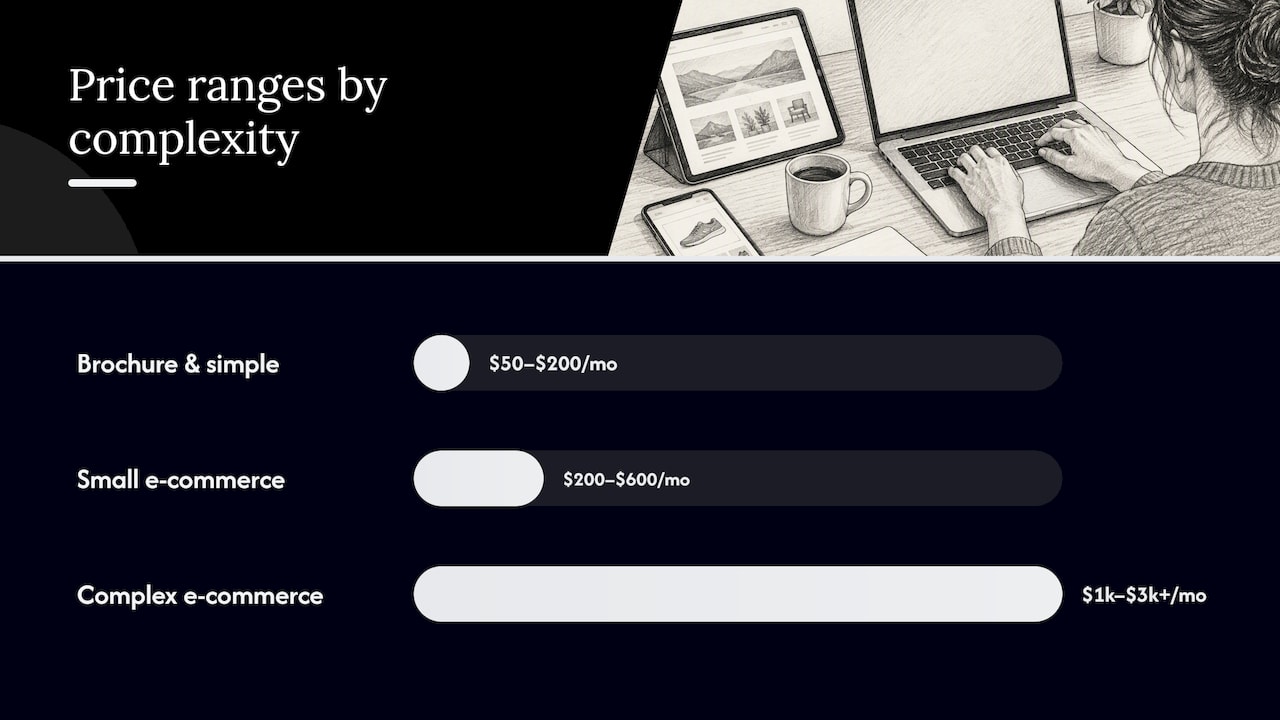
Complex e-commerce or membership sites (high transaction volume, user accounts, third-party integrations) typically run $1,000 to $3,000 or more a month. This tier usually includes daily backups with tested restoration, dedicated uptime monitoring, security patching on an accelerated schedule, and priority support response.
Across every tier, a few things are standard inclusions and a few are typically billed separately:
- Normally included: CMS and plugin updates, scheduled backups, basic uptime monitoring, TLS certificate checks, and a defined number of minor content edits.
- Usually extra: custom development, full site redesigns, platform migrations, and advanced SEO or accessibility audits.
- Cost drivers beyond page count: traffic volume (more visitors means more monitoring load), third-party integrations (payment gateways, CRMs, booking tools each add a failure point to watch), and compliance needs such as PCI requirements for stores handling card data.
If your site sits between tiers, say a growing service business adding a booking plugin, price toward the higher tier rather than assuming the lower one still applies.
What ‘maintenance’ typically covers: a checklist of core services
Price comparisons fall apart when buyers do not know what should be included by default. Before comparing dollar figures, compare scope using this checklist.
- Software updates. CMS core, plugins, and themes patched on a regular schedule, not only when something breaks.
- Security monitoring. Ongoing scanning for malware, vulnerabilities, and suspicious login activity.
- Encrypted backups stored off-network. Elementor backup plugins provide reliable tools for regular, encrypted backups kept off the live network as a cost-effective security practice.
- Tested restoration. A backup that has never been restored is a guess, not a safety net.
- Uptime monitoring. Alerts the moment your site goes down, not hours later.
- TLS and SSL checks. Certificate renewal and proper configuration, which the FTC’s cybersecurity guidance for small business names as a basic question to ask any host or provider.
- Basic performance checks. Page load monitoring to catch slowdowns before they affect visitors.
Beyond that baseline, useful add-ons include scheduled content edits, accessibility reviews, technical SEO audits, page-speed optimization, and integration monitoring for tools like booking systems or payment processors. These are reasonable to pay extra for, but they should be itemized, not buried inside a vague “unlimited” label.
Development work, platform migrations, and brand-new features are routinely billed outside a standard maintenance plan, and that is fair. The problem is when “minor edit” is left undefined and a simple text change gets billed as development.
Pro Tip: Ask every provider for the date of their last full restore test and its outcome. If they cannot answer specifically, treat their backup claims as unverified.
How to compare and choose a maintenance plan: a checklist and negotiation tips
Once you know what should be included, comparing providers becomes a matter of asking the right questions rather than just comparing price tags.
- Who performs updates, and how often? Weekly patching is a meaningfully different service than “as needed.”
- Are backups encrypted and stored off-site? Confirm this in writing, not just verbally.
- Is a full restore tested and documented? Ask for the last test date and result.
- What is the response time for critical incidents? A same-day response and a 48-hour response are not comparable services, even at similar prices.
- Who holds access to the site and code repository? You should always retain admin-level access, regardless of who manages day-to-day work.
- How are out-of-scope requests priced? Get the hourly rate or per-task fee in writing before you need it urgently.
When you line up two or three proposals, compare them across the same dimensions: price model, what’s actually included, support response time, suitability for your site’s complexity, and contract terms. A lower monthly fee attached to a 12-month lock-in and no restore testing is not automatically the better deal.
A few negotiation moves worth trying: ask for a sample SLA document rather than a verbal promise, request a one-time test migration or restore before signing a longer contract, and negotiate a capped emergency rate so a late-night fix doesn’t arrive at triple the normal price. Also push for a written definition of “minor edit” in the contract itself. Vague language here is the single most common source of billing disputes once a plan is underway.
DIY, partial outsourcing, or managed agency: which route fits your business and budget
Three broad paths exist, and the right one depends on your internal skills and how much risk you can tolerate.
- DIY costs the least in direct dollars but the most in your own time. It works for a simple brochure site with no transactions and an owner comfortable with basic CMS tasks.
- Hybrid outsourcing pays a specialist for security and backups while your team handles routine content edits in-house. This fits businesses with some technical comfort but no bandwidth for monitoring or incident response.
- Managed agency plans cost more monthly but transfer risk: predictable billing, documented restoration, and a team accountable for uptime. This tends to be the better value when internal technical staff are limited, when the site handles payments, or when downtime would directly cost revenue.
The pitfall across all three routes is the same: a plan that looks cheap because it skips restoration testing or limits “edits” to trivial text changes. Verify coverage in writing rather than assuming a low price includes the same protection as a higher one. NIST’s small business security guidance notes that prices for security-related services can range from free to thousands of dollars depending on scope, which is exactly why scope, not price alone, should drive your decision.
How a boutique agency scopes maintenance for SMBs
We build every maintenance plan around a written scope rather than a flat sticker price, because a number without a defined scope tells you nothing about what you’re actually buying. Our Website Hosting and Maintenance service maps directly to the complexity tiers above: brochure sites get a lighter update and monitoring schedule, while e-commerce and membership sites get daily backups, tested restoration, and faster response commitments.
Three safeguards sit behind every plan:
- A documented SLA stating response times for critical issues, not a vague promise.
- Backup and restore testing on a defined schedule, with results reported to the client.
- A clear, written definition of what counts as a minor edit versus billable development work.
Before requesting a quote from any provider, ask for these three items in writing. If a provider can’t produce them, that gap tells you more than their price does.
What SMB owners get wrong about maintenance pricing
The mistake we see most often is shopping by monthly price before shopping by scope. A $75 plan and a $400 plan can look like the same service until you ask whether either one has ever actually restored a backup. The number on the invoice matters less than what it obligates the provider to do when something breaks.
One useful action is to request the vendor’s SLA document and a record of their last documented restore test. If a current provider or one you’re considering can’t produce both within a week, treat that as your real price signal.
— Bernadette
How King Digital can help with hosting and maintenance
Predictable pricing only works when the scope behind it is just as predictable, and that’s the gap we built our maintenance plans to close. Rather than quoting a number before we understand your site, we start by matching your platform and complexity to one of our hosting and maintenance tiers, so the price you get reflects the work your site actually needs, not a generic package.

To get an accurate quote, send us your site URL, your CMS or platform (WordPress, Shopify, or a custom build), your approximate page count, any third-party integrations like payment gateways or booking tools, and a rough monthly traffic estimate. That’s enough for us to scope a plan with a clear SLA and a defined edit allowance instead of a one-size number.
Reach out through our Website Hosting and Maintenance page to request a scoped quote or a free review of your current plan’s coverage.
FAQ
How much should I charge for website maintenance?
Rates vary by scope and region, with hourly support charged at customary market rates and full monthly plans adjusted according to site complexity. Base your rate on what’s included, backups, monitoring, restore testing, rather than matching a competitor’s number alone.
Is $1,500 a good price for a website?
Whether an amount like $1,500 is reasonable depends entirely on what it covers, a brochure site build, a year of basic maintenance, or a single month of managed e-commerce support are very different purchases. Compare the figure against the specific scope and tier it maps to rather than judging the number on its own.
How much does it cost to pay someone to manage a website?
Costs for ongoing website management typically increase with site complexity, starting lower for simple sites and rising for complex e-commerce or membership platforms. The exact figure depends on update frequency, backup requirements, and how much support response time you need.
Do websites cost money to maintain?
Yes, even a simple site has ongoing costs for hosting, security updates, and backups, and skipping maintenance raises the risk of downtime or a security breach. CISA’s guidance for small businesses treats patching and backups as basic, cost-effective practices rather than optional extras.
Sources
- Cyber Guidance for Small Businesses | CISA
- Cybersecurity for Small Business | Federal Trade Commission
- Small Business Information Security: the Fundamentals (NIST)
Recommended
- Small Business Website Maintenance: Avoid 2025 Costs
- What Does a Website Manager Change for a Maintenance 2025
- A Comprehensive Guide to Comparing Website Hosting & Maintenance
- Why Update Website Content: SMB Guide for 2026
