Why Google Maps Review Management Defines Your Local Business Success
Google Maps review management is the process of monitoring, responding to, collecting, and protecting the reviews on your Google Business Profile — and it directly shapes whether local customers choose you or your competitor.
Here’s a quick breakdown of what it involves:
- Monitor — Track new reviews across all your locations in real time
- Respond — Reply to both positive and negative reviews promptly and professionally
- Collect — Ask real customers for honest feedback through ethical, policy-compliant methods
- Protect — Report fake or policy-violating reviews and appeal wrongful removals
- Optimize — Use review signals to improve your visibility in Google Maps, local search, and AI-powered results like Google’s AI Overviews
Why does this matter so much right now? In 2025 alone, Google blocked or removed over 292 million policy-violating reviews — nearly 22% of all review activity on the platform. Enforcement is no longer passive. Google is actively using algorithmic detection, retroactive audits, and even in-app user surveys to ask customers directly: “Did this business offer rewards in exchange for a review?” Businesses caught in the net have seen hundreds of reviews wiped out in a single month.
At the same time, reviews are one of the most powerful ranking signals in local search. Getting this right isn’t optional — it’s a core part of competing online.
I’m Bernadette King, founder of King Digital Marketing Agency, and I’ve spent years helping franchise owners and local businesses build stronger digital reputations through strategic Google Maps review management — from setting up compliant review collection systems to recovering visibility after enforcement events. In this guide, I’ll walk you through everything you need to know to manage your reviews with confidence.
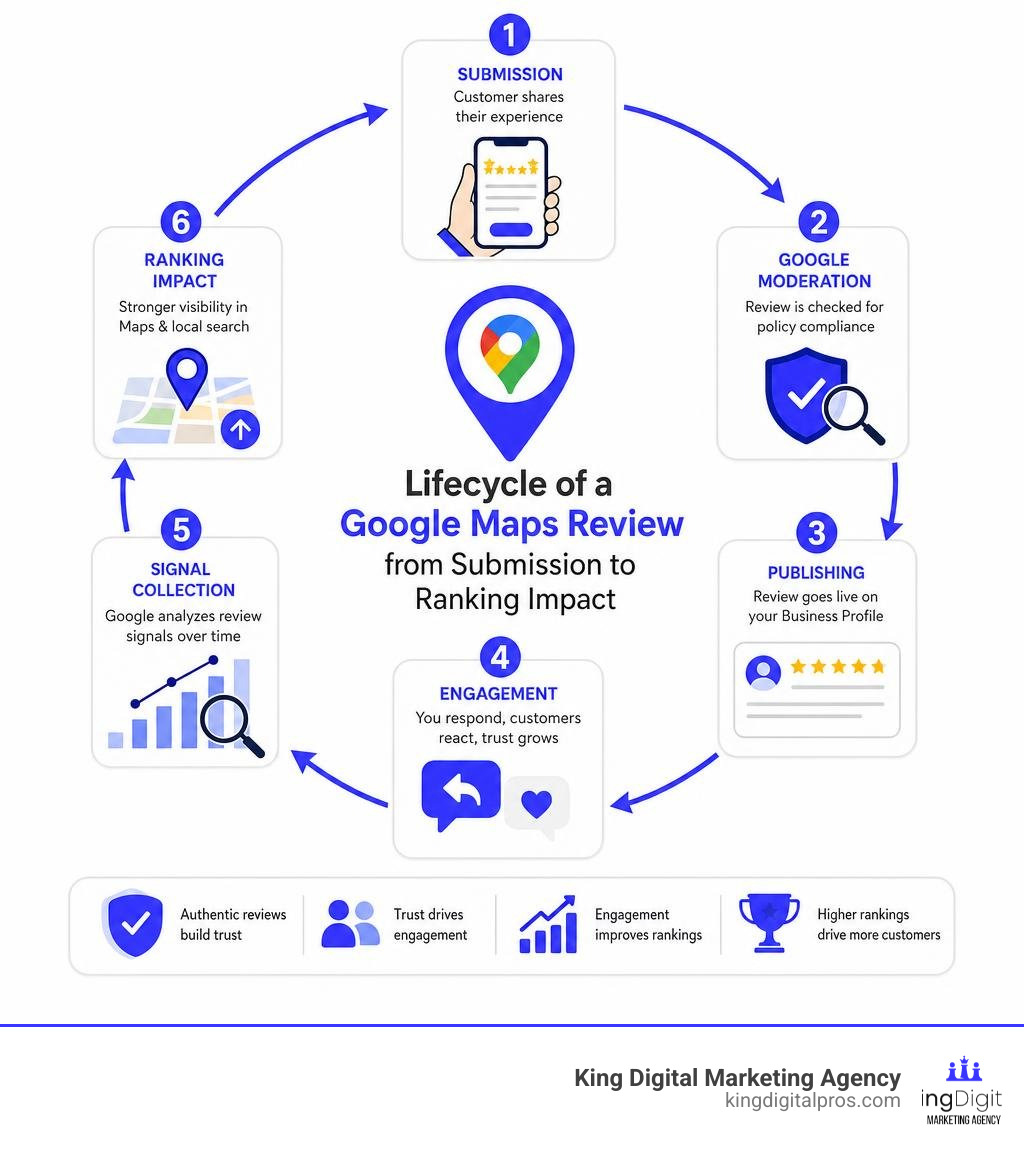
Handy Google Maps review management terms:
Understanding Google Maps review management Policies and Enforcement

Navigating local search in places like Albuquerque, Rio Rancho, or Santa Fe means playing by Google’s rules. If you want your business to show up when someone searches for your services, you must understand the rules of the road. Google’s guidelines are not just suggestions; they are strictly enforced parameters designed to protect the integrity of the platform.
To build a sustainable presence, businesses must prioritize policy compliance. Trying to bypass these guidelines with short-term tricks is a recipe for disaster. If you want to understand how reviews fit into your broader marketing objectives, our guide on Beyond the Stars: Understanding Review Management for Business Growth breaks down the strategic value of keeping your profile clean and compliant.
Google’s primary policy framework is outlined in the Prohibited & restricted content guidelines. This document covers everything from harassment and hate speech to fake engagement and rating manipulation. For local business owners, the sections on fake engagement and conflicts of interest are the most critical.
Google’s Stance on Fake and Incentivized Reviews
Google has a zero-tolerance policy for fake and incentivized reviews. According to the official guidelines, any review that does not represent a genuine, unbiased experience is subject to removal.
What exactly does Google classify as a violation?
- Incentivized Reviews: Offering discounts, free items, gift cards, or cash in exchange for a review is strictly prohibited. It doesn’t matter if you ask for a “honest” review; the act of offering a reward violates the core policy.
- Fake Reviews: Writing reviews from multiple accounts you control, hiring third-party services to post reviews, or having employees review your own business are all forms of fake engagement.
- Conflicts of Interest: You cannot post reviews of your own business, nor can you post negative reviews on a competitor’s listing to undermine their reputation.
If you or your customers want to understand how reviews are technically created or edited, you can refer to Google’s guide on how to Add, edit, or delete Google Maps reviews & ratings. The takeaway for merchants is clear: reviews must be unsolicited in terms of compensation and entirely authentic.
The Consequences of Violating Google Maps review management Guidelines
If Google catches your business violating its guidelines, the penalties can be swift and severe. We are no longer in an era where Google simply ignores suspicious activity. Today, the platform uses aggressive enforcement sequences that can damage your local visibility overnight.
The consequences of non-compliance include:
- Retroactive Deletions: Google can and will wipe out years of accumulated reviews if it determines they were acquired through manipulative tactics.
- Listing Suspensions: Your entire Google Business Profile can be suspended, removing your business from Google Maps and search results entirely.
- Account Restrictions: Google can restrict the accounts of users who post fake reviews or restrict the merchant’s ability to receive new reviews.
To put the scale of this enforcement into perspective, Google restricted over 782,000 policy-violating accounts and removed more than 13 million fake Business Profiles across 2025. If you want to ensure your profile is optimized to survive these sweeps while still ranking at the top, check out our playbook on how to Unlock Local Success: Master Your Google Business Profile for Top Map Rankings.
How Google Detects and Purges Policy-Violating Reviews

How does Google actually know when a review is fake or incentivized? The answer lies in their highly sophisticated enforcement architecture, which combines advanced machine learning algorithms with real-world user feedback signals.
In 2025, Google blocked or removed over 292 million policy-violating reviews globally. This means that roughly 22% of all review activity on Google Maps was flagged as non-compliant. If you think your business can fly under the radar, these numbers suggest otherwise.
Algorithmic Detection and Retroactive Audits
Google’s machine learning models analyze reviews before they are even published, looking for patterns that indicate spam, automated bots, or coordinated review networks. However, the real danger for businesses using shady tactics is the retroactive audit.
Google regularly runs historical sweeps of its database. A review that was posted a year ago and seemed “safe” can suddenly be flagged and deleted today if Google’s algorithm detects a pattern of suspicious behavior associated with the reviewer’s account or your business profile.
For example, a single tracked business experienced 496 review deletions in November 2025 and 1,045 deletions in December 2025. Over 80% of their yearly deletions occurred in the final 60 days of the year, with Google retroactively removing reviews that had been published more than a year prior. This shows that algorithmic enforcement is deliberate, retroactive, and highly coordinated. To protect your business from these sudden drops, read our guide on how to Boost Local SEO with Effective Review Management.
The Impact of In-App Survey Prompts on Review Authenticity
One of the newest and most effective weapons in Google’s detection arsenal is the in-app user survey. If Google’s location data shows that a user physically visited your business in Taos, Santa Fe, or Rio Rancho, it may send them a push notification or an in-app prompt asking about their experience.
Lately, Google has begun asking users a highly direct question: “Does this business offer rewards in exchange for reviews?”
This simple behavioral signal has massive consequences. If multiple users answer “yes” to this prompt, it triggers an automatic review purge for that business listing. You can read more about how this feature is rolling out in this report on how Google Maps is now asking users if businesses paid for their reviews. This human-verified signal makes it almost impossible to maintain incentivized reviews over the long term.
A Strategic Playbook for Compliant Review Collection
Now that you know what not to do, let’s talk about how to build a robust, policy-compliant review collection system. You don’t need to bribe your customers to get great feedback. In fact, most happy customers are glad to leave a review if you make the process quick and easy.
To set up a complete system that covers everything from local citations to map optimization, take a look at Your Google Maps Optimization Playbook.
Ethical Tactics for Google Maps review management
The key to getting more reviews is consistency and automation. You should build review requests directly into your customer journey. Whether you operate a plumbing business in Rio Rancho, a restaurant in Corrales, or an professional office in Albuquerque, the principles remain the same.
We recommend using these compliant methods:
- Automated Email Sequences: Send a polite follow-up email a day or two after completing a service, thanking the customer and inviting them to share their experience.
- SMS Requests: Text messages have incredibly high open rates. Send a short text with a direct link to your Google Business Profile review page.
- QR Codes on Printed Materials: Place QR codes on your receipts, business cards, or vehicle wraps, allowing customers to scan and review on the spot.
When review requests are automated immediately after a service is completed, about 15 percent of customers will leave a review. Without an automated system, that rate drops to nearly zero. To choose the right platform to run these campaigns, read our Customer Review Management Software Complete Guide.
The Risks of Review Filtering and Private Feedback Channels
Many software tools offer a feature called “review gating” or “review filtering.” This is the practice of asking a customer if they had a good or bad experience before showing them the Google review link. If they say they had a great experience, they are sent to Google. If they say they had a bad experience, they are sent to a private feedback form.
Warning: Review gating is a direct violation of Google’s policies and FTC guidelines.
Google’s terms state that you must not discourage negative reviews or selectively solicit positive ones. If you use a tool that filters reviews based on rating thresholds, you risk having your entire profile suspended. The safest approach is to ask every customer for a review while using a private channel to catch and resolve problems early—without blocking their access to Google if they still wish to post publicly.
Best Practices for Responding to Reviews and Managing Reputation
Getting reviews is only half the battle; how you respond to them is just as important. Your responses are public, meaning they serve as a secondary marketing channel. Potential customers in Santa Fe or Los Alamos are watching how you handle criticism and praise.
Responding to reviews is so critical that we recommend checking out our Beginner’s Guide to Review Response Managed Service to see how professional management can save you time and protect your brand.
Crafting On-Brand and Timely Responses
When a customer leaves a review, you should aim to respond within 24 hours. Doing so can lift customer trust by up to 88%.
Here are our top tips for responding:
- Develop a Brand Voice: Write responses that match your business personality—whether that’s warm and professional, or casual and friendly.
- Personalize Every Reply: Avoid generic “Thank you for your business” templates. Mention specific details from the review to show you actually read it.
- Use Keywords Naturally: If a customer mentions your “AC repair in Rio Rancho,” you can echo that naturally in your response, which helps with indexing.
While AI tools can help you draft replies quickly, always have a human verify the content before hitting publish to ensure it sounds authentic and on-brand.
Handling Negative Reviews and Review Bombing Attacks
Every business will eventually get a negative review. When it happens, do not panic or reply in anger. A professional, calm response to a one-star review can actually impress potential customers more than a five-star rating.
However, if you are hit with a sudden wave of fake one-star reviews—often called a “review bomb”—you need to take action. This is common during competitor attacks or extortion attempts.
If you receive a ransom email demanding money to stop a review bomb, do not pay it. Paying extortionists only invites more attacks. Instead, follow Google’s official channels to report the reviews. You can learn how to flag and report inappropriate content directly through the Report or Fix Content help center.
How Reviews Impact Local SEO and AI Search Visibility
Reviews are not just about reputation; they are a primary driver of your local search engine optimization (SEO) performance. Google uses review metrics to evaluate the prominence and trustworthiness of your business.
| Review Metric | Impact on Local SEO | Actionable Strategy |
|---|---|---|
| Star Rating | High (affects click-through rates and filtering) | Maintain high service standards; resolve issues quickly |
| Review Volume | Medium (signals business size and activity) | Build a consistent, automated ask campaign |
| Review Velocity | High (signals current relevance and popularity) | Ask for reviews continuously, not in seasonal bursts |
| Keyword Richness | Medium (helps Google associate services with your business) | Encourage customers to mention specific services and locations |
Review Velocity and Map Pack Rankings
Many business owners believe that having 500 reviews means they can stop asking. However, Google values review velocity (how frequently you receive reviews) and recency far more than your historical total. A business with 100 reviews, getting 5 new ones every week, will often outrank a competitor with 400 reviews who hasn’t received a new one in six months.
Review velocity signals to Google that your business is active, popular, and currently providing a great experience. This is especially true for highly competitive industries in Albuquerque or Santa Fe, where appearing in the “Local 3-Pack” is the difference between a phone that rings constantly and one that stays silent.
Appearing in AI Overviews and Ask Maps
As search evolves in 2026, Google is increasingly relying on AI search results, such as Google’s AI Overviews and conversational tools like Ask Maps. These AI systems do not just look at your website; they scan your customer reviews as credibility signals.
If a user asks, “Where is the best place to get a transmission flush in Rio Rancho?”, the AI will search for profiles where customers have specifically written about “transmission flushes” in Rio Rancho. To help your business stand out in these AI-driven results, encourage your customers to mention the specific services they used and their location.
Developers looking to pull and display these high-quality reviews on their own websites can utilize the Place Reviews API to safely showcase their authentic customer feedback.
Frequently Asked Questions about Google Maps Review Management
How do I report a review that violates Google’s policies?
To report a review that you believe violates Google’s guidelines:
- Open Google Maps or search for your business on Google.
- Find the review you want to report.
- Click the three vertical dots (Menu) next to the review and select Report review or Flag as inappropriate.
- Choose the category that best describes the violation (e.g., Spam, Conflict of Interest, Off-topic).
- Submit the report.
You can track the status of your reported reviews through the managing portal in your Google Business Profile. For detailed steps on reporting different types of media, visit the Report or Fix Content guidelines page.
Can Google restore reviews that were deleted by mistake?
Generally, Google does not reinstate reviews that have been removed due to policy violations. However, if your business was hit by a buggy algorithmic sweep or a wrongful deletion event, you can submit an appeal.
To appeal, open a support ticket through your Google Business Profile dashboard. You will need to provide clear evidence—such as screenshots of the reviews, transaction records, or proof that the reviewers are real customers—to support your case.
Is it safe to use automated tools to reply to reviews?
Using automated tools to draft replies is safe and highly efficient, but fully automated posting is discouraged. Google’s guidelines prefer genuine engagement. If an automated system posts identical, robotic “Thank you” messages to every review, it can look like spam to both Google’s algorithms and your customers.
The best practice is to use tools that suggest personalized, AI-assisted responses based on the review content, and then have a team member review and approve them before they go public.
Conclusion
Managing your Google Maps reviews isn’t just about collecting stars; it’s about building a trustworthy digital asset that drives continuous leads to your business. In 2026, with Google actively policing fake reviews and using user surveys to catch policy violations, staying compliant is the only way to protect your local search presence.
At King Digital Marketing Agency, we specialize in helping local businesses across Albuquerque, Rio Rancho, Santa Fe, Corrales, Taos, and surrounding NM areas optimize their Google Business Profiles and build ethical review management systems that last.
Ready to take control of your local reputation and dominate the map pack? Master your local reputation with King Digital Marketing Agency’s Review Management Services today.
