What Is Location Tracking and Why Does It Matter?
Location tracking is the process of identifying and recording where a person, device, or vehicle is in real time or over time using technologies like GPS, Wi-Fi, cell towers, and Bluetooth.
Here is a quick overview of what you need to know:
- GPS uses satellite signals to pinpoint your device’s position, accurate to within 3-5 meters under ideal conditions
- Built-in phone features like Google’s Find My Device and Apple’s Find My let you locate lost devices instantly
- Family sharing apps like Life360 let you share real-time locations with people you trust
- Privacy risks are real – apps can collect and sell your location data to third-party brokers without your knowledge
- Legal tracking always requires consent – tracking someone without their permission is illegal
Whether you want to find a lost phone, share your location with family, or simply understand who has access to your whereabouts, location tracking touches your daily life in ways most people don’t fully realize.
Many different entities may be tracking and recording your movements – and in some cases, that data is being sold. That makes it critical to understand how the technology works and how to stay in control of your own data.
I’m Bernadette King, a digital marketing expert who has worked extensively with location-based technologies, including location tracking tools and geo-targeted advertising strategies for local businesses. In this guide, I’ll break down everything you need to know – from how the tech works to how to protect your privacy.
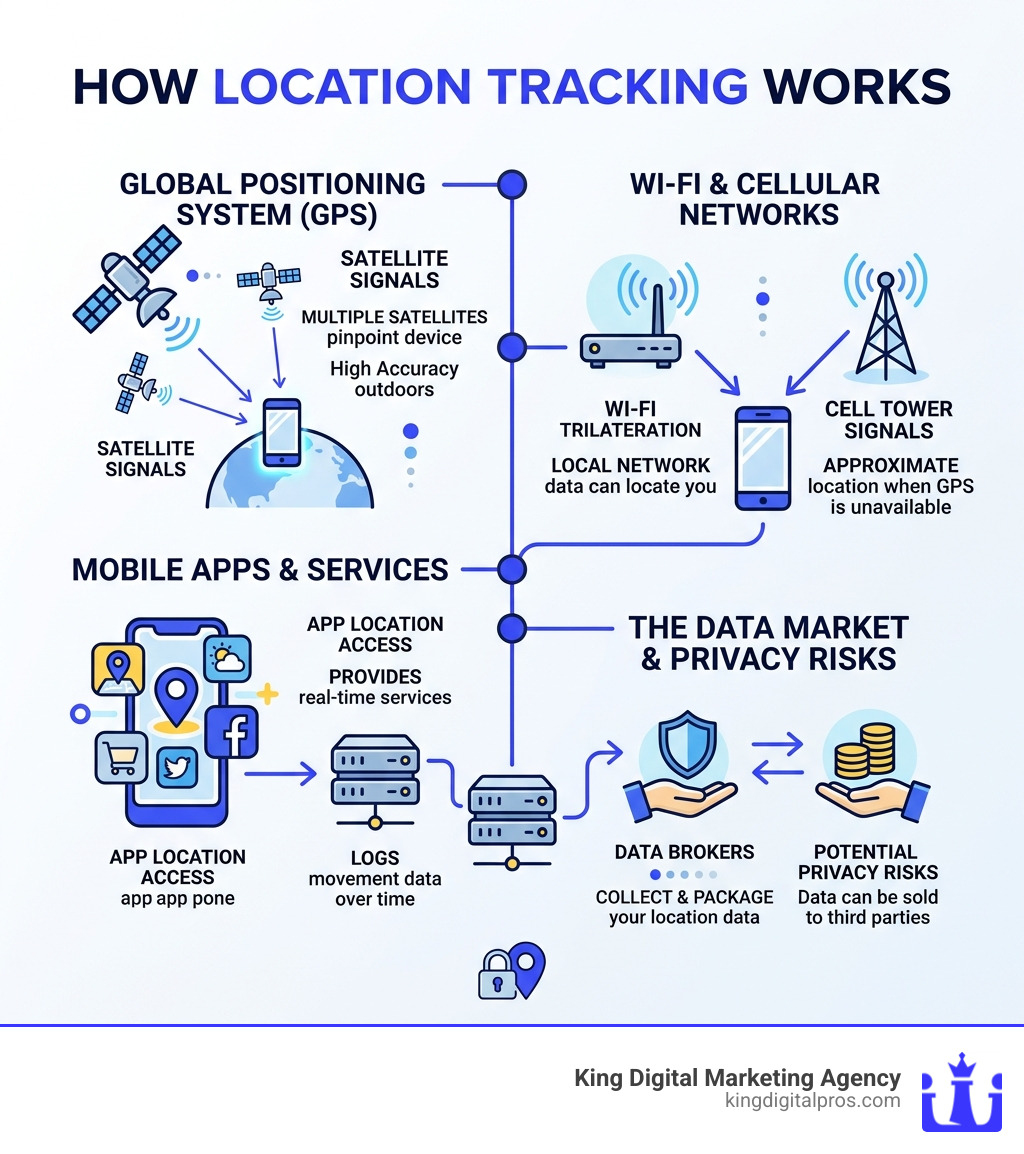
Discover more about location tracking:
How Modern Technology Powers Location Services
When we talk about location tracking, we are really talking about a symphony of different technologies working together. Whether you are driving through the high desert near Santa Fe or navigating the busy streets of Albuquerque, your phone is constantly communicating with the world around it to figure out exactly where you are.
The Global Positioning System (GPS)
At the heart of most location tracking is the Global Positioning System (GPS). This is a network of satellites orbiting the Earth that beam signals down to your phone. By calculating the time it takes for signals from at least four satellites to reach your device—a process called trilateration—your phone can determine its latitude, longitude, and altitude.
According to technical benchmarks, GPS accuracy is within 3-5 meters under optimal conditions. However, “optimal” means a clear view of the sky. If you are hiking in the East Mountains or walking between tall buildings in downtown Albuquerque, those signals can bounce around, leading to slight inaccuracies.
Wi-Fi Positioning and Cell Tower Triangulation
Satellites aren’t the only way your phone knows its location. In urban areas like Rio Rancho, your phone uses Wi-Fi positioning. It doesn’t even need to connect to the Wi-Fi; it just looks at the unique IDs of nearby routers. Since the locations of these routers are stored in massive databases, your phone can estimate its position based on which signals are strongest.
Cell tower triangulation works similarly. Your phone is always connected to the nearest cell tower. By measuring the signal strength and “handshake” time between multiple towers, carriers can narrow down your location. This is often the fallback when GPS isn’t available.
Bluetooth Beacons
Have you ever noticed that a shopping app knows exactly which aisle you are in? That is likely thanks to Bluetooth beacons. These are small, low-energy transmitters placed in stores or public spaces. When your phone comes within range, it recognizes the beacon and triggers a location-specific action.
Accuracy Comparison Table
To help you understand how these technologies differ, we’ve put together a quick comparison of their typical performance:
| Technology | Typical Accuracy | Best Use Case |
|---|---|---|
| GPS | 3 – 10 meters | Outdoor navigation, driving, hiking |
| Wi-Fi | 10 – 50 meters | Indoor tracking, urban areas |
| Cellular | 500 – 2000+ meters | Rural areas, emergency backup |
| Bluetooth | 1 – 5 meters | Precise indoor retail or office tracking |

Legitimate Apps and Built-in Features for location tracking
In our experience at King Digital Marketing Agency, we see location tracking used most often for two things: convenience and safety. There are several high-quality, legitimate apps designed specifically to help families stay connected and help individuals find lost property.
Popular Consumer Apps
One of the most well-known names in the industry is Life360. This GPS Location Tracking App | Life360 allows families to create “Circles” where everyone can see each other’s real-time movements on a private map. It offers advanced features like “Place Alerts” (notifying you when a child arrives at school) and “No-show Alerts” (letting you know if someone didn’t arrive at a destination on time).
For those interested in more technical or business-oriented tracking, apps like GPSWOX or LocationOf provide robust platforms. These tools are often used for fleet management or by power users who want to record every second of a journey. For example, LocationOf records GPS coordinates every second and uploads them every 15 seconds, providing an incredibly detailed trail of movement.
Geofencing: The Power of Virtual Borders
A key feature in many of these apps is geofencing. This technology creates a virtual boundary around a real-world geographic area. When a tracked device enters or leaves that boundary, a notification is triggered. We find this incredibly useful for businesses as well, which you can learn more about in our Geofencing Marketing Complete Guide.
Setting Up Built-in Phone Features for location tracking
You don’t always need a third-party app to use location tracking. Both Android and iOS come with powerful “Find My” features built directly into the operating system.
For Android Users: Google provides a native service called “Find My Device.” To use it, you must be signed into your Google Account and have location services turned on. If you lose your phone, you can go to the Find My Device website to:
- View the phone’s last known location on a map.
- Play a sound (even if the phone is on silent).
- Secure the device by locking it and displaying a message.
- Erase the device entirely if you believe it has been stolen.
You can find more detailed instructions on How to Track, Locate and Find Your Phone’s Location | Android.
For iPhone Users: Apple’s “Find My” network is legendary for its reach. It uses an encrypted network of hundreds of millions of Apple devices to help locate a lost iPhone, even if it is offline. Like Android, it allows for remote locking and erasing, ensuring your personal data stays private even if the hardware is gone.
Sharing Real-Time location tracking with Family and Friends
Sometimes you don’t want to track a “lost” phone; you just want to let a friend know you’re on your way to dinner in Corrales or heading to a meeting in Los Alamos. Google Maps makes this incredibly easy.
Step-by-Step for Google Maps:
- Open the Google Maps app on your mobile device.
- Tap your profile picture or initial in the top right.
- Select Location Sharing.
- Tap New Share.
- Choose how long you want to share (e.g., “For 1 hour” or “Until you turn this off”).
- Select the person you want to share with from your contacts.
When you Share your real-time location with others in Google Maps, they can see your name, photo, and real-time position. They can even see your phone’s battery level, which is helpful if your phone is about to die while you’re out and about!
Privacy Risks and the Legal Landscape of Data Sharing
While location tracking offers immense benefits for safety and local search, it also carries significant privacy risks. As a digital marketing agency, we believe it’s important for users to be informed about how their data moves through the digital economy.
The Data Broker Pipeline
Many free apps—including weather apps, games, and fitness trackers—collect location data via third-party Software Development Kits (SDKs). These SDKs are small pieces of code provided by data aggregators. The app developer gets paid based on the number of active users, and in exchange, the aggregator gets a constant stream of precise location data.
This data is often “anonymized,” but because our movements are so unique (most of us go from home to work and back every day), it is often possible to “re-identify” individuals. This data is then sold to marketers, researchers, and sometimes even government agencies.
Legal Protections and Government Access
The legal landscape is shifting to protect consumers. In the landmark case Carpenter v. United States, the Supreme Court ruled that the government generally needs a warrant to access historical cell-site location information. However, a loophole exists: government agencies have been known to purchase location data directly from brokers to circumvent the need for a warrant.
Regulators are starting to crack down. The FCC proposed $200 million fines against major telephone service providers for selling location data without proper consent. Additionally, the FTC has taken action against data brokers for selling sensitive location data, such as visits to medical clinics or places of worship.
For businesses, using this data ethically is key to building trust. We discuss the balance between utility and privacy in our guide on Location Marketing.
Best Practices for Managing Your Location Data
You don’t have to go completely off the grid to protect your privacy. By following a few best practices, you can enjoy the benefits of location tracking while minimizing the risks.
Audit Your App Permissions
Both Android and iOS now give you granular control over location access. We recommend checking your settings once a month:
- “While Using the App”: This is the safest setting for most apps. It means the app can only see where you are when you actually have it open.
- “Always Allow”: Reserve this only for apps that absolutely need it, like a family safety app or a fitness tracker that records your runs.
- “Never”: If a calculator app or a basic game is asking for your location, just say no!
Manage Google Account Settings
Google keeps a “Timeline” of your movements if you have Location History turned on. While this is great for remembering that amazing restaurant you visited in Taos, you should periodically Manage your Location Sharing settings to delete old data or set it to auto-delete every three months.
Minimize Battery Drain
Location tracking can be a battery hog because the GPS chip requires a lot of power. To save juice:
- Use Wi-Fi whenever possible, as it’s more power-efficient than GPS.
- Adjust the “frequency” settings in tracking apps. Setting an app to update every 180 seconds instead of every second can significantly extend your battery life.
- Turn off “Background App Refresh” for apps that don’t need to track you when they aren’t in use.
For more on how businesses use this data responsibly for reach, see our article on Targeted Mobile Advertising.
Frequently Asked Questions about Location Tracking
Can I track a phone’s location using just its phone number?
This is one of the biggest myths in the tech world. Real-time GPS tracking via phone number alone is technically impossible for the average person.
While there are many websites that claim to offer this service, they are usually just “phone number locators.” These tools can tell you the general region where the number was registered (like Albuquerque or Santa Fe) and the carrier (like Verizon or T-Mobile), but they cannot show you a dot on a map moving in real time. To track a phone’s live location, you must have an app installed on that device with the user’s explicit consent.
Why is my GPS location inaccurate when I am indoors?
If you’ve ever looked at your map while inside a large building in downtown Albuquerque and seen your icon “jumping” or creating a zigzag pattern, you’ve experienced “indoor drift.”
GPS signals are relatively weak and are easily blocked by physical structures like concrete, steel, and even thick glass. When the signal is blocked, your phone tries to guess your location using Wi-Fi and cell towers, which are less precise. This is not a bug in your phone; it’s simply a limitation of satellite technology.
How does location tracking impact my phone’s battery life?
Constant location tracking is one of the primary causes of rapid battery depletion. When an app requests your location every second, your phone has to keep the GPS hardware fully powered and active.
The best practice to minimize this effect is to set update intervals to 180 seconds or more. Many modern apps also use “Geofencing” or “Cell-tower changes” to wake up the GPS only when necessary, which is much more efficient than constant polling.
Conclusion
Location tracking is a powerful tool that makes our lives safer and more convenient. From finding a misplaced phone to ensuring your family arrives safely at their destination in Grants or Tijeras, the benefits are undeniable. However, with that power comes a responsibility to manage your data wisely and understand who is watching.
At King Digital Marketing Agency, we understand the local landscape of New Mexico—from the urban centers to the mountain communities. We specialize in helping local businesses harness the power of location through Google Business Profile optimization. We know that visibility is everything, and Profiles with photos receive 42% more requests for directions and 35% more click-throughs to their websites.
If you are a business owner in Albuquerque, Rio Rancho, Santa Fe, or any of our surrounding communities, we can help you manage your digital map presence to ensure you are found by the customers who need you most. Whether you need help with local SEO or want to understand how Geofencing Marketing can grow your brand, we are here to help.
Ready to dominate your local market? Let’s make sure your business is the one people find when they use location tracking to search for services near them. Reach out to us today!
