
Understanding YouTube Optimization and Video Discovery in 2026
A YouTube video optimization tool helps creators identify high-demand keywords, evaluate metadata relevancy, test visual thumbnails, and align content with critical engagement metrics to improve video rankings. By analyzing search intent alongside audience retention and click-through rates (CTR), these tools bridge the gap between search indexing and viewer satisfaction.
With millions of videos uploaded daily, YouTube’s discovery engine balances relevance with real-time performance signals. When a viewer enters a search query, the algorithm evaluates titles, descriptions, and tags alongside watch time and average view duration. If viewers click and watch, YouTube distributes the video across search rankings, suggested feeds, and browse features.

Reaching the top spot for a competitive search term demands strong viewer interest. Videos that rank #1 have about 70% more likes or dislikes than videos that rank #2 for the same search query, reflecting deep viewer interaction. Optimizing for modern search intent requires tools that help you craft high-converting titles, compelling thumbnails, and structured descriptions that satisfy both search bots and human viewers.
Core Features of a Modern YouTube Video Optimization Tool
Selecting the right software begins with knowing which features actually move the needle. The best platforms act as strategic assistants, saving you hours of manual guesswork while benchmarking your assets against proven formats.
A comprehensive video optimization tool should provide:
- Search Intent and Volume Discovery: Real-time data showing how your target audience searches.
- Algorithmic Content Scoring: Actionable 0-100 scores grading your titles, descriptions, and tags against top-ranking videos.
- AI-Powered Metadata Generation: Instant recommendations that weave emotional triggers, high-ranking keywords, and clean formatting into your text.
- Visual Asset Evaluation: Preview modes and design feedback to measure contrast, composition, and emotional resonance.
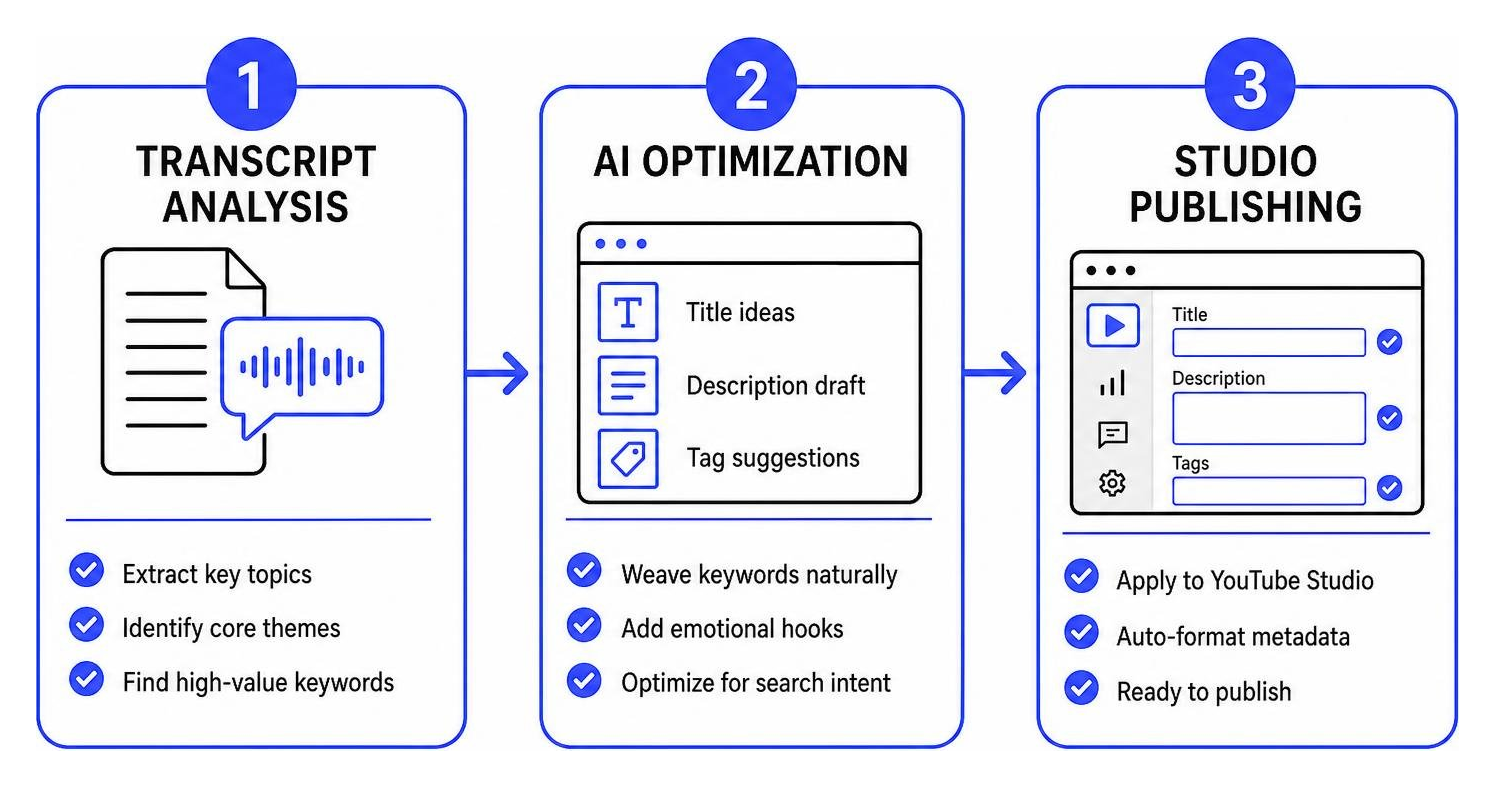
- Workflow Automation: Direct API integration with YouTube Studio for fast metadata updates, chapter generation, and bulk edits.
Choosing the Right YouTube Video Optimization Tool for Keyword Research
Strategic keyword research prevents you from creating videos that nobody wants. Dedicated tools help you uncover search volume, analyze search intent, and focus on reachable targets. By evaluating YouTube keyword competition score, creators can find high-opportunity long-tail phrases that rank quickly rather than fighting over saturated broad terms.
Platforms like TubeBuddy provide integrated keyword explorers right inside your browser. These tools calculate custom opportunity scores based on your channel’s historical performance, helping you prioritize topics that have strong demand and reasonable competition.
AI-Driven Title, Description, and Tag Generation
Generative AI has streamlined video packaging. Advanced tools analyze transcripts, identify core themes, and generate title options that combine emotional hooks with primary keywords.
Front-loading your main keyword into the first 60 characters prevents mobile search truncation, while detailed 200-350 word descriptions give search engines context. For instance, the open-source JCVIQ optimizer Chrome extension harnesses Google Gemini directly inside YouTube Studio, reading your video transcript and visual frames to produce metadata that fits YouTube’s 500-character tag limits.
Thumbnail Design Feedback and Visual A/B Testing
Your thumbnail is your primary billboard. Even the best video will struggle if viewers scroll past it. Modern optimization suites now include visual diagnostic tools that evaluate color contrast, balance, and the rule of thirds.
AI-driven visual testers score your thumbnail’s emotional impact and display it in mock search feeds alongside top competitors. Advanced platforms also offer automated A/B testing, swapping thumbnails and titles over alternating intervals to determine which combination delivers the highest organic CTR.
Top Tool Categories and Solutions for YouTube Video Ranking
Different channels require different tools based on catalog size, publishing volume, and technical requirements.
| Tool Type | Primary Focus | Best Suited For | Key Advantages | Typical Investment |
|---|---|---|---|---|
| All-in-One Suites (e.g., TubeBuddy, YouSEO) | Keyword research, A/B testing, bulk updates | Growing creators, agencies, businesses | Comprehensive toolkits, direct Studio integration | Free tiers available; $4-$40/mo |
| Lightweight AI Generators (e.g., Free.ai, VIDIO) | Fast title, script, and description copy | Solo creators, quick uploads | Zero setup, copy-ready text, no credit card required | Free to low pay-as-you-go |
| Automated Developer Scripts (e.g., SEOTube) | Automated metadata refreshing via cron | Technical users, large archives | Hands-off updates, direct API connections | Free, open-source |
| Specialized Channel Analytics (e.g., TubeToolkit) | Competitor research, chaptering, revenue tracking | Content networks, scaling channels | Multi-video bulk processing, custom workflow tools | Free tiers; paid tiers vary |
Building a Starter Stack with a Free YouTube Video Optimization Tool
You do not need a large budget to establish an effective workflow. Emerging channels can build an efficient stack using free browser extensions, standalone generators, and native analytics.
Begin by identifying low-competition topic opportunities, exploring proven ways to rank your videos on YouTube to establish your foundational strategy. When uploading, use the Free.ai metadata generator to produce title variations and descriptive paragraphs without paid software tiers. Pair this with free tag extraction tools to review top-ranking competitors in your niche, building a solid metadata foundation at no cost.
Advanced Automation and Bulk Metadata Optimization
As your video library grows to dozens or hundreds of uploads, optimizing metadata by hand becomes impractical. Bulk processing tools allow you to update descriptions, refresh cards, and adjust links across your entire catalog in minutes.
For creators seeking full automation, the SEOTube automation engine uses scheduled cron jobs and Google Gemini to detect underperforming videos and refresh metadata via the YouTube API. These workflows ensure your older content remains fresh as search patterns evolve.
Native YouTube Studio Analytics vs. Third-Party Software
Third-party software excels at external keyword discovery, competitor benchmarking, and metadata drafting. However, YouTube Studio remains the source of truth for post-publish performance metrics.
Third-party tools suggest what should work, but YouTube Studio reveals what is working. Use the Studio Audience and Reach tabs to review impression click-through rates, traffic source distributions, and audience retention curves. If a third-party tool helped you score a 100 on an SEO checklist but Studio shows viewers dropping off within the first 15 seconds, your content delivery needs adjustment rather than your metadata.
Best Practices to Rank and Revive Evergreen Video Content
Publishing a video is only the beginning. Search behavior changes, and well-targeted content can drive views for years if maintained properly.

To keep your catalog fresh:
- Match Video Length to Search Intent: For ‘how-to’ keywords, the median video length is about 8 minutes. For broader topics and deep dives, high-ranking videos average around 17 minutes. Avoid short clips under 3 minutes for search queries unless posting as a dedicated Short.
- Structure Content with Timestamps: Add clear, keyword-rich chapter markers to your description. This helps viewers navigate long videos and lets Google extract rich video moments directly onto search engine result pages.
- Revitalize Stagnant Videos: Apply actionable tactics to escape the zero-view dungeon by swapping outdated thumbnails, updating titles to reflect modern search phrasing, and adding fresh links in the description.
Channel Audits and Competitor Benchmarking
Regular channel audits highlight technical gaps that slow channel growth. Auditing tools scan your library for missing descriptions, missing cards, broken end screens, and unoptimized playlists.
Competitor benchmarking takes this a step further. By monitoring velocity metrics and extracting metadata from top-performing videos in your industry, you can identify rising trends before they become saturated. Look at the exact terms industry leaders use, analyze their thumbnail color palettes, and locate keyword gaps their content overlooks.
AI Search Discovery and Cross-Platform Video Visibility
Modern video optimization extends beyond YouTube’s internal search bar. Large language models and conversational search engines routinely surface YouTube videos as primary source citations for technical and how-to queries.
To maximize reach across search engines and AI answer engines, combine on-platform optimization with external authority signals. Learning the fundamentals of building authority backlinks for YouTube videos boosts off-page trust and helps external web crawlers index your content. Embedding videos on fast-loading, topical blog posts further reinforces authority across both Google Search and generative AI platforms.
Frequently Asked Questions About YouTube Optimization Tools
Do YouTube video tags still matter for ranking in 2026?
Tags play a modest supporting role in search discovery. YouTube primarily relies on your title, thumbnail, spoken transcript, and detailed description to understand video context. However, top-ranking videos still use an average of 13 tags. Tags remain helpful for capturing common misspellings, alternate terminology, and niche long-tail phrases that do not fit naturally into your main title.
What are the main limitations of relying solely on YouTube Studio?
While YouTube Studio provides clear internal analytics, it does not offer external keyword search volume, competitor tag data, AI title scoring, or visual thumbnail preview tools. It shows how your current audience interacts with existing uploads, but cannot help you forecast demand or benchmark against competing channels.
How do free YouTube SEO tools compare to paid software?
Free tools provide essential functions like basic tag extraction, individual keyword lookups, and simple title drafting. Paid software provides advanced capabilities, including multi-video bulk processing, deep competitor velocity tracking, historical rank tracking, automated A/B thumbnail testing, and larger AI generation limits.
Elevating Your Video Search Strategy with Expert Guidance
Selecting the right software removes the friction from video packaging, keyword discovery, and channel maintenance. Combining intelligent keyword planning, compelling visual assets, and continuous performance tracking creates a reliable path toward long-term organic discovery.
Whether you manage an enterprise video library or produce targeted tutorials for local audiences, a structured SEO strategy ensures your content reaches the viewers who need it most. Review our comprehensive step-by-step guide to YouTube SEO and Google rankings to strengthen your channel’s search presence and build sustainable organic growth.
