
TL;DR:
- Web design for SMBs focuses on achieving business results through layout, usability, and SEO rather than aesthetics alone. It involves strategic planning, visual trust-building elements, and optimized mobile performance to enhance site speed, user experience, and search rankings. Ongoing maintenance, content creation, and performance checks are essential investments for long-term website effectiveness and growth.
Your website is not just a digital brochure. For a small or medium-sized business, it is the first place a potential customer judges your credibility, decides whether to call you, and either stays or leaves within seconds. Understanding what is web design for SMBs means looking beyond fonts and color palettes. It means learning how layout, user experience, site speed, and SEO work together to drive real business outcomes. This article covers the principles, practical strategies, and cost considerations that help you make smarter decisions about your website.
Table of Contents
- Key takeaways
- What web design for SMBs actually means
- How design choices affect your SEO rankings
- Mobile performance and accessibility basics
- Budgeting and the real cost of SMB web design
- My take: what most SMBs get wrong about web design
- How King Digital Marketing Agency can build your SMB website right
- FAQ
Key takeaways
| Point | Details |
|---|---|
| Design is about outcomes | Every design decision should guide visitors toward calls, bookings, or purchases. |
| SEO and design are connected | Page speed, mobile responsiveness, and site structure directly affect your search rankings. |
| Mobile performance is non-negotiable | Most visitors arrive on a phone, so slow load times and poor navigation kill conversions. |
| Content is the biggest hidden cost | Quality page content and clear calls-to-action require planning and budget beyond the build. |
| Treat your site as an asset | Ongoing maintenance, updates, and measurement matter as much as the initial launch. |
What web design for SMBs actually means
Most business owners think of web design as a visual exercise. Pick a template, choose some colors, upload a logo, and you are done. That framing is the reason so many SMB websites look acceptable but produce nothing. Web design for SMBs involves planning visual layout, interactivity, and usability focused on business outcomes, not just aesthetics.
A proper web design process includes discovery, strategy, design, development, content setup, and launch support. Each stage serves a specific purpose. Discovery identifies what your customers need and what actions you want them to take. Strategy translates that into a site structure and user flow. Design applies visual choices that reinforce trust. Development builds a technically sound platform. Content setup populates the pages with copy and media that convert. Launch support confirms everything works before real visitors arrive.
Visual design elements that build trust
Your visual design is the handshake before any words are exchanged. Color, typography, and spacing combine with usability and accessibility practices to create a website that feels credible. A service company using clashing colors and inconsistent fonts signals carelessness before the visitor reads a single sentence.
Spacing deserves special attention. Crowded pages overwhelm visitors and bury the call-to-action. White space is not empty space. It is strategic breathing room that directs attention where you want it.
Navigation, user flow, and calls-to-action
Think of your navigation as a map your customers use to get from curious to converted. Every menu item should lead somewhere that serves a business goal. Keep primary navigation to five or fewer items. Secondary information belongs in the footer or subpages.
Your calls-to-action (CTAs) are the most important text on your site. “Call us today,” “Book a free estimate,” or “Get a quote” should appear above the fold on every major page. Visitors should never have to search for how to contact you.
- Keep navigation labels simple and descriptive, not clever
- Place your primary CTA in the top right of the header and repeat it mid-page and at the bottom
- Use contrasting button colors so CTAs stand out without clashing with the overall palette
- Design your mobile menu with thumb-friendly tap targets, at minimum 44 pixels tall
Pro Tip: Run your site through Google’s free Mobile-Friendly Test. If a visitor on a phone cannot tap your navigation or read your text without zooming, you are losing leads every single day.
How design choices affect your SEO rankings
Search engines do not just read your content. They measure how your site performs for users. The importance of web design for small businesses becomes clearest here because design decisions you make on day one can either help or hurt your search visibility for years.

Google ranks pages using Core Web Vitals metrics, which measure real user experience on mobile. There are three primary signals to understand.
| Metric | What It Measures | Target Threshold |
|---|---|---|
| LCP (Largest Contentful Paint) | How fast the main content loads | Under 2.5 seconds |
| INP (Interaction to Next Paint) | How quickly the page responds to clicks | Under 200 milliseconds |
| CLS (Cumulative Layout Shift) | How much the page jumps around while loading | Score below 0.1 |
Failing these metrics does not just frustrate visitors. It signals to Google that your site delivers a poor experience, which pulls your rankings down. LCP failures are the most common and the most damaging to both rankings and bounce rates.
Beyond speed, your SEO-friendly site structure is built into design decisions that happen early in development. URL structure, proper header use (H1 through H3), schema markup, and metadata all need to be part of the design plan, not patched in afterward. A beautiful website with no SEO foundation is like a perfectly stocked store with no sign on the door.
Pro Tip: Fix Core Web Vitals in order: start with server response time (TTFB), then address LCP, then INP, and finally CLS. Fixing in priority order reduces wasted effort and improves user experience faster.
Mobile performance and accessibility basics
More than half of web traffic globally arrives on mobile devices. If your site is slow or awkward on a phone, you are turning away the majority of your potential customers before they see what you offer. Web development for small businesses cannot be done well without treating mobile as the primary experience, not an afterthought.
Mobile visitors expect fast loading, intuitive navigation, and no layout shifts while they scroll. Meeting those expectations requires more than just a “responsive” template. Here is what actually matters in practice.
- Use a proper viewport meta tag so content scales correctly on all screen sizes
- Stack content vertically on narrow screens so users scroll without pinching or zooming
- Compress images and use modern formats like WebP to reduce file sizes without losing quality
- Implement lazy loading so images below the fold do not slow down the initial page load
- Use a content delivery network (CDN) to serve assets from servers closer to your visitor’s location
Accessibility is another area most SMBs overlook. Making your site usable for people with visual or motor impairments is not just a legal consideration. It expands your audience. Basics include sufficient color contrast, descriptive alt text on images, and keyboard-navigable menus. Real visitor experience is affected by hosting quality, CDN use, image format, and lazy loading strategies, not just the design file your developer hands over.
Pro Tip: Add descriptive alt text to every image on your site. It improves accessibility, helps Google understand your content, and gives you an additional opportunity to include relevant keywords naturally.
Budgeting and the real cost of SMB web design
Here is where a lot of business owners get surprised. They budget for the build and forget about everything that happens after. Treating web design as an ongoing business asset means budgeting for maintenance, SEO, and content updates beyond the initial build.
Think in a three-year window rather than a one-time price. Over three years, total cost of ownership includes hosting, security updates, plugin or software maintenance, content refreshes, SEO work, and eventually a redesign cycle. An affordable web design service that delivers a site for a flat fee but provides no ongoing support often costs more in the long run when performance degrades and rankings slip.
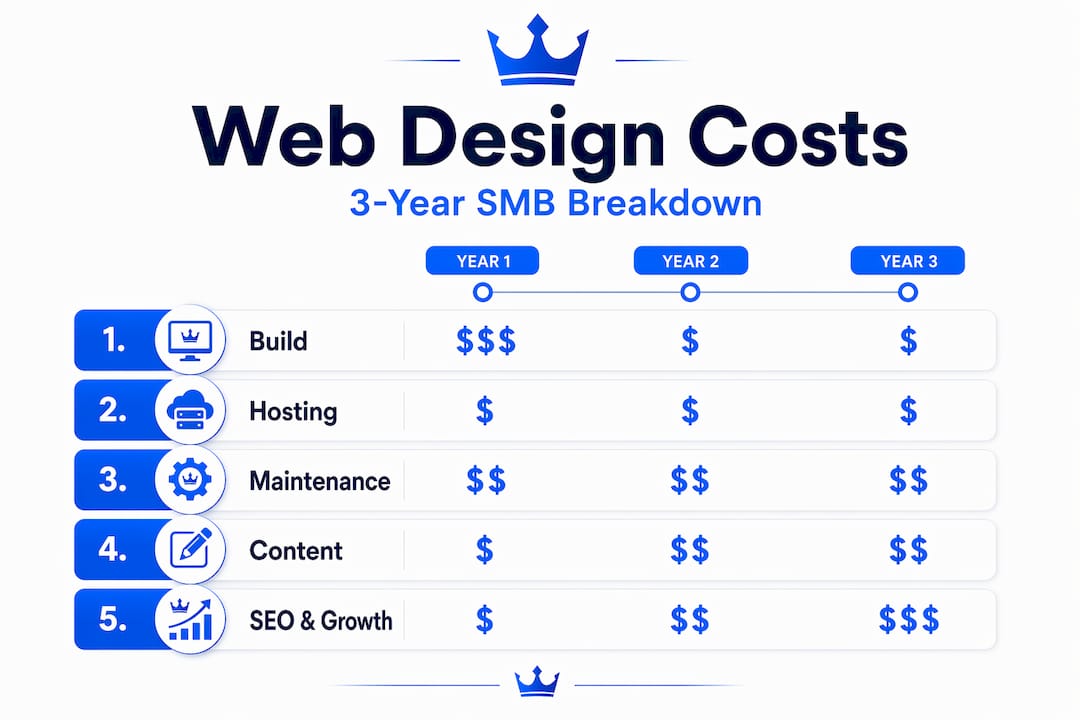
The most underestimated cost in virtually every SMB web design project is content creation. High-quality, customer-focused page content with clear CTAs drives conversions, but it requires planning, writing, editing, and sometimes professional photography or video. Many business owners assume they will write their own content, then discover it takes months and stalls the entire project.
When choosing a provider, prioritize agencies that ask about your business goals before they talk about design preferences. An agency that wants to understand what success looks like for your business in year two is far more valuable than one that focuses entirely on what your site will look like at launch.
My take: what most SMBs get wrong about web design
I have worked with enough small business owners to recognize a pattern. They invest in a website that looks great on launch day, then treat it like a piece of furniture. Set it and forget it. Six months later, they wonder why leads have not changed.
In my experience, the businesses that get real results from their websites treat them like a sales tool, not a design project. That means measuring bounce rates and conversion rates. It means updating service pages when offerings change. It means running the site through performance checks quarterly to catch speed issues before Google penalizes them.
Here is the contrarian truth: a mediocre-looking website that loads fast, ranks well, and has clear calls-to-action will outperform a beautifully designed site that is slow, hard to navigate on mobile, and ignored after launch. Every time. I have seen it play out repeatedly. Aesthetics matter for first impressions, but the design and SEO integration is what drives sustained traffic and leads over time.
The other thing I push every client on is owning their content. Your website’s words are the difference between someone calling you and clicking to the next result. Do not write generic paragraphs about your company’s commitment to excellence. Write for the person who just searched for what you do, is comparing three options, and needs a reason to choose you. That is web design strategy that actually moves revenue.
— Bernadette
How King Digital Marketing Agency can build your SMB website right
At King Digital Marketing Agency, we design SMB websites the way they should be built: with SEO, conversion, and your specific business goals baked in from the start. We do not hand you a template and wish you luck. Our in-house team integrates local SEO with design decisions so your site earns rankings while it earns trust. We also handle post-launch support, analytics setup, and content strategy so your site grows as your business grows. Whether you are starting from scratch or fixing a site that has gone stale, explore our guide on building an SEO-friendly structure and see what a strategic approach looks like. When you are ready to talk, our team is here to build something that actually works for your bottom line.
FAQ
What does web design include for a small business?
Web design for a small business includes planning layout, user experience, mobile responsiveness, navigation, content setup, and technical SEO foundations. It covers everything from visual choices to site speed and call-to-action placement.
Why does web design matter for SMB search rankings?
Google uses Core Web Vitals metrics like LCP, INP, and CLS to rank pages based on real user experience. Poor design choices that slow your site or create layout problems directly lower your search visibility.
How much should an SMB budget for web design?
Budget for the full three-year cost, not just the initial build. This includes hosting, maintenance, content creation, SEO work, and eventual updates. Content creation alone is the most commonly underestimated cost in SMB web design projects.
What is the most important mobile design factor for SMBs?
Fast loading time and simple, thumb-friendly navigation are the most critical mobile design factors. Visitors expect pages to load in under 2.5 seconds and need to tap menus and buttons without difficulty on small screens.
How often should an SMB update its website?
Review and update your website at minimum every quarter. Check performance metrics, refresh service page content when your offerings change, and run speed tests to catch issues before they affect rankings or user experience.
Recommended
- Web Design Essentials for Albuquerque SMBs: Boost Leads & SEO
- Website Performance Improvement Tips for SMB Success
- Web design that builds credibility and grows your leads
- Small business web 2025: Unlock Essential Hosting
