Win Local Customers with Google Business Profile Optimization
Google Business Profile optimization is the process of enhancing your free Google listing to maximize visibility in local search results and attract nearby customers. Here’s what effective optimization includes:
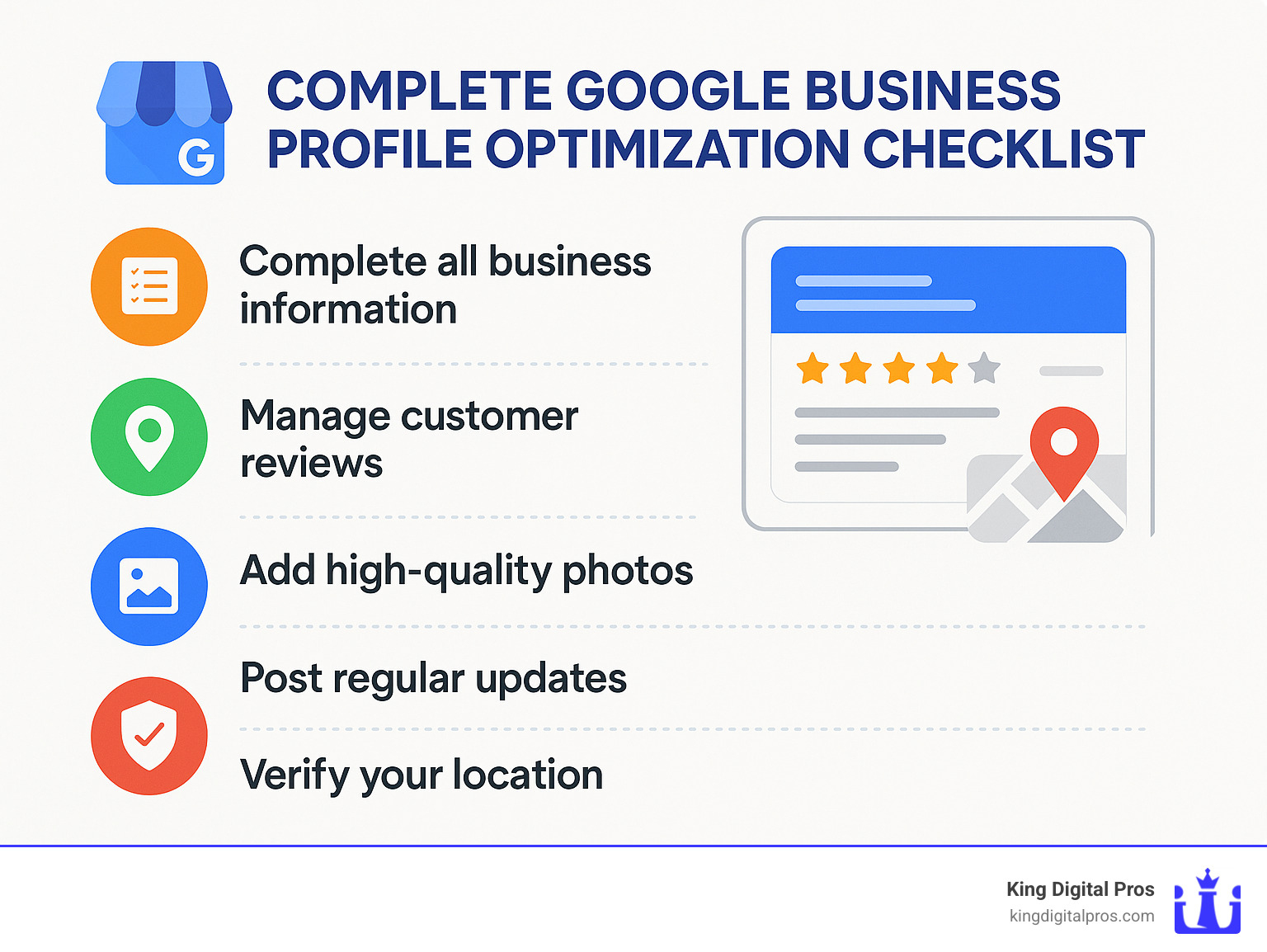
- Complete all profile sections (name, address, hours, description)
- Select accurate business categories (primary and secondary)
- Add high-quality photos (interior, exterior, products, team)
- Collect and respond to customer reviews
- Post regular updates (offers, events, announcements)
- Add products and services with descriptions and pricing
- Answer questions in the Q&A section proactively
Every local business owner knows the struggle: You’re providing great products or services, but potential customers can’t find you online. With 82% of smartphone shoppers conducting local searches and the majority of those searches resulting in same-day store visits, your Google Business Profile has become the new digital storefront.
Think of it this way – when someone searches “coffee shop near me” on their phone, what appears isn’t your website. Instead, they see the Google Map Pack featuring three local businesses with reviews, photos, hours, and directions. If your business isn’t there (or looks incomplete compared to competitors), you’re invisible to potential customers.
“Businesses with more than 100 photos get 520% more calls, 2,717% more direction requests, and 1,065% more website clicks than the average business.”
The good news? Google Business Profile optimization is completely free and delivers impressive returns when done correctly. Unlike paid advertising that stops working when you stop paying, an optimized profile continues working for you 24/7, connecting your business with motivated local customers.
I’m Bernadette King, founder of King Digital Marketing Agency with extensive experience helping small businesses and franchises achieve measurable growth through Google Business Profile optimization and comprehensive local SEO strategies.
Setting Up & Verifying Your Google Business Profile
Before you can optimize your profile, you need to claim and verify it. This crucial first step establishes you as the legitimate owner of the business listing and gives you full control over how your business appears across Google Search and Maps.
How to claim or create a profile
Think of your Google Business Profile like a house – you can’t redecorate until you have the keys! If your business has been around for a while, Google might have already created a listing for you (they’re helpful like that).
To check if your business already exists on Google, simply search for your business name. Do you see your business with a “Claim this business” or “Own this business?” option? Great! Click it and follow the prompts to take ownership – it’s like finding out someone built you a house and left the keys under the mat.
If no listing exists, don’t worry! Creating one is straightforward:
Head over to business.google.com/create, sign in with your Google account (or create one if needed), and follow the guided setup process. You’ll enter your business name, address (or service area for mobile businesses), select your business category (choose this carefully – it’s a crucial element of Google Business Profile optimization), and add your contact details.
For businesses with multiple locations, you’re not stuck claiming each one individually. After setting up your first location, you can request bulk verification to save time and maintain consistency across all your listings.
Essential verification methods
Google wants to make sure you’re really who you say you are (can’t blame them!). They offer several verification methods depending on your business type:
The postcard verification is the most common approach – Google sends a physical postcard with a verification code to your business address. It usually arrives within 5 days, though it can sometimes take a bit longer. Think of it as Google’s way of saying “we just want to make sure you actually get mail at this address!”
Some businesses qualify for phone verification, where you’ll receive an automated call with a verification code. It’s quick and convenient when available.
Email verification is available to certain businesses, while video verification requires you to record a short video showing your business location, signage, and operations – kind of like a quick virtual tour for Google.
If your website is already verified with Google Search Console, you might qualify for instant verification – the express lane of the verification world!
Struggling with verification? Don’t panic! Reach out to Google My Business support via Twitter (@GoogleMyBiz) or through the help section in your dashboard. According to Google’s guidelines, businesses must have a physical location or serve customers in-person to qualify for a profile.
Verification isn’t just a bureaucratic hoop to jump through – unverified listings have severely limited visibility and features. It’s like having a store with the lights off! If you need expert assistance with the verification process, our team at King Digital Marketing Agency can guide you through every step, ensuring your NAP (Name, Address, Phone) information is consistent across all platforms – a key factor in local search success.
Google Business Profile Optimization Checklist
Once verified, it’s time to optimize your profile. Google determines local rankings based on three key factors:
- Relevance: How well your profile matches what someone is searching for
- Distance: How far your location is from the searcher or the area specified in their search
- Prominence: How well-known your business is (based on reviews, links, articles, etc.)
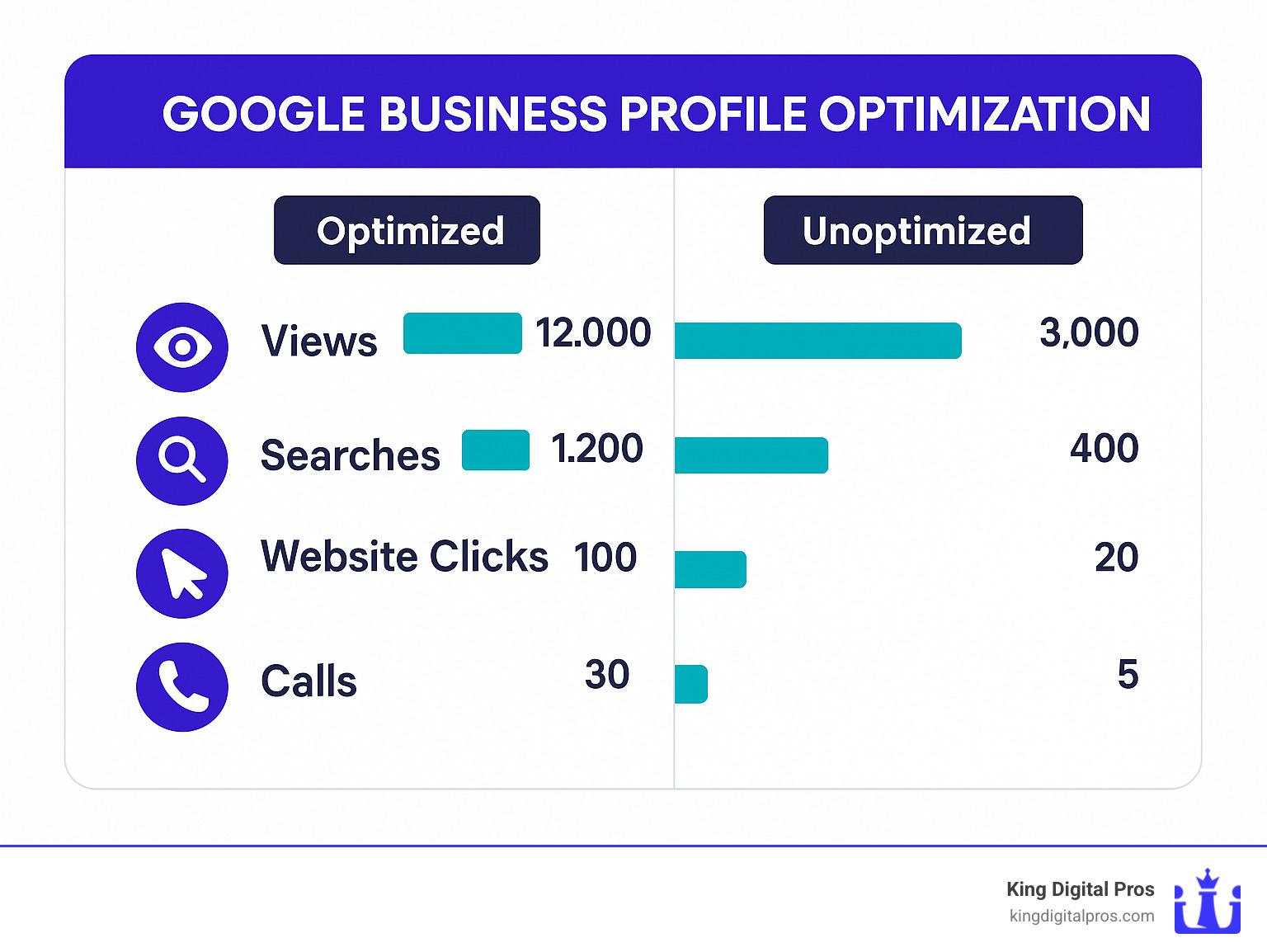
A fully optimized Google Business Profile dramatically outperforms incomplete listings, as you can see in the comparison below:
Core fields for Google Business Profile optimization
Your business name matters—but play by the rules. Use your exact business name without adding keywords or location modifiers unless they’re officially part of your name. Keyword stuffing might seem tempting, but it violates Google’s guidelines and can result in penalties that hurt more than help.
Getting your address & service area right is crucial. Ensure your address is accurate and consistent across all online platforms. If you’re a plumber, landscaper, or another service provider who travels to customers, you can hide your physical address and specify service areas by cities, postal codes, or radius instead.
We’ve all experienced the frustration of arriving at a coffee shop only to find it unexpectedly closed. Don’t let that happen to your customers! Set accurate business hours and remember to update special hours for holidays or irregular closings at least 7 days in advance.
Choosing the right primary & secondary categories can make or break your local visibility. Your primary category is especially important for ranking. With over 4,100 business categories available, choose the most specific one that describes what you primarily do. You can add up to 9 secondary categories to showcase additional services you offer.
Don’t overlook attributes—these special features help your business stand out. Whether you’re women-owned, wheelchair accessible, or offer free Wi-Fi, these details matter to customers. In fact, one controlled test showed that simply adding a “women-owned” attribute created a new 3-pack result where none existed before!
Your business description gives you 750 characters to tell your story. While not directly influencing rankings, this text helps Google understand your business and may appear in AI-generated responses. Front-load important information and include relevant keywords naturally—no stuffing allowed.
Don’t forget to add your website link with UTM parameters (e.g., ?utm_source=google&utm_medium=organic&utm_campaign=gmb) to track traffic from your profile in Google Analytics. This helps you measure the effectiveness of your Google Business Profile optimization efforts.
Products & services listings
Transform your profile into a virtual storefront by adding products and services directly to your Google Business Profile. This allows potential customers to browse what you offer without even visiting your website.
For products, include clear names, descriptions, and pricing alongside high-quality images (720×720 pixels work best). Organize your products into logical categories and include “Learn more” links to relevant website pages for those wanting additional details.
When listing services, include both predefined services (suggested by Google) and custom services unique to your business. When possible, include pricing information—transparency builds trust! Use service descriptions (up to 300 characters) to highlight the benefits customers receive, not just what you do.
Here’s a pro tip: If you run a retail business, connect your Google Merchant Center account to automatically display your in-store inventory directly on your profile. This real-time information helps drive foot traffic from online browsers.
Consistency is key—make sure the products and services listed on your Google Business Profile match what’s on your website. This builds trust with both potential customers and Google’s algorithms.
At King Digital Marketing Agency, we’ve seen businesses transform their local visibility through proper Google Business Profile optimization. Want to see how your listing measures up? Check out our Google Business Listing Help for personalized assistance or explore our Conversion Optimization services to turn profile visitors into paying customers.
Engage & Convert: Photos, Reviews, Posts & Messaging
The real magic of Google Business Profile optimization happens when you move beyond basic setup into active engagement. These interactive elements don’t just improve visibility—they transform browsers into buyers by creating meaningful connections.
Reviews: fuel for ranking & trust
Let’s talk about reviews—the beating heart of local search success. When BrightLocal found that 98% of consumers read online reviews before choosing a local business, they confirmed what we’ve seen firsthand: reviews aren’t just nice to have, they’re essential.
Good news is that most customers are happy to help! About 62% of customers will leave a review when simply asked. Creating a short review link makes this process painless—just search your business on Google, click “Write a review,” and share that direct link with customers after a positive interaction.
The magic doesn’t stop at collecting reviews, though. Your responses matter tremendously. When you thoughtfully reply to both glowing praise and constructive criticism, you’re nearly doubling your trustworthiness in consumers’ eyes. Think of each review response as a mini-conversation happening on your digital storefront, visible to everyone walking by.
Occasionally, you might encounter reviews that cross the line. If a review contains inappropriate content, hate speech, or clearly violates Google’s policies, don’t hesitate to flag it for removal. Just remember—legitimate negative feedback, even when it stings, should be addressed rather than removed.
For maximum impact on your rankings, aim for consistency rather than volume. Recent, steady reviews signal to Google that your business continues to delight customers, which often matters more than your total review count from years past.
One important note: while it’s perfectly fine to ask for honest reviews, offering incentives or rewards for positive feedback violates Google’s guidelines and can lead to penalties. Keep it ethical!
Google Posts & Q&A
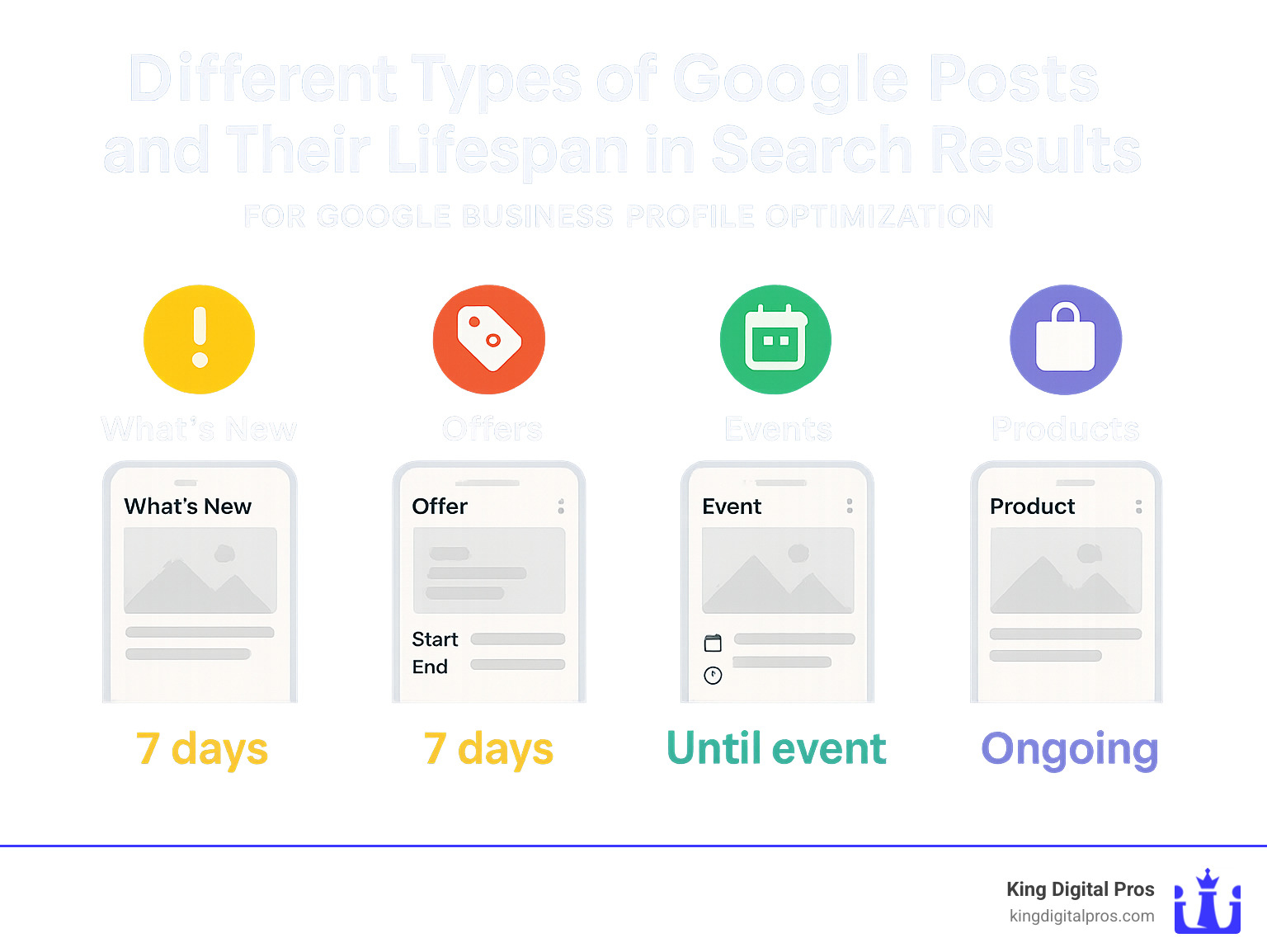
Think of Google Posts as your free mini-billboard right on your business profile. These timely updates remain visible for seven days before archiving, making them perfect for keeping your profile fresh and engaging.
What’s New posts work brilliantly for general business updates or industry insights. Offers posts highlight special promotions with clear start/end dates that create urgency. Events posts showcase upcoming happenings with specific times and dates. Products posts put your specific items front and center for interested shoppers.
For maximum impact, pair each post with an eye-catching image (1200×900 pixels works best) and concise, compelling text. While you have up to 1,500 characters available, only the first 100 or so display in the thumbnail, so front-load your most important information. Always include a clear call-to-action button that guides customers toward the next step.
The Q&A section might be the most underused goldmine in Google Business Profile optimization. Many business owners don’t realize that anyone—yes, anyone—can ask and answer questions about your business here. This means without your involvement, potential customers might receive incorrect information from well-meaning strangers or, worse, competitors.
Take control by seeding your own frequently asked questions and answering them thoroughly. Monitor for new questions daily and respond quickly—ideally within hours, not days. Use the upvote feature strategically to ensure the most helpful answers (including your own) appear first. This section provides the perfect opportunity to address common concerns before they become barriers to conversion.
Google’s messaging feature creates direct lines of communication between you and interested customers. If you activate this feature, be prepared to respond promptly—within 24 hours at minimum, though much sooner is better. Set up thoughtful automated responses for times when you’re unavailable, and consider using the Google My Business app for on-the-go management. Setting clear expectations about response times helps maintain customer satisfaction.
Beautiful photos create emotional connections that text alone can’t achieve. Upload high-quality images (at least 720×720 pixels) that showcase your business at its best—interior spaces, exterior views, team members, and products in action. Short videos (under 75MB) and 360° virtual tours can dramatically increase engagement by giving potential customers an immersive preview of what to expect.
At King Digital Marketing Agency, we’ve seen businesses transform their local presence through these engagement features. When consistently maintained, they create a virtuous cycle: increased visibility leads to more customer interactions, which generates more reviews and engagement, further boosting visibility… and the wheel keeps turning, bringing more local customers through your door.
Measure Success & Avoid Common Pitfalls
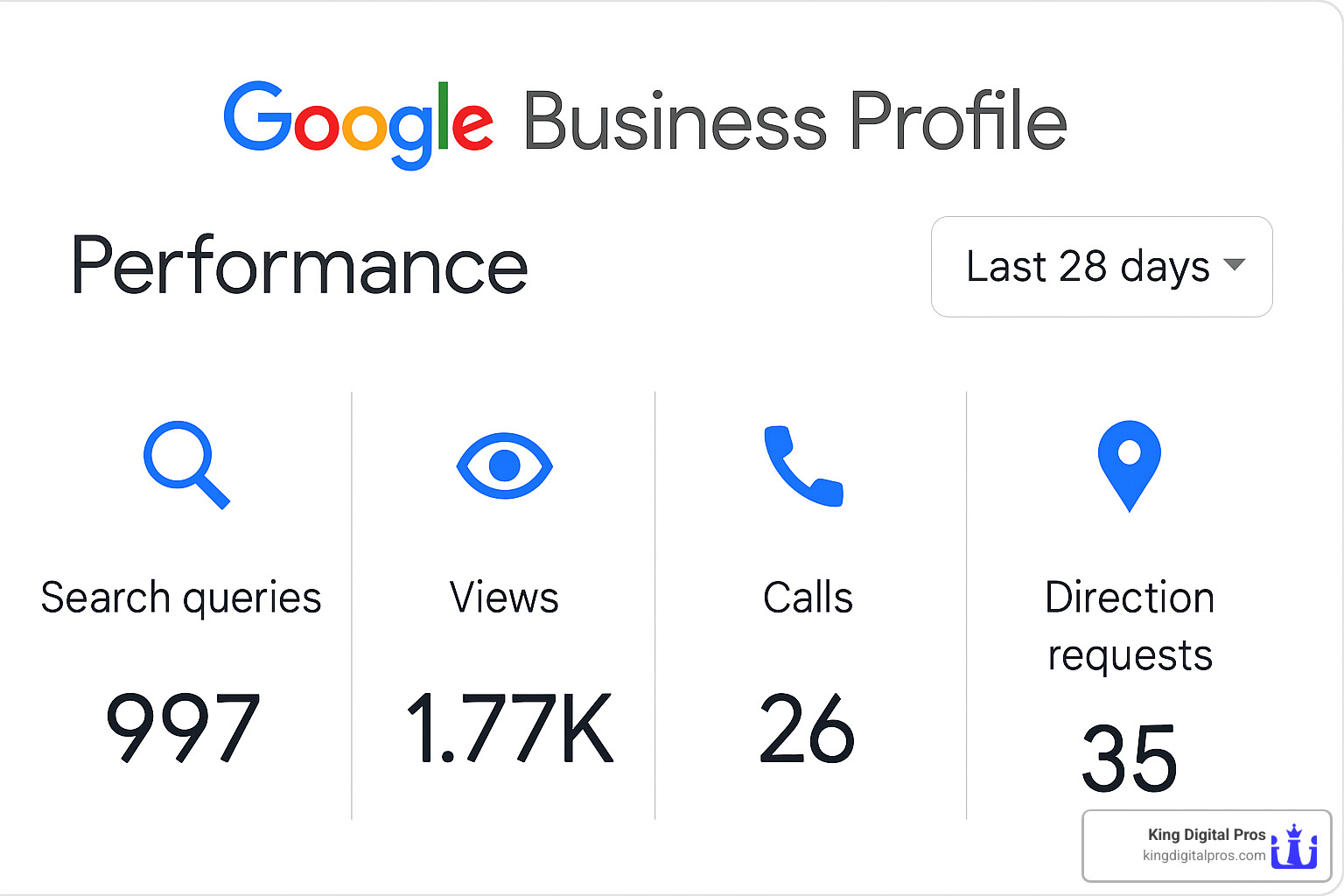
Effective Google Business Profile optimization isn’t a set-it-and-forget-it task—it’s more like tending a garden that needs regular attention to truly flourish. The good news? Google gives you all the tools you need to see exactly how your profile is performing.
Tracking the ROI of Google Business Profile optimization
Your profile’s insights section is like having a window into your customers’ minds. You’ll find:
Search queries that bring customers to your doorstep—sometimes these surprise even the most seasoned business owners! One restaurant owner told me, “We had no idea people were searching for ‘gluten-free pasta near me’ so often. We immediately updated our menu descriptions to highlight this option.”
Customer actions show exactly how people engage with your listing. Are they calling you directly? Requesting directions? Visiting your website? These metrics tell you which parts of your profile are working hardest for you.
Photo views provide insight into which images resonate with potential customers—and how you stack up against competitors. Remember those businesses with 100+ photos getting 520% more calls? This is where you track that impact.
Popular times data helps you understand when customers are most likely searching for you, which can inform staffing decisions and special offers during typically slow periods.
For deeper insights, I always recommend adding UTM parameters to your website link (something like ?utm_source=google&utm_medium=organic&utm_campaign=gbp). This simple addition lets you track exactly how many visitors from your Google listing convert on your website. Connect this with Google Analytics, and you’ll have a complete picture of your listing’s performance, as detailed in this UTM tagging guide.
As one happy client shared, “We love the insights that we get on searches. It helps us understand what our customers are looking for and how to better serve them.”
Common mistakes to dodge
Even the savviest business owners can stumble when optimizing their Google Business Profile. Here are the pitfalls I see most often:
Keyword stuffing the business name is tempting but dangerous. Adding “Best Plumber | Emergency Service | 24/7” to your business name might seem clever, but it violates Google’s guidelines and can get your listing suspended. Your business name should match your real-world signage—nothing more, nothing less.
Inconsistent NAP information (Name, Address, Phone) across the web confuses both Google and customers. If your address is “123 Main Street” on your website but “123 Main St.” on your Google profile, you’re creating unnecessary friction.
Neglecting special hours during holidays leads to frustrated customers standing outside your locked door. Nothing ruins customer goodwill faster than an unexpected “CLOSED” sign. Update those holiday hours at least a week in advance!
Ignoring reviews—especially negative ones—is like ignoring a customer standing in your store asking for help. A thoughtful response to criticism often impresses potential customers more than a perfect 5-star record.
Using stock photos instead of authentic images of your business is like wearing someone else’s clothes to a first date. Customers can spot generic images immediately, and they don’t build trust.
One particularly painful mistake I witnessed: An HVAC company dropped from position #1 to #31 in local pack results overnight after changing their primary category without research. They only recovered after reverting to the original category—a costly lesson in “if it ain’t broke, don’t fix it.”
Quick-fire FAQ
What if verification fails? Don’t panic! Try an alternative verification method or contact Google support directly. If you’re attempting video verification (which can be tricky), keep it under two minutes, shoot in one continuous take, and clearly show your business location and signage. Google just wants to confirm you’re a legitimate business.
How often should I update photos and posts? For best results, add fresh photos weekly and publish at least one Google Post every seven days. This regular activity signals to Google that your business is alive and thriving. Think of it as keeping your digital storefront clean and inviting.
Does running Local Ads help my Google Business Profile ranking? While Google Ads don’t directly improve organic rankings (Google keeps these systems separate), they can increase your overall visibility. More importantly, ads often drive additional engagement with your listing—clicks, calls, and direction requests—which are factors in ranking. Consider it an indirect boost rather than a direct one.
At King Digital Marketing Agency, we’ve seen businesses transform their local presence through consistent, strategic Google Business Profile optimization. The key is regular maintenance and data-driven adjustments to keep your profile working as hard as you do for your business.
Conclusion
Let’s be honest – the digital landscape for local businesses can feel overwhelming. But your Google Business Profile optimization isn’t just another box to check—it’s your most powerful tool for connecting with local customers actively searching for what you offer. When 84% of profile views come from findy searches (people looking for your type of business rather than your specific name), can you afford to leave this opportunity on the table?
At King Digital Marketing Agency, we’ve witnessed the change when local businesses go from barely visible to dominating the map pack. Our clients tell us the same story again and again: “I didn’t realize how many customers I was missing until my profile was properly optimized.”
Think of your Google Business Profile as a living, breathing entity that requires ongoing care:
- Fresh information when details change
- New photos that showcase your latest work
- Thoughtful responses to every customer review
- Weekly posts that highlight what makes you special
- Regular check-ins with your performance data to spot opportunities
Google loves to keep us on our toes, constantly rolling out new features and tweaking how they rank local businesses. That’s why partnering with experts who live and breathe this stuff (that’s us!) can give you peace of mind that your local presence stays ahead of the curve.
Whether you’re starting from scratch or looking to lift an existing profile, the strategies we’ve shared will help turn your free Google listing into a powerful customer attraction engine. And remember, you don’t have to do it alone. If you’d rather focus on what you do best—running your business—while experts handle your online presence, we’re here to help.
The beautiful thing about Google Business Profile optimization is that it delivers results regardless of your business size or budget. Unlike paid ads that stop performing the moment you stop paying, an optimized profile works for you 24/7, connecting you with motivated local customers exactly when they’re looking for you.
Start implementing these strategies today, and watch as more local customers find, trust, and choose your business. The map pack is waiting for you to claim your spot!