Why Your Google Listing Needs to Be Fixed (and How to Do It Fast)
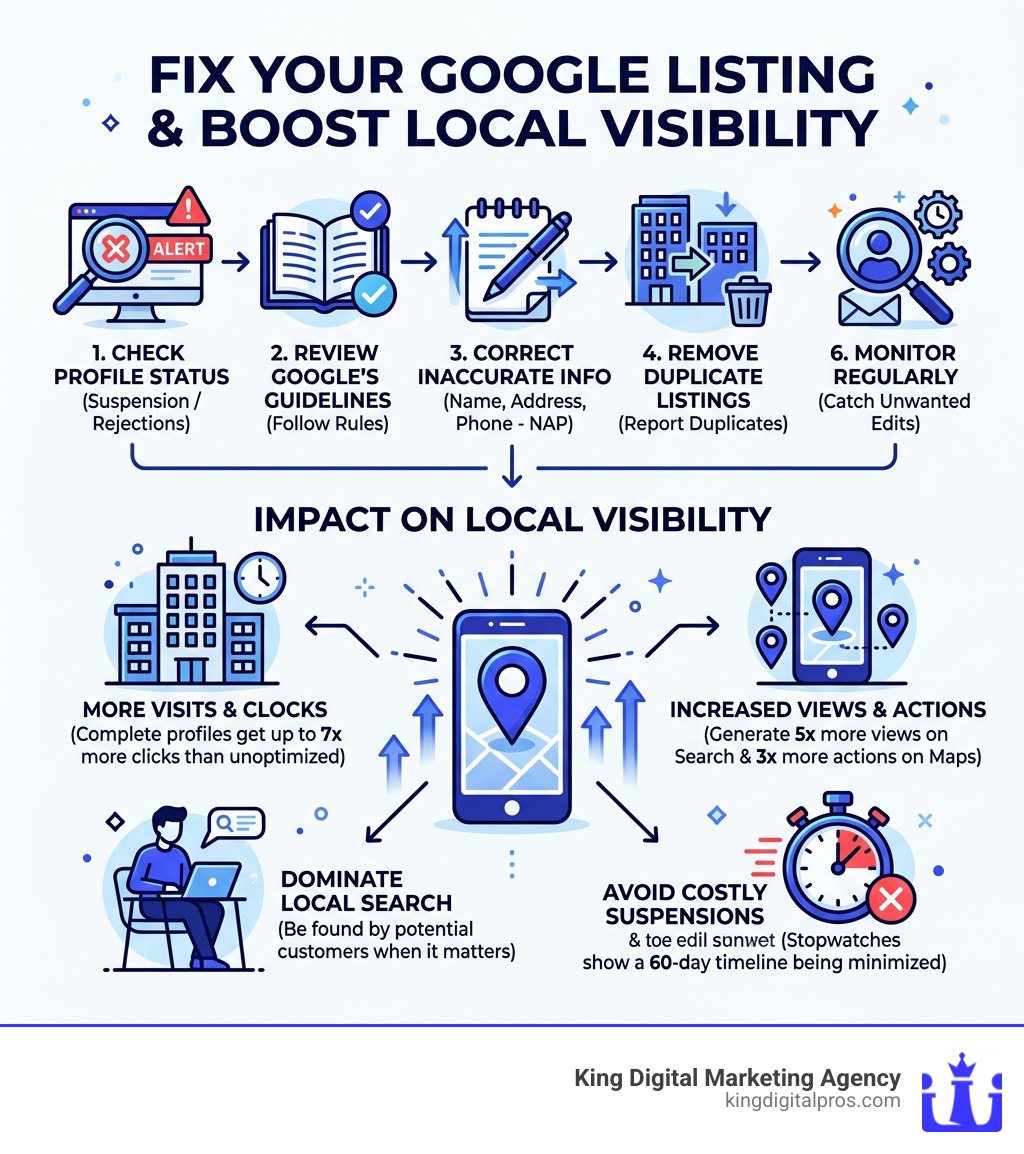
Fix Google listing issues by following these steps:
- Check your profile status — log in to Google Business Profile and look for suspension or rejection notices
- Review Google’s guidelines — make sure your business name, address, and category follow the rules
- Correct any inaccurate info — update your name, address, phone number (NAP), hours, and website
- Remove duplicate listings — search for your business and report any duplicates
- Submit an appeal — use the Google Business Profile appeals tool with supporting documents
- Monitor regularly — check your listing every few weeks to catch unwanted edits
Your Google Business Profile (GBP) is often the first thing a potential customer sees. If the information is wrong — or worse, your listing is suspended — you’re invisible when it matters most.
Here’s why this is a big deal:
- Businesses with complete, optimized profiles get up to 7x more clicks than unoptimized ones
- Fully optimized listings generate 5x more views on Search and 3x more actions on Maps
- A suspension can take your listing down for 60 days or longer
The frustrating part? You may not have done anything obviously wrong. Google automatically pulls data from third-party sources like Yelp and social media. Customer-suggested edits can go live without your approval. Even a small formatting difference — like “Ste.” vs. “Suite” — can create problems.
And when something breaks, the path to fixing it isn’t always clear.
This guide walks you through every major GBP issue — from suspensions and rejected edits to wrong addresses and duplicate listings — with practical, step-by-step fixes.
I’m Bernadette King, founder of King Digital Marketing Agency, and helping local businesses fix Google listing problems and reclaim their online visibility is at the core of what I do every day. With years of hands-on experience navigating GBP suspensions, appeals, and profile optimization, I’ll show you exactly what works — so you can stop guessing and start getting found.
Fix Google listing terms simplified:
Common Reasons for Profile Suspensions and Rejections
Finding out your listing has been yanked off the map is a heart-sinking moment. For businesses in Albuquerque or Santa Fe, this means disappearing from local search results overnight. While Google doesn’t always send a detailed “break-up” letter explaining why, most suspensions stem from a few common culprits.
First and foremost are Google’s guidelines violations. This includes using a P.O. Box or a virtual office address, keyword stuffing your business name (e.g., “Albuquerque Best Plumber & Drain Pro” instead of just “Albuquerque Plumber”), or having multiple listings for the same location.
Suspicious activity is another big one. If you make too many major changes at once—like changing your name, address, and phone number in a single afternoon—Google’s bots might flag the account for fraud. Similarly, third-party app interference can cause “ghost” edits that trigger red flags. If you’ve granted access to an old marketing tool or a directory sync service, it might be pushing outdated data that contradicts what you’ve manually entered.
Consistency is the secret sauce of local SEO. Inconsistent NAP (Name, Address, Phone) data across the web makes Google lose trust in your listing. If your website says you’re on Central Ave in Albuquerque but your Yelp profile says you’ve moved to Rio Rancho, Google might suspend your profile until the truth is sorted out. This is where professional Google Business Page Management becomes invaluable to ensure every digital footprint matches perfectly.
Understanding Account Restrictions vs. Profile Suspensions
It is important to distinguish between a “slap on the wrist” for a single profile and a total lockout.
- Profile Suspension: This affects one specific business location. Your other managed locations might still be live.
- Account Restriction: This is much more serious. It happens at the user level. If your Google account is restricted, every profile you manage is effectively frozen. You can check your status on the My accounts page.
Often, account restrictions happen because of ownership transfer issues or if a manager on the account has a history of policy violations. If you’re a business owner in Taos or Los Alamos, ensure you are the Primary Owner and be very selective about who you add as a manager.
How to Fix Google Listing Suspensions and Rejections
If the worst has happened, don’t panic. You can Fix Google listing suspensions through the official appeals process. However, you need to be methodical.
The first step is using the How to Use the Google Business Profile Appeal Tool video guide or the tool itself. Once you initiate an appeal, Google gives you a very tight 60-minute window to upload your evidence. If you miss this window, your evidence won’t attach, and your appeal will likely be denied.
For businesses needing Google Business Listing Help, we recommend gathering every possible document before you even click “Appeal.”
Steps to Fix Google Listing Rejections
Before you hit submit, perform a “Compliance Check.” Did you remove the keywords from your name? Is your address a real physical location? Once the profile is compliant, prepare your evidence:
- Utility Bills: A recent water, electric, or internet bill showing the exact business name and address.
- Business Registration: Articles of Incorporation or a New Mexico Secretary of State filing.
- Tax Certificates: State or local business tax licenses.
- Signage: A photo of your permanent storefront signage (not a paper sign taped to a door).
Managing Appeals for Bulk Profiles
If you manage a franchise with locations across Albuquerque, Rio Rancho, and Santa Fe—specifically more than 10 profiles—the process changes. You cannot appeal 15 locations one by one without looking like a spammer. Instead, you must use the bulk verification and appeal process, which involves submitting a spreadsheet with specific Business Profile IDs. This is a complex area of Google My Business Verification that usually requires expert oversight to avoid a total brand blackout.
How to Fix Google Listing Address and Category Errors
Sometimes your listing is live, but it’s just… wrong. Maybe Google rejected your category change, or you keep seeing the dreaded “Your edit was not approved” message.
| Feature | Owner Edits | User-Suggested Edits |
|---|---|---|
| Authority | High, but still reviewed by AI | Moderate; depends on user “Trust Score” |
| Speed | Often instant for minor changes | Can take days or weeks for review |
| Verification | May require re-verification for NAP | Requires community consensus |
| Common Errors | “Edit not approved” due to data conflict | “Google updated your info” (Blue text) |
If you’re stuck in a loop of rejections, GBP support is your next stop. Technical glitches often prevent category updates, especially if your business is set to “Corporate Office” but you actually provide services. Manual updates through a support ticket are often the only way to break the cycle and achieve proper Business Profile Optimization.
Updating Business Information Without Triggering Suspensions
Moving your business from Albuquerque to Corrales? Proceed with caution. Address changes are “high-risk” actions in Google’s eyes. To Fix Google listing address updates without a suspension:
- Update your website first. Google crawls your site to verify the new address.
- Gather your new lease or utility bill.
- Make the edit once. Don’t change your phone number and name at the same time.
- Ensure permanent signage is up. If Google asks for a video verification at the new spot, you need to show the world you really exist there.
Check out our Optimize Google Business Listing Guide for a deeper dive into safe editing.
Resolving Inaccurate Phone Numbers and Hours
Is your listing showing an old 800-number instead of your local 505 area code? Or perhaps your holiday hours are wrong? You can Suggest edits to a place in search results even on your own listing to nudge the algorithm.
Pro tip: Always use a local phone number as your primary contact. It reinforces your local presence in New Mexico. Toll-free numbers are fine as secondary options, but they don’t provide the “local signal” Google loves.
Proactive Management and Prevention Best Practices
At King Digital Marketing Agency, we believe the best way to Fix Google listing problems is to prevent them from happening in the first place.
Regular monitoring is essential. Google gathers info from user reports and licensed content constantly. If you don’t check your profile, you might miss that a competitor suggested your business is “permanently closed.” We recommend a quarterly audit of your Google Profile Management to catch these errors early.
Authentic engagement also helps. Responding to reviews and posting regular updates tells Google’s algorithm that the profile is managed by a real human. This builds “trust” in your listing, making it less likely to be suspended for minor technicalities. For more on this, read our guide on how to Improve your local ranking on Google.
When to Contact Support or Use Google Forums
If you’ve followed the steps and you’re still stuck, it’s time to escalate.
- GBP Support: Use the GBP support link to start a chat or email case. Always keep your Case ID!
- Google Forums: If support gives you a canned response, post your Case ID in the Google Business Profile Help Community. Product Experts (volunteers) can sometimes escalate “stuck” cases to the internal Google team.
This is often necessary for technical glitches where an edit is stuck in “Pending” for more than 14 business days. We specialize in navigating these hurdles to Unlock Local Success Master Your Google Business Profile for Top Map Rankings.
Frequently Asked Questions about Google Listings
How long does the Google Business Profile reinstatement process take?
The standard review timeline is about 14 business days. However, during high-volume periods or if your evidence is incomplete, we have seen delays of 60 days or more. If you haven’t heard back in two weeks, it’s time to follow up with your Case ID.
What are the most effective types of evidence for an appeal?
The “Holy Trinity” of evidence includes:
- A utility bill (electricity or water) in the business name.
- A signed lease agreement or deed.
- A business license from the State of New Mexico. All documents must show a name and address that match your GBP exactly.
How do I remove a duplicate Google listing?
Duplicate listings split your “SEO juice” and confuse customers. To fix this, use the “Report a problem” link on the duplicate listing and select “Place has another listing.” If you own both, you can sometimes merge them through the Google Local Business Guide tools, which preserves your reviews.
Conclusion
Troubleshooting a Google listing can feel like a full-time job, but it’s the most important work you can do for your local visibility. From ensuring NAP consistency to navigating the high-stakes world of appeals, every step you take strengthens your digital foundation.
Your profile isn’t “set it and forget it.” It requires ongoing care, monitoring, and a quick response when things go sideways. If you’re tired of fighting with “Edit not approved” messages or you’re staring at a suspended screen, you don’t have to do it alone.
Learn more about the 5 Common Myths About Your Map Listings and Why You Should Hire a Google Business Profile Expert to see how we can take the stress off your plate.
Ready to get your listing back on track and dominating the local maps? Contact our Albuquerque PPC Agency for expert profile management and let’s get your business the visibility it deserves across New Mexico.
