Turn Your Business Visibility Around with Google Business
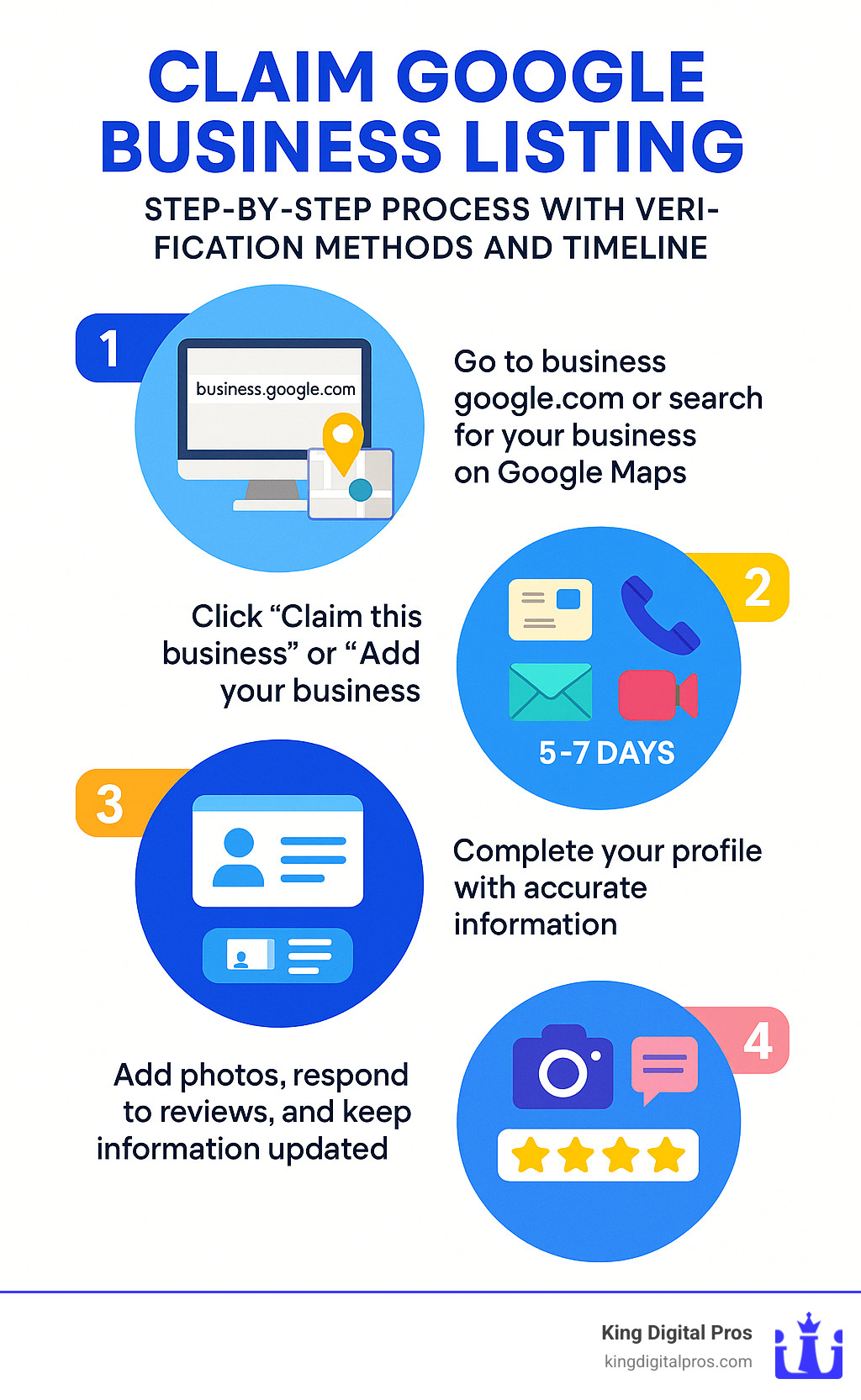
Claim Google Business listing in just a few minutes with these simple steps:
- Go to business.google.com or search for your business on Google Maps
- Click “Claim this business” or “Add your business”
- Verify ownership via postcard, phone, email, or video (usually takes 5-7 days)
- Complete your profile with accurate information
- Add photos, respond to reviews, and keep information updated
Over 85% of consumers use Google to find and evaluate local businesses. If you’re not showing up when they search, you’re missing out on potential customers. A verified Google Business Profile makes your business twice as likely to be considered reputable, and businesses with complete profiles are 70% more likely to attract visits to their physical location.
Why is this so important? Think about the last time you searched for a local business. Did you scroll past the first page of results? Probably not – and neither do 75% of searchers. When your business appears in Google’s local results with accurate information, you’re instantly more accessible to nearby customers.
“Getting Yogolandia on Google was absolutely key. It truly legitimizes you as a business. It’s free, there are photos, and we’ve gotten phenomenal reviews,” shares one business owner who saw immediate benefits after claiming their listing.
I’m Bernadette King, founder of King Digital, and I’ve helped hundreds of small businesses claim Google Business listings to dramatically improve their local visibility and customer engagement, turning online searches into real-world revenue.
What Is a Google Business Profile (GBP)?
Ever noticed that helpful box that pops up when you search for a local business on Google? That’s a Google Business Profile (GBP) – your digital storefront in the world’s busiest marketplace. Formerly known as Google My Business, this free tool lets you control exactly how your business appears when customers search for you on Google Search and Maps.
Think of your GBP as your business’s home on Google – a centralized information hub that showcases everything potential customers need to know about you. When properly set up, your profile creates a knowledge panel that instantly communicates your business’s key details:
Your business name, address, and phone number (the critical “NAP” information) When you’re open (and special holiday hours) A direct link to your website Eye-catching photos that show off your space and products Real customer reviews and your overall star rating Details about what you sell or services you offer Answers to questions customers commonly ask
Claim Google Business listing opportunities exist for every type of local business. Whether you run a cozy café in Albuquerque with a physical storefront or provide mobile dog grooming services throughout Santa Fe and Taos, a GBP is absolutely essential for local visibility. Service-area businesses like plumbers in Los Alamos or landscapers in Rio Rancho can even hide their physical address while still appearing prominently in local searches.
Key Data & Benefits
The numbers don’t lie – Google Business Profiles deliver real results:
Over 85% of consumers turn to Google first when researching local businesses (that’s most of your potential customers!)
Being verified on Google makes you twice as reputable in consumers’ eyes – claim Google Business listing verification is like getting a digital trust badge
Businesses with complete profiles see 70% more visits to their physical locations – because customers can find you easily
These same businesses experience 50% more sales compared to those with unclaimed or incomplete profiles
Adding photos to your listing generates 35% more clicks than profiles without visual content
Direct customer calls from GBP listings increased by 61% in 2020 alone
At King Digital Marketing Agency, we’ve witnessed these statistics come to life with our clients across New Mexico communities from Edgewood to Grants. When businesses claim Google Business listing opportunities, their local visibility transforms from invisible to unmissable.
Why You Must Claim Your Google Business Listing
Let’s be honest – in today’s digital world, claiming your Google Business listing isn’t just a nice-to-have. It’s absolutely essential for any local business hoping to thrive. Think of it as planting your flag on the digital main street where most of your customers are already walking by.
Trust & Legitimacy
When potential customers see that verified checkmark next to your business name, it’s like a digital handshake that says, “Yes, we’re really here, and yes, we’re professional.” I remember a coffee shop owner in Albuquerque telling me, “The day after we verified our listing, people started mentioning they found us on Google.” That little verification badge speaks volumes about your credibility.
Control Your Information
Have you ever driven to a store only to find it closed when Google said it would be open? Frustrating, right? By claiming your Google Business listing, you take control of what customers see about you. Your hours, phone number, holiday closures – all accurate and up-to-date because you manage them. This prevents those awkward moments when a customer arrives at your East Mountains shop expecting service on a day you’re actually closed.
Protect Your Brand
Here’s something that keeps me up at night: unclaimed listings can be modified by anyone. Former employees, competitors, or even well-meaning but misinformed customers can submit edits to Google. Without ownership of your listing, these changes might go live without your knowledge, potentially damaging your reputation or sending customers to the wrong location.
Local SEO Advantage
Google’s local search algorithm absolutely loves verified and complete Business Profiles. In fact, it’s one of the top factors that determines which businesses appear in that coveted “Local Pack” – you know, that map with three business listings that appears at the top of local search results. Want to be one of those three? Claiming your Google Business listing is step one.
Voice Search Optimization
“Hey Google, where can I get my car fixed near me?” Voice searches are skyrocketing, and guess where Google pulls that information from? You guessed it – Google Business Profiles. If yours isn’t claimed and optimized, you’re essentially invisible to voice searchers in your area.
Mobile “Near Me” Searches
The 500% increase in “near me” searches represents real people in your community looking for services right now. When someone in Sandia Park pulls out their phone and searches for “coffee shop near me,” your claimed and optimized listing helps you appear right when they need you most.
Reviews as Social Proof
We all do it – 64% of consumers check Google reviews before visiting a business. Your Google Business Profile is home base for these reviews, and claiming your listing allows you to respond to them. A thoughtful response to a negative review can actually win you more customers than a perfect five-star rating with no engagement.
Unclaimed vs. Claimed: Impact on Visibility
The numbers tell a compelling story about the difference between claimed and unclaimed listings:
| Metric | Unclaimed Listing | Claimed & Optimized Listing |
|---|---|---|
| Click-through rate | Baseline | Up to 7× higher |
| Calls from listing | Minimal | 61% increase on average |
| Direction requests | Few | 42% more with photos added |
| Appearance in “Local Pack” | Rare | Significantly more likely |
| Customer trust | Low | 2× higher |
I’ve seen these statistics come to life with real businesses. Just last month, a family restaurant in Santa Fe saw a 35% jump in foot traffic within weeks of claiming and optimizing their profile. A boutique in Corrales started receiving calls from customers who specifically mentioned finding them “on that map thing on Google.”
The bottom line? If you want local customers to find you, trust you, and choose you, claiming your Google Business listing is your essential first step. It’s like turning on the “Open” sign for your digital storefront – and the best part is, it won’t cost you a penny.
Step-by-Step: Claim Google Business Listing
Now that you understand the importance, let’s walk through exactly how to claim your Google Business listing. Before you begin, make sure you have:
- A Google account (preferably using your business email)
- Authority to manage the business
- Basic business information (address, phone, website, hours)
There are multiple ways to claim your listing, and we’ll cover each method:
The claiming process starts with finding your business on Google. You have several options here, and I’ll walk you through each one. Many business owners don’t realize they likely already have a listing created automatically by Google—it’s just waiting for you to claim it!
If you’re using Google Maps, simply search for your business name. For businesses with a physical location, you might find your listing already exists based on map data. Service-area businesses might need to create a new listing from scratch.
Using the Google Search interface is another great option. Just type your business name and location into Google, and see if your business appears in the results. If it does, you’ll usually see an option to claim it right there.
Perhaps the most straightforward approach is going directly to business.google.com/add and following the prompts. This portal was specifically designed for business owners to claim and manage their listings.
Before creating a new listing, always do a thorough duplicate check. Having multiple listings for the same business can actually hurt your visibility and confuse customers. I’ve seen businesses accidentally create three different listings while trying to get set up—which required quite a bit of cleanup afterward!
The Google Business interface changes periodically, but the basic process remains the same. If you’re feeling overwhelmed, don’t worry—at King Digital Marketing Agency, we help business owners steer this process every day. The initial setup takes just minutes, but the benefits last for years.
1. Search & Select “Claim this business”
Finding and claiming your Google Business listing is easier than you might think. I’ll walk you through the most common ways to get started, so you can choose whichever method feels most comfortable for you.
Search Bar Method
The simplest approach is often the direct one. Head over to Google Maps (maps.google.com) and type your business name and location in the search bar. For example, “King Digital Marketing Agency Albuquerque.” If your business appears in the results, click on it to open the business panel. Look for the “Claim this business” or “Own this business?” button, which is usually quite visible. Once you click it, select “Manage now” to begin the claiming process.
Right-Click Method
If you prefer a more visual approach, you can steer to your business location on the map itself. Open Google Maps and zoom in to where your business is located. Then simply right-click on the exact spot of your business, and you’ll see an option to “Add your business” in the dropdown menu. This method works especially well if your business isn’t already showing up in search results but you know exactly where it’s located.
Menu Method
Perhaps the most straightforward method starts with the main menu. When you’re on Google Maps, look for the three horizontal lines (hamburger menu) in the top left corner. Click this menu icon, scroll down a bit, and you’ll find the “Add your business” option. Select this and follow the guided prompts to enter your information.
If you’d rather skip Google Maps entirely, you can go directly to business.google.com/add. This takes you straight to the business creation portal where Google will walk you through each step of the process.
Already see your business on Google but don’t manage it yet? When you search for your business name, you’ll notice either “Own this business?” or “Claim this business” prompts appearing in the business profile. This means Google knows about you, but you haven’t taken control of your listing yet.
Don’t worry if your business doesn’t appear at all—this just means you’ll be adding it as a new listing, which is just as simple as claiming an existing one.
Need more detailed guidance? We’ve created comprehensive Google Business Listing Help resources to walk you through every step of the process, including troubleshooting common issues that might come up along the way.
2. Choose a Verification Method
After you’ve started the claim process, Google needs to verify you’re actually the business owner or manager. This step isn’t just red tape – it’s Google’s way of making sure only the right people control your business information online.
Google offers several ways to verify your business, and choosing the right one can save you time:
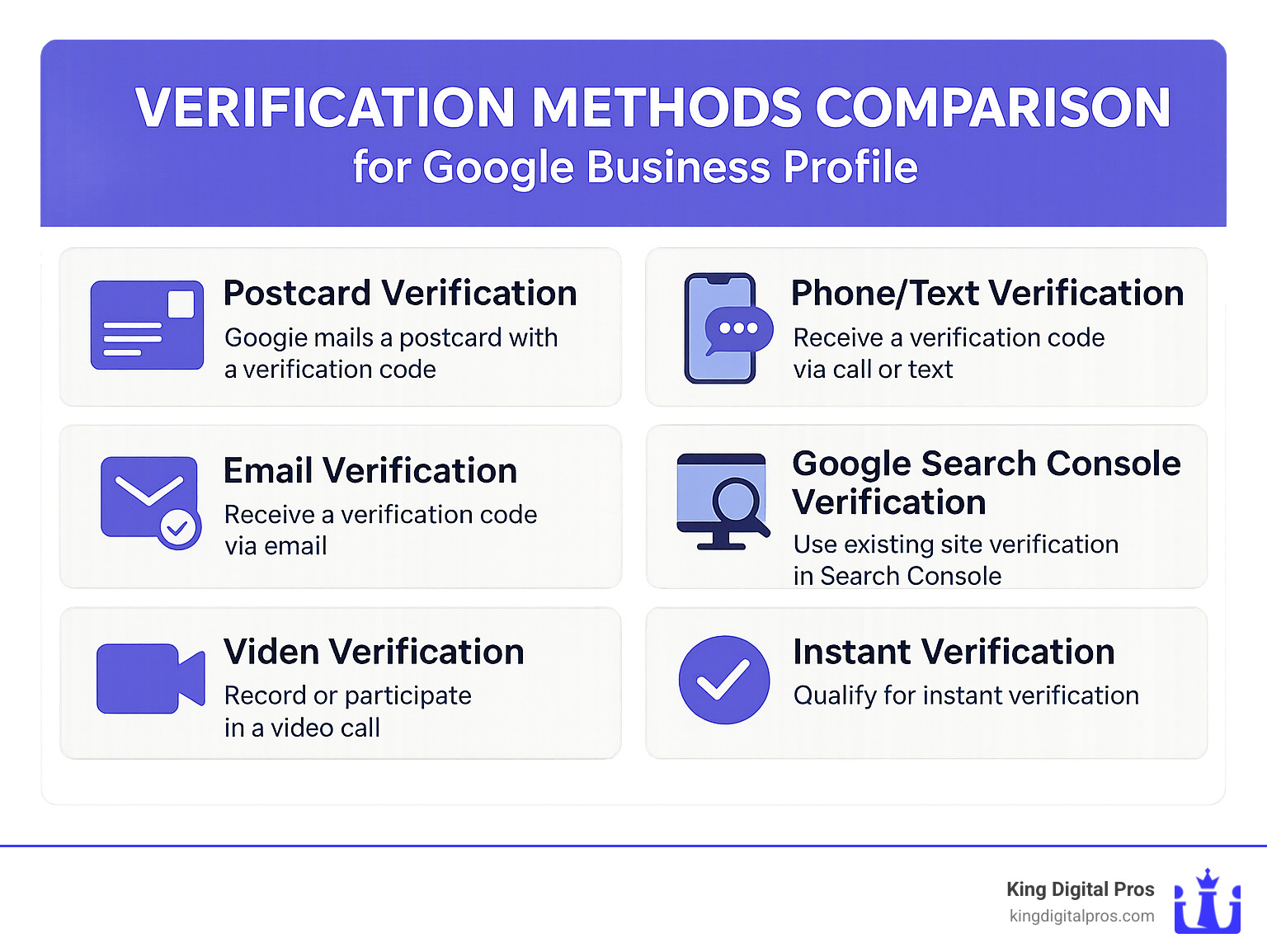
Postcard Verification
This is the classic method that works for everyone. Google sends a physical postcard with a verification code to your business address, usually arriving within 5 business days. Once it arrives, you’ll log into your dashboard and enter the code. While not the fastest option, it’s the most reliable and available to all businesses – from Albuquerque to Taos.
Phone/Text Verification
If you’re in a hurry, this is a great option. You’ll receive an automated call or text with a verification code that you enter immediately. The catch? This option only appears if Google can confirm your business phone number is legitimate and matches their records.
Email Verification
Some business categories qualify for email verification, where Google sends a code to your business email. Quick and simple, but not available to everyone. As one restaurant owner told us, “I was thrilled when email verification popped up as an option – we were verified and updating our menu within an hour!”
Video Verification
If other methods aren’t working, you can use video verification. You’ll either record or participate in a live video call showing your business location, signage, permits, or other ownership proof. It’s particularly helpful for new businesses or those with complex addresses.
Google Search Console Verification
Already verified your website in Google Search Console? You might qualify for instant verification. This is the express lane of Google Business listing verification.
Instant Verification
Some businesses hit the verification lottery and qualify for instant verification, especially if they’ve previously verified their business website with Google.
In our years helping businesses throughout New Mexico claim Google Business listings, we’ve found that while postcard verification is most common, it’s worth checking if you qualify for faster options. A client in Santa Fe was pleasantly surprised to find phone verification was available, allowing them to launch a weekend promotion they would have otherwise missed while waiting for a postcard.
The verification method you’re offered depends on your business type, location, and Google’s current verification policies. Don’t worry if you only see the postcard option – it’s still reliable and worth the short wait to properly claim your Google Business listing.
3. Troubleshoot If Someone Else Claimed It
Uh-oh! You’ve tried to claim your Google Business listing only to find someone else has already claimed it. Don’t panic – this is actually quite common, especially if your business has changed hands, has multiple managers, or has been around for a while.
I’ve helped dozens of businesses steer this exact situation, and there’s a straightforward process to resolve it:
- Search for your business on Google Maps
- Click on your business listing
- Look for and select the “Request access” option
- Complete the ownership request form with your relationship to the business
- Submit your request and wait for a response
Once you’ve submitted your request, the current profile owner has 3 days to respond. This waiting period can feel like forever when you’re eager to take control of your online presence, but it’s designed to protect legitimate business owners.
Here’s what happens next:
If they approve your request – Great! You’ll receive access to manage the listing. Just be aware that as a new owner, you’ll face a 7-day restriction period where some management actions are limited. This is Google’s way of preventing hasty changes that might confuse customers.
If they deny your request – Don’t lose hope! You can appeal the decision by requesting postcard verification through the link in your confirmation email. This gives you a chance to prove you’re physically located at the business address.
If they don’t respond within 7 days – Good news! In most cases, Google will allow you to verify the listing yourself. The system will notify you when this option becomes available.
“We had a client in Santa Fe whose previous marketing manager had claimed their listing and then left the company without transferring ownership,” recalls Bernadette King. “After the current owner submitted a request and didn’t receive a response, Google allowed them to verify through postcard, and they were managing their profile within two weeks.”
If you’re struggling with a particularly complicated ownership situation, you may need to provide additional documentation like:
- Your business license
- A utility bill in the business name
- Tax documents showing ownership
- A signed letter on company letterhead
For the most up-to-date guidance on this process, refer to Google’s official instructions on requesting ownership.
Persistence pays off when it comes to claiming your Google Business listing. The visibility and control you’ll gain are well worth the effort, and our team at King Digital Marketing Agency is always here to help if you get stuck in this process.
4. Multi-Location & Bulk Claims
If you own or manage multiple business locations across New Mexico—perhaps a coffee shop in Albuquerque and another in Santa Fe—Google has made your life easier with streamlined processes for managing multiple listings.
Bulk Verification
Managing 10 or more locations? You don’t need to verify each one individually (thank goodness!). Here’s how to save yourself hours of repetitive work:
- Create your Google Business Profile account if you haven’t already
- Prepare a spreadsheet containing all your location information (addresses, phone numbers, hours, etc.)
- Log in and upload this spreadsheet to your account
- Address any ownership conflicts that pop up (these happen when someone else has already claimed one of your locations)
- Submit everything for bulk verification
I recently helped a restaurant chain with locations from Rio Rancho to Taos use this method, and what would have taken days of individual verifications was completed in just one afternoon!
Managing Multiple Locations
Once all your locations are verified, you’ll love the convenience of managing everything from a single dashboard:
Log into your Google Business Profile and steer to the “Manage locations” tab. From here, you can view and edit all your locations without constantly logging in and out of different accounts. Need to update holiday hours for all your stores? You can apply certain changes across multiple locations at once.
This centralized management is incredibly helpful for businesses scattered throughout New Mexico. Whether you have shops in Grants, Los Alamos, or anywhere in between, you’ll maintain consistent information across all profiles while saving significant time.
Claiming Google Business listings for multiple locations might seem daunting at first, but the bulk management tools make it surprisingly straightforward. One of our clients with 15 locations across the state told me, “I was dreading the verification process, but it was actually pretty painless. Now I can update all our locations in minutes instead of hours.”
Each location should have unique, accurate information—Google’s algorithm rewards businesses that take the time to customize each profile rather than copy-pasting the same details across all locations.
Verify, Secure & Manage Your New GBP
Congratulations on claiming your Google Business listing! Now comes the fun part – making it work for you. Think of your new Google Business Profile as your digital storefront that needs regular attention to keep it secure and performing at its best.
Security Settings
Your GBP is valuable digital real estate, so let’s make sure it’s properly protected. I always recommend adding trusted team members with the right access levels. You can assign them as Owners (who get full access), Managers (who can edit but can’t delete the listing or add new owners), or Site Managers (who only have access to specific locations).
Always use your business email rather than a personal one – this keeps things professional and ensures continuity if an employee leaves. While you’re at it, enable two-factor authentication on your Google account. This simple step prevents unauthorized access even if your password is compromised.
Remember to periodically review who has access to your listing. I’ve seen businesses forget to remove former employees, which can create awkward situations down the road!
Monitor for Changes
Here’s something many business owners don’t realize: Google allows anyone to suggest edits to your business listing. While this crowdsourcing helps keep information current, it can also lead to unwanted or incorrect changes.
Make it a habit to check your profile weekly for suggested edits. Setting up email notifications for changes is a smart move too – this way, you’ll know immediately if someone tries to alter your hours, address, or other critical information. When you see incorrect suggestions, respond promptly to maintain control of your information.
Avoid Profile Suspension
Nothing’s worse than building up your profile only to have Google suspend it! The most common reasons I see this happen include:
Listing inaccurate business information, stuffing keywords into your business name (very tempting but definitely against the rules!), using a P.O. box as your address, creating duplicate listings, or posting inappropriate content in photos or posts.
At King Digital Marketing Agency, we’ve helped many businesses steer these potential pitfalls and maintain healthy, compliant listings that keep working for them 24/7.
Pro Tips After You Claim Google Business Listing
Now for the fun part – optimizing your profile to attract more customers! Start with a compelling, keyword-rich business description (you get 750 characters) that naturally includes relevant search terms for your business. If you serve specific New Mexico communities like Albuquerque or Rio Rancho, mention them where it makes sense.
Your category selection significantly impacts which searches you appear in, so choose your primary and secondary categories carefully. Don’t forget to add business attributes like “women-owned,” “veteran-owned,” or “wheelchair accessible” – these little details help customers connect with your values and services.
High-quality photos make a massive difference – businesses with good photos receive 35% more clicks! Aim for at least 10-15 images showing your exterior, interior, products/services, and team. These visual elements build trust before customers ever set foot in your door.
Set up your Q&A section proactively by adding frequently asked questions and answers before customers do. This gives you control over the information and saves you from constantly responding to the same questions. Enable messaging if you can respond promptly, and add booking buttons if you use supported scheduling software.
For more comprehensive guidance on managing your online reputation, including those all-important Google reviews, check out our Reputation Management services.
Monitoring Insights & Analytics
One of the most valuable perks of having a claimed GBP is access to performance data that shows exactly how customers are finding and interacting with your business.

Your dashboard reveals fascinating insights like how customers find you – whether through direct searches (people looking specifically for your business name), findy searches (people searching for your category or service), or branded searches (people looking for products you carry).
You’ll also see exactly what actions customers take after finding you – whether they click to your website, request directions, call you directly, or send a message. The photo views comparison is particularly eye-opening, showing how your visual content performs against competitors.
The “popular times” data is gold for staffing and planning – you’ll see exactly when people are searching for and visiting your business, helping you prepare for busy periods.
These insights help you understand how customers interact with your listing in Cedar Crest, Edgewood, or any New Mexico location you serve, informing smarter marketing decisions and helping you measure your return on investment from your Google Business listing.
Ongoing Optimization to Outrank Competitors
After you claim your Google Business listing, the real work begins. Think of your listing as a garden that needs regular tending to truly flourish and stand out from the competition.
Regular Posts & Offers
Unlike social media posts that quickly vanish down the feed, content on your Google Business Profile sticks around. Posts remain visible for a full week (except for event posts, which stay up until the event ends). This gives you a fantastic opportunity to keep customers engaged.
I recommend sharing weekly updates that showcase what’s happening at your business. Maybe it’s a new product arrival in your Sandia Park shop, a limited-time service discount for Tijeras residents, or an upcoming workshop. Always include an eye-catching image – listings with photos get 35% more clicks! And don’t forget a clear call-to-action that tells customers exactly what you want them to do next.
“We’ve seen incredible engagement when our clients maintain a consistent posting schedule,” says Bernadette King. “One restaurant in Santa Fe saw a 27% increase in direction requests after just one month of weekly posts featuring their special dishes.”
Seasonal Hours & Special Announcements
Nothing frustrates customers more than driving to your business only to find it unexpectedly closed. Keep your hours accurate, especially during holidays or special events.
Update your holiday hours well in advance – Google even sends helpful reminders about major holidays. If you need to close temporarily or adjust your services (like switching to curbside pickup only), use the special announcements feature to keep customers informed. Your customers will appreciate the heads-up, and you’ll avoid those dreaded negative reviews about wasted trips.
Review Generation & Management
Reviews aren’t just nice to have – they’re critical for your local search ranking and customer trust. Make gathering reviews a systematic part of your business operations.
Create a simple link that takes customers directly to your review form (we can help you with this at King Digital Marketing Agency). Train your team to naturally ask for reviews after positive interactions. The key is timing – ask when customers are happiest with your service.
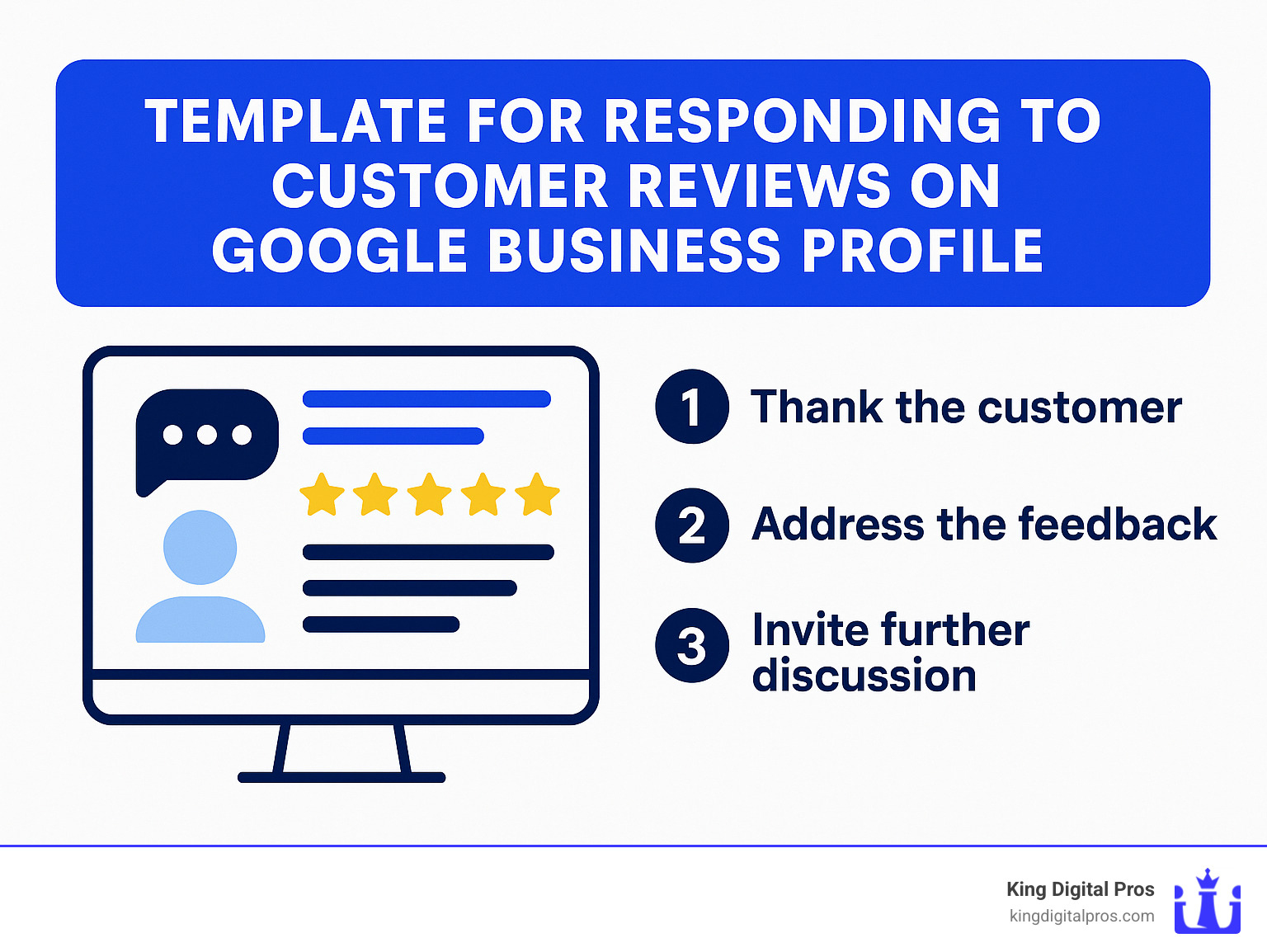
Most importantly, respond to ALL reviews within 24-48 hours – yes, even the negative ones. A thoughtful response to criticism often impresses potential customers more than a perfect five-star record. For negative reviews, acknowledge the concern, apologize if appropriate, and move the conversation offline with an invitation to contact you directly.
Product & Service Listings
Many business owners don’t realize they can showcase their products and services directly on their Google Business Profile. This feature essentially gives you a free mini-website right in the search results!
Add comprehensive descriptions of your services with pricing where appropriate. Upload high-quality photos of your products – remember, people eat with their eyes first if you’re a restaurant, and virtually “try on” products before visiting your store. Keep your inventory updated regularly to reflect what’s actually available.
One of our clients, a boutique in Albuquerque, saw a 40% increase in store visits after adding their full product catalog with professional photos to their listing.
UTM Tracking
How do you know if your Google Business Profile is actually driving results? By tracking it! Add UTM parameters to your website link so you can see exactly how much traffic comes from your listing.
It’s simple to set up: create a custom URL with UTM parameters (like yourbusiness.com/?utmsource=google&utmmedium=organic&utm_campaign=gbp), add it to your profile’s website field, and then monitor the traffic in Google Analytics. This data helps you understand the real value of your listing and make informed decisions about where to focus your marketing efforts.
Advanced Local SEO Hacks
Ready to take your local visibility to the next level? These advanced techniques can give you an edge in competitive markets:
Geo-tag your images before uploading them to your profile. This embeds location data that helps Google understand where the photo was taken, reinforcing your local relevance.
Ensure NAP consistency across the web. Your Name, Address, and Phone number should be identical everywhere they appear online – from your website to every directory listing.
Build local backlinks from community organizations, chambers of commerce, and local news sites. These signals tell Google your business is an established part of the community.
Create localized content on your website that references neighborhoods and landmarks. A blog post about “The Best Coffee Shop Near Sandia Heights” helps Google connect you to those specific locations.
Leverage Google Ads Smart Campaigns to complement your organic presence. Even a small ad budget can dramatically boost visibility for competitive search terms.
For a visual walkthrough of these advanced techniques, check out this external video guide.
At King Digital Marketing Agency, we’ve helped countless businesses across New Mexico implement these strategies. The businesses that commit to ongoing optimization don’t just appear in search results – they dominate them, turning online visibility into a steady stream of new customers walking through their doors.
Frequently Asked Questions about Claim Google Business Listing
How much does it cost to claim and manage my listing?
Good news! Claiming your Google Business listing won’t cost you a penny. Google provides this powerful tool completely free of charge with no subscription fees or hidden costs lurking in the fine print.
Why would Google offer this valuable service for free? It’s actually a win-win situation. When your business information is accurate and up-to-date, Google’s search results and maps become more reliable for users. This keeps people coming back to Google, which is exactly what they want.
“When I tell clients there’s no cost to claim and optimize their Google listing, they’re often shocked,” says Bernadette King of King Digital Marketing Agency. “It’s one of the few truly free marketing tools that delivers real results.”
While Google may introduce premium features down the road that cost money, the essential functions – creating, claiming, and managing your profile – remain completely free. If you later decide to boost your visibility with Google Ads, that’s a separate service with its own costs, but it’s entirely optional and not required to maintain your listing.
Can service-area or home-based businesses claim Google Business listing?
Absolutely yes! If you run a mobile dog grooming service from your Corrales home or operate a landscaping business across the East Mountains, you can (and definitely should) claim your Google Business listing.
The process works slightly differently for service-area businesses, but it’s just as straightforward:
- During the setup process, select “Yes” when asked if you deliver goods and services to customers
- Check the box to “Hide my address (it’s not a store)”
- Define your service area by cities, counties, or zip codes
This smart approach allows your business to appear in local searches without revealing your home address to the world. You’ll enjoy all the visibility benefits while maintaining your privacy – perfect for home-based entrepreneurs throughout New Mexico.
What if verification postcard never arrives?
It happens more often than you might think – especially in some of New Mexico’s more remote areas. If your verification postcard hasn’t shown up after 14 days, don’t worry. You have several options:
First, sign in to your Google Business Profile and click “Verify now” or “Request another code.” Double-check that your business address is absolutely correct – even small errors can send your postcard to the wrong place.
Still having trouble? Try these approaches:
If available, switch to an alternative verification method like phone, email, or video verification. These are often faster and more reliable, especially for businesses in places like Taos or other remote areas where mail delivery can be inconsistent.
You can also contact Google Business Profile support directly for assistance. Their team can help troubleshoot verification issues and sometimes offer alternative solutions.
Lastly, check if you qualify for instant verification through Google Search Console. If your website is already verified there, you might be able to skip the postcard process entirely.
“We had one client in a tiny New Mexico town whose postcard never arrived after three attempts,” recalls a King Digital Marketing Agency specialist. “We helped them switch to video verification, and they were up and running within 48 hours.”
Conclusion & Next Steps
Let’s be honest – claiming your Google Business listing is like planting a flag in the digital world that says “We’re here, we’re open, and we’re ready for your business!” It’s one of those rare marketing opportunities that’s completely free yet incredibly powerful for businesses in Albuquerque, Santa Fe, or anywhere else in New Mexico.
I’ve seen how a well-optimized Google Business Profile can transform a local business from invisible to unmissable. Just last month, a small café in Rio Rancho saw their foot traffic double after we helped them claim and optimize their listing. The owner called me, practically bubbling with excitement about all the new faces coming through their door.
At King Digital Marketing Agency, we eat, sleep, and breathe local search optimization. We’ve guided hundreds of New Mexico businesses through the claiming process and beyond, helping them stand out in an increasingly competitive digital landscape. We understand that each business is unique – what works for a restaurant in Albuquerque might not work for a plumber in Taos.
Claiming your listing is just the starting line, not the finish line. Think of your Google Business Profile as a living, breathing entity that needs regular attention:
- Fresh photos that showcase your latest products or seasonal offerings
- Timely posts about specials, events, and news
- Thoughtful responses to every customer review (yes, even the not-so-glowing ones)
- Updated hours during holidays or special occasions
The Google algorithm loves profiles that show consistent activity and engagement. And more importantly, so do your potential customers!
Ready to take your local visibility from good to great? Our team at King Digital Marketing Agency specializes in turning Google Business Profiles into customer magnets. Check out our comprehensive digital marketing services or reach out today for a friendly chat about your business goals.
Google is constantly rolling out new features for Business Profiles – from appointment booking buttons to messaging capabilities. When you partner with local experts (that’s us!), you don’t have to worry about keeping up with these changes. We’ll make sure your profile is always leveraging the latest tools to connect with customers.
Every day your business remains unclaimed on Google is another day of missed opportunities and potential customers walking through your competitors’ doors instead of yours. Why leave money on the table?
Let’s get your business the visibility it deserves. Your future customers are searching – make sure they find you!