Rank YouTube Video on Google: 5 Master Steps for Success
Why Ranking YouTube Videos on Google Matters for Your Business
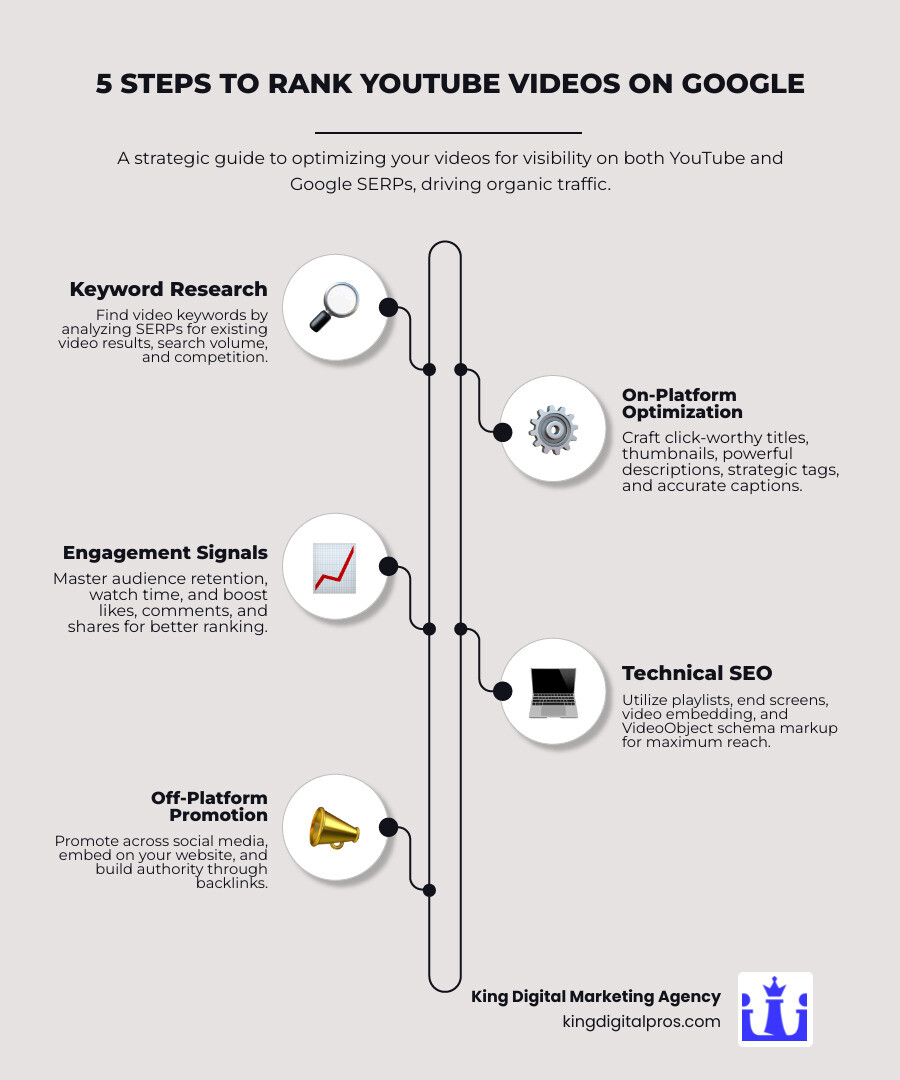
To rank youtube video on google, you must optimize your video for both YouTube’s and Google’s search algorithms. Here’s what matters most:
- Conduct keyword research for terms that already show video results on Google.
- Optimize your video metadata: title, description, tags, and custom thumbnail.
- Add accurate closed captions and timestamps to help Google understand your content.
- Encourage engagement signals like watch time, likes, comments, and shares.
- Embed your video on relevant web pages with proper VideoObject schema markup.
- Promote your video on social media and build backlinks to increase its authority.
If you’ve searched for “how to tie a tie” on Google, you’ve seen video results at the top of the page – often before text articles. Google knows people prefer videos for certain content. As the second-largest search engine, YouTube offers a massive opportunity for local businesses: rank your video in two places at once – on YouTube and in Google’s main search results (SERPs).
However, simply uploading a video isn’t enough. YouTube ranks videos based on factors like watch time and engagement, while Google evaluates keyword relevance, structured data, and how well the video answers user intent. The good news is that these ranking factors overlap, so you can optimize once to improve visibility on both platforms.
Even better, you don’t need a fancy production or millions of subscribers. Research shows 18% of videos in Google’s top 10 search results are from channels with fewer than 1,000 subscribers. What matters is creating valuable content that keeps viewers watching and following proven optimization strategies.
I’m Bernadette King, founder of King Digital Marketing Agency. I’ve helped dozens of local businesses rank youtube video on google with strategic video SEO. In this guide, I’ll walk you through our step-by-step process for ranking on both platforms.
Rank youtube video on google terminology:
Understanding the Foundations: YouTube SEO and the Google Algorithm
Think of YouTube as a massive marketplace and Google as the main highway leading to it. To succeed, your video content-whether for customers in Albuquerque, Rio Rancho, or Santa Fe-needs to be visible in both.
Google prefers video for certain queries, such as “how to fix a leaky faucet” or “review of the best restaurants in Los Alamos.” A video often provides a more direct answer than text. This is driven by user signals and search intent, as Google’s algorithms strive to deliver the best possible answer.
What is YouTube SEO?
At its core, SEO in YouTube Means optimizing your video content and channel for higher visibility in both YouTube’s internal search and Google’s SERPs. It’s about making your videos easy for the right viewers to find, which increases organic traffic. For local businesses in areas like Taos or Cedar Crest, this means connecting with your community through engaging video content. We focus on relevance and authority, telling both platforms what your video is about and why it’s the best resource for a search query.
How Google and YouTube Rank Videos
While their algorithms differ, Google and YouTube share many ranking factors for video. Here’s what they both value:
- Watch Time: The total time viewers spend watching your video. YouTube promotes videos it predicts will have a longer watch time.
- Audience Retention: The percentage of your video that viewers watch. High retention signals valuable content. A 10-minute video with 50% retention (5 minutes) is often better than a 3-minute video with 20% retention (36 seconds).
- Click-Through Rate (CTR): How often people click your video when they see it. A high CTR indicates a compelling title and thumbnail.
- Engagement Metrics: Likes, comments, and shares signal that your content resonates with viewers. Brian Dean credits comments for helping grow his channel to 189,000 views per month.
- Keyword Relevance: Your video’s title, description, and tags must clearly communicate its topic and match user searches.
- Channel Authority: A channel with a history of producing high-quality, engaging content will have more authority.
- Session Duration: YouTube rewards videos that lead viewers to watch more content on the platform, increasing the overall session time.
Phase 1: Strategic Keyword Research for Dual-Platform Visibility
Before you hit record, you must find what people are searching for. Strategic keyword research ensures your videos are findable on both YouTube and Google. Skipping this step is like building a store with no roads leading to it.
Finding “Video Keywords” for Google
Not all keywords are equal for video. Google prominently features video results for specific queries where visual content is most helpful. We call these “video keywords” and they often include:
- How-to queries: “how to make green chile stew,” “how to install a smart thermostat in Edgewood.”
- Reviews: “review of the new Ford F-150,” “best local coffee shops in Corrales.”
- Tutorials: “beginner yoga tutorial,” “tutorial for editing photos in Photoshop.”
- Fitness content: “home workout routine,” “stretching exercises for back pain.”
- Funny videos: A popular category that Google recognizes for video results.
To find these opportunities, search for terms relevant to your business on Google. If you see video carousels or featured videos on the first page, you’ve likely found a video keyword. For a landscaper in Sandia Park, searching “how to plant drought-resistant plants New Mexico” might reveal video results, signaling a great topic.
Using YouTube Search and Competitor Analysis
Once you have potential keywords, dive into YouTube itself.
- YouTube Search Suggest: Type your keyword into YouTube’s search bar and note the auto-suggestions. These are real phrases people are searching for, like “New Mexico hiking trails with dogs.”
- Analyze Top-Ranking Videos: For your target keywords, examine the top 5-10 videos. What are their titles, descriptions, and tags? Tools like TubeBuddy or VidIQ can reveal tags, giving you insight into what’s working.
- Check Search Volume and Competition: Use external tools to estimate search volume, aiming for keywords with at least 300-800 monthly Google searches. Also, assess the competition. If top-ranking videos are poorly optimized or from small channels, you have an opportunity to outrank them. For more on this, see our guide on How to Find YouTube Keyword Competition Score and SEO.
Phase 2: On-Platform Optimization to Rank Your YouTube Video on Google
Once you know your video’s topic, you need to optimize its metadata to ensure YouTube and Google understand what it delivers. This is like dressing your video for success.
Crafting Click-Worthy Titles and Thumbnails
Your title and thumbnail are a powerful duo for video SEO. They are the first impression and are critical for a high Click-Through Rate (CTR).
- Compelling Titles: Include your main keyword near the beginning, but also make the title catchy. Instead of “Hiking Trails,” try “5 Must-Do Hiking Trails in Los Alamos, NM | Epic Views!” Balance SEO with creating curiosity.
- Eye-Catching Thumbnails: Custom thumbnails are essential for standing out. They should be:
- High-Contrast and Visually Appealing: Use bright, strong imagery. For example, The Diary of a CEO channel A/B tests 100 thumbnails per episode to maximize clicks.
- Relevant: The image must accurately represent your video’s content to avoid frustrating viewers and harming retention.
- Legible: Any text overlays should be short, impactful, and easy to read on small screens.
- Optimal Size: Use 1280×720 pixels, with a minimum width of 640 pixels, and keep the file size under 2MB.
Writing Powerful Descriptions and Using Tags
Your description provides context to search engines, reinforcing your video’s relevance.
- Detailed Descriptions: Aim for at least 200-250 words. A Semrush study found that top-ranking videos often have descriptions over 100 words.
- Front-Load Keywords: Place your main keyword within the first 25 words.
- Natural Keyword Usage: Include your main keyword 2-4 times naturally, along with related terms.
- Structure and Value: Add a summary, timestamps, links to resources (like your website), and a call to action. Branded links can increase CTR by up to 39%.
- Strategic Tag Usage: While less critical than titles or descriptions, tags help YouTube categorize your video. Use 8-12 relevant tags, including your target keyword, variations, and broader topics. Use up to three relevant hashtags in your description, as YouTube displays them above the title.
Before uploading, name the raw video file with your main keywords (e.g., “best-local-coffeeshop-corrales-nm.mp4”). For more tips, see our guide on how to Rank Your Videos on YouTube.
Leveraging Transcripts, Closed Captions (CC), and Subtitles
This powerful strategy improves both accessibility and findability.
- Accessibility: Accurate captions make your content accessible to the nearly 20% of the global population with hearing loss and those who watch videos on mute. Learn More about the importance of accessibility from WHO.
- Search Engine Crawling: Google and YouTube can’t watch videos; they read text. Transcripts and captions provide a full text version of your dialogue, allowing search engines to crawl and index every spoken word. This is a great way to include keywords naturally.
- Editing for Accuracy: YouTube’s auto-generated captions are rarely perfect. Always review and edit them for accuracy or upload your own .srt file for complete control.
Phase 3: Mastering Engagement Signals and Performance Metrics
Once your video is live, the next phase is keeping viewers hooked. YouTube and Google prioritize engaging content because it keeps users on their platforms. Mastering these engagement signals is vital for local businesses in areas like Edgewood, Tijeras, and Grants.
The Critical Role of Audience Retention and Watch Time
These two metrics are the heartbeat of your video’s performance.
- Audience Retention: The percentage of your video that viewers watch. High retention is a strong signal of value.
- Average View Duration: The average time viewers spend on your video.
- Session Watch Time: How long a viewer stays on YouTube after watching your content. The longer they stay, the more YouTube rewards your video.
How to Improve Retention:
- Create Engaging Intros: Hook viewers in the first 15-30 seconds by telling them what they’ll learn and why it matters.
- Keep it Concise: Cut out dead air and unnecessary tangents. Every second should add value.
- Use Pattern Interrupts: Change camera angles, add graphics, or use humor to maintain attention.
- Focus on Quality: The Scrumdiddlyumptious video on “baking tips” ranked first with 3.9M views, despite being much shorter than the second-place video. This shows that shorter, high-value videos can dominate if they have high completion rates.
Boosting Engagement Metrics
Active engagement sends powerful signals to search algorithms.
- Encouraging Comments: Comments show active interest. Ask questions in your video and respond to comments to build a community.
- Asking for Likes and Subscribes: A clear call to action works. As Steven Bartlett of The Diary of a CEO does, don’t be afraid to ask viewers to subscribe.
- Social Sharing Prompts: Encourage viewers to share your video if they found it helpful, expanding your reach.
- Community Interaction: Engage with your viewers by replying to questions and acknowledging feedback to build a loyal audience.
Phase 4: Advanced Tactics and Technical SEO for Maximum Reach
Once your videos are optimized and engaging, amplify their reach with YouTube’s built-in features and technical SEO. These advanced tactics are crucial to Improve Search Ranking for your video content.
How to rank a youtube video on google with Playlists and End Screens
These features increase session watch time, a major ranking factor, by keeping viewers on your channel.
- Playlists: Organize videos into logical, keyword-optimized playlists like “Best Hiking Spots in New Mexico” or “Albuquerque Restaurant Reviews.” This helps search engines understand the theme and encourages binge-watching.
- End Screens and Cards: These are interactive elements you can add to your videos.
- End Screens: In the last 5-20 seconds, link to other videos, playlists, or your subscription button.
- Cards: Small, clickable pop-ups that can appear during your video to promote other content.
Embedding Videos and Using VideoObject Schema
This is key to getting your YouTube video to rank youtube video on google via your website.
- Embedding on Relevant Blog Posts: Embed your video on a relevant page of your website, like a blog post on “Local SEO Tips.” This increases time on page and tells Google your page is a comprehensive resource.
- VideoObject Structured Data: Use VideoObject structured data to give Google explicit details about your video, such as its title, description, thumbnail, and duration. This code helps your page qualify for video rich results in Google search.
- Key Moments (Chapters): Add timestamps with descriptive labels in your YouTube description (e.g.,
0:00 Introduction). Google can display these “key moments” in search results, allowing users to jump to specific sections.
Common Mistakes to Avoid When You rank youtube video on google
Steer clear of these common pitfalls:
- Poor Video Quality: Shaky cameras or bad audio will cause viewers to leave, no matter how good your SEO is.
- Ignoring Analytics: Regularly check YouTube Studio and Google Search Console to understand what’s working and what isn’t.
- Keyword Stuffing: Forcing keywords into your metadata looks spammy to users and algorithms. Use natural language.
- Inconsistent Uploading: YouTube’s algorithm favors channels that consistently provide fresh content.
- Failing the Rich Results Test: Always use Google’s Rich Result Test tool to ensure your structured data is correctly implemented and eligible for rich results.
Phase 5: Off-Platform Promotion and Link Building
You’ve created an optimized video. Now, promote it outside of YouTube to boost its authority and help it rank youtube video on google. This is like sending invitations to your grand opening!
Promoting Your Video Across Social Media and Your Website
Spread the word about your video far and wide.
- Social Media Sharing: Share your new video on Facebook, X (formerly Twitter), LinkedIn, and Instagram. Create short teaser clips (Reels or Shorts) for visual platforms to drive viewers to the full video on YouTube. This initial surge of engagement signals value to YouTube’s algorithm.
- Embedding on Your Website: Embed your video on your homepage, blog posts, or service pages. For example, a real estate agent in Corrales could embed a property tour on its listing page. This improves user experience and signals to Google that your site is a rich multimedia resource.
Building Authority with Embeds and Backlinks
Backlinks act as a vote of confidence, signaling authority to Google. For more on this, explore our guide on Backlinks for YouTube Channel.
- Guest Posting with Video Embeds: When guest posting on a relevant blog, offer to embed your video within the content. This provides value to their readers and a powerful backlink.
- Answering Quora Questions with Your Video: Find questions on Quora related to your video’s topic. Provide a helpful answer and link to your video as a resource for more information.
- Outreach for Link Building: Reach out to other websites or businesses that might find your video valuable and encourage them to link to or embed it. Because YouTube has a high domain authority, even lower-quality links to your video can provide a boost without risking your main website.
Frequently Asked Questions about Ranking YouTube Videos
Here are answers to common questions we get from local New Mexico business owners about using YouTube for Google rankings.
How long does it take for a YouTube video to rank on Google?
It varies. A video can be indexed by YouTube in 8-16 hours. Ranking on Google can take a few hours to several weeks, depending on:
- Competition Level: Highly competitive keywords take longer.
- Channel Authority: Established channels tend to rank faster.
- Initial Performance: A quick burst of views and engagement can accelerate the process.
- Optimization Quality: Well-optimized videos are indexed more efficiently.
Patience and consistent effort are key.
Should I prioritize ranking on YouTube or my website?
This depends on your business goals.
- Prioritize Website: If your goal is lead generation (e.g., a B2B service in Los Alamos), embed videos on your site to keep traffic on your owned property. The main goal is using video to improve your website’s SEO.
- Prioritize YouTube: If your business model is content creation or brand awareness, focus on optimizing for YouTube’s internal algorithm and channel growth.
Google’s algorithm decides which version ranks higher based on authority and relevance. We recommend optimizing for both to maximize reach.
Does video length affect YouTube and Google rankings?
Yes, but it’s nuanced. The true metric is retained watch time, not just length.
- Longer Videos: Can lead to more total watch time if they are engaging. For complex topics, longer videos (7-15 minutes or more) often perform well.
- Shorter, Engaging Videos: A short video with high audience retention is better than a long one where viewers drop off quickly. For many “how-to” topics, videos around 7-8 minutes perform well.
The key is to match video length to the content and user expectation. A 10-minute video with 50% retention (5 minutes of watch time) is better than a 3-minute video with 20% retention (36 seconds of watch time).
Conclusion: Take Your Video Rankings to the Next Level
Ranking YouTube videos on Google is an ongoing process of strategic planning, optimization, and analysis. By understanding how YouTube and Google work together, you can open a powerful channel to attract customers to your New Mexico business, from Albuquerque to Santa Fe.
We’ve covered the essential phases, from keyword research and on-platform optimization to mastering engagement and promotion. Consistency, data analysis, and a focus on user experience are the cornerstones of long-term success.
At King Digital Marketing Agency, we specialize in helping local businesses in communities like the East Mountains, Corrales, and Rio Rancho steer the complexities of online visibility. If you’re ready to see your videos climb the search rankings, we’re here to help.
Let us help you craft a winning video SEO strategy that drives real results.
Get professional YouTube SEO services
